
What is a tablet menu system: boost restaurant service
- Abhi Bose
- Mar 17
- 10 min read


Many restaurant managers view tablet menus as simply digital versions of paper menus, but this misconception overlooks their transformative power. Tablet menu systems enable guests to browse, order, and pay directly from their table without waiting for server availability. This technology addresses core operational challenges: slow table turnover, order errors, and bottlenecks during peak hours. In 2026, implementing these systems has become essential for restaurants aiming to enhance guest satisfaction while streamlining contactless ordering. This article explores what tablet menu systems are, their key features, operational benefits, customization options, implementation challenges, and practical strategies for successful deployment in your restaurant.
Table of Contents
Key takeaways
Point | Details |
Enhanced guest engagement | Tablet menus allow guests to browse vibrant photos, customize orders, and pay instantly without server dependency. |
Faster table turnover | Tableside ordering systems boost efficiency by 15 to 20 percent, reducing wait times and increasing revenue per shift. |
Customization flexibility | Restaurants can choose between off-the-shelf solutions or custom-built systems tailored to their branding and operational needs. |
Integration requirements | Seamless connection with POS, kitchen display systems, and inventory management is critical for operational success. |
Staff workflow transformation | Tablets empower servers to focus on hospitality rather than order-taking, improving service quality and guest interactions. |
Understanding tablet menu systems and their benefits
A tablet menu system consists of touchscreen devices placed at dining tables, enabling guests to view menus, place orders, and complete payments without direct server interaction. These systems display high-resolution food photography, detailed descriptions, and customizable options that let diners personalize their meals in real time. Unlike traditional paper menus or server-mediated ordering, tablets provide immediate access to the full menu catalog with dynamic pricing and availability updates.
The core functionality extends beyond simple browsing. Guests can filter menu items by dietary preferences, view nutritional information, watch preparation videos, and submit orders directly to the kitchen. Payment processing happens at the table through integrated card readers or mobile wallets, eliminating the wait for checks. This self-service model reduces wait times and improves order accuracy, addressing two major pain points in restaurant operations.
Major restaurant chains have validated this technology’s effectiveness. Olive Garden deployed tablet systems across hundreds of locations, demonstrating that enterprise-scale adoption delivers measurable improvements in guest satisfaction scores and operational metrics. The tablets serve dual purposes: they function as ordering tools during meals and as entertainment devices while guests wait for food, displaying games or promotional content.
These systems enhance guest engagement and streamline contactless ordering by removing friction from the dining experience. Guests appreciate the autonomy to browse at their own pace, modify orders without feeling rushed, and settle bills instantly when ready to leave. For managers, this translates to higher table turnover rates and reduced labor costs associated with order-taking and payment processing.
Pro Tip: Tablets eliminate bottlenecks during rush periods by enabling multiple tables to order simultaneously, preventing kitchen overload while maintaining consistent service quality across your dining room.
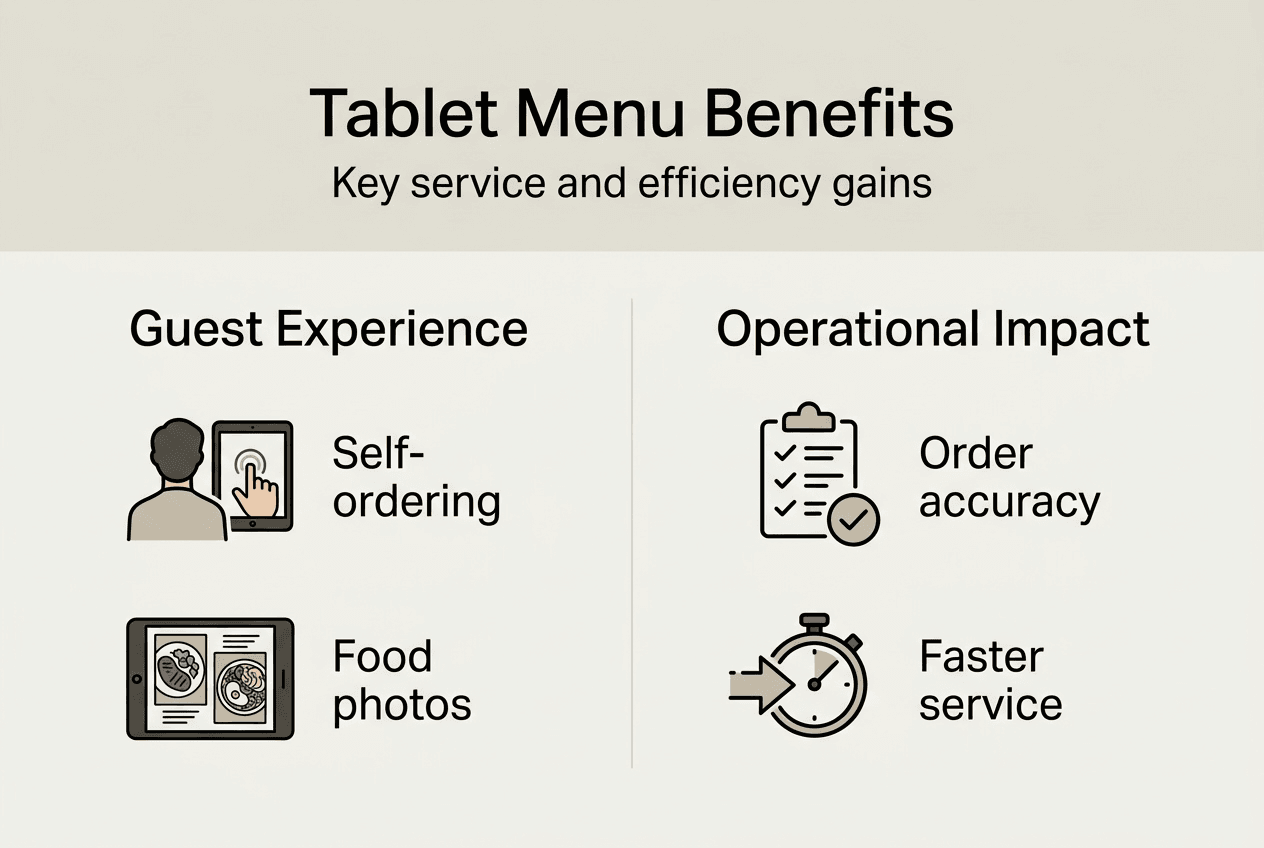
The visual presentation capabilities distinguish tablet menus from traditional formats. Restaurants can showcase dishes through professional photography that updates seasonally, highlight limited-time offers with banner notifications, and use ingredient transparency to build trust with health-conscious diners. This rich media approach influences purchasing decisions more effectively than text descriptions alone.
Integration with digital menu tablets in hospitality platforms ensures real-time synchronization across all ordering channels. When kitchen staff marks an item as sold out, the tablet interface immediately reflects this change, preventing guest disappointment and wasted kitchen time on unavailable orders.
Customization and technology considerations for tablet menu systems
Restaurants face a fundamental choice between off-the-shelf tablet solutions and custom-built systems. Pre-packaged platforms offer faster deployment and lower upfront costs, typically featuring standardized interfaces with limited branding flexibility. Custom systems like Stacked’s iPad ordering platform provide complete control over design elements, workflow logic, and integration specifications, though they require larger initial investments and longer implementation timelines.
The decision hinges on operational complexity and brand differentiation priorities. Quick-service restaurants with straightforward menus often succeed with turnkey solutions, while fine dining establishments benefit from custom tablet menu systems that reflect their unique service philosophy and aesthetic standards. Custom builds allow granular control over user journeys, from menu navigation patterns to checkout confirmation screens.
User interface design determines adoption success or failure. The system must function intuitively without instruction manuals, accommodating guests ranging from tech-savvy millennials to older diners unfamiliar with touchscreens. Clear visual hierarchy, large touch targets, and logical menu organization prevent frustration. Avoid overwhelming users with excessive options on single screens; instead, use progressive disclosure that reveals complexity only when needed.
Hardware specifications directly impact operational reliability. Restaurant-grade tablets require extended battery life to survive full service shifts without recharging, ruggedized casings to withstand spills and impacts, and anti-glare screens readable under varied lighting conditions. Consumer tablets repurposed for restaurant use frequently fail within months due to inadequate durability standards.
Pro Tip: Prioritize tablets designed specifically for commercial foodservice environments, featuring sealed ports against liquid damage, reinforced corners, and replaceable components for cost-effective repairs.
Payment processing capabilities must be built into the hardware. Devices with payment processing capabilities eliminate the need for separate card readers, reducing equipment clutter and simplifying the checkout experience. Integrated systems support EMV chip cards, NFC contactless payments, and mobile wallets, providing guests with comprehensive payment flexibility.
Integration architecture forms the technical foundation. Tablets must communicate seamlessly with your point-of-sale system to ensure order accuracy and sales tracking. Kitchen display system connectivity routes orders to appropriate prep stations with timing coordination. Inventory management integration prevents overselling items and enables automatic menu updates when ingredients run low.
Network infrastructure deserves careful evaluation. Reliable WiFi coverage across the entire dining area is non-negotiable, as connectivity drops cause order failures and guest frustration. Consider redundant internet connections and offline fallback modes that cache menu data locally when network issues occur.
Explore options for creating intuitive tablet menu interfaces that align with your restaurant’s service model and guest expectations. The interface should feel like a natural extension of your brand rather than a generic technology overlay.
Security considerations include PCI compliance for payment data, encrypted transmission protocols, and regular software updates addressing vulnerabilities. Tablets storing guest information require data protection measures meeting current privacy regulations.
Operational impact: efficiency and guest experience enhancements
Tablet menu systems fundamentally reshape restaurant workflows, delivering measurable improvements across multiple operational dimensions. The efficiency gains stem from parallel processing: multiple tables can simultaneously browse menus, customize orders, and submit requests without competing for server attention. This parallelization increases table turnover rates averaging 15 to 20 percent, directly boosting revenue capacity during peak hours.
Metric | Traditional Ordering | Tablet Menu Ordering | Improvement |
Average order time | 8 to 12 minutes | 4 to 6 minutes | 50 percent faster |
Order accuracy rate | 85 to 90 percent | 96 to 99 percent | 8 percent gain |
Table turnover | 2.5 turns per shift | 3.0 turns per shift | 20 percent increase |
Payment processing | 5 to 8 minutes | 1 to 2 minutes | 70 percent faster |
The workflow transformation follows a streamlined sequence:
Guests seat themselves and immediately access the tablet menu without waiting for server greeting.
They browse the full catalog, filtering by preferences and viewing detailed item information at their own pace.
Orders submit directly to kitchen display systems with precise customization notes, eliminating transcription errors.
Kitchen staff receive orders organized by prep station with timing coordination for multi-course meals.
Guests track order status through the tablet interface, reducing anxiety about wait times.
Payment processing happens instantly when guests are ready, with receipts delivered via email or SMS.
This automation shifts server roles from transactional order-taking to relationship-building hospitality. Staff members focus on greeting guests warmly, making personalized recommendations, addressing special requests, and ensuring dining satisfaction. The technology handles routine tasks while humans deliver the emotional connection that defines memorable restaurant experiences.
Pro Tip: Train servers to position tablets as convenience tools that free them to provide attentive service, not as replacements threatening their roles or tip income.
Guest autonomy increases satisfaction scores. Diners appreciate controlling their pace, especially during business lunches with time constraints or family meals where children’s patience varies. The ability to add items mid-meal without flagging down busy servers encourages incremental purchases like appetizers, desserts, and beverages, driving higher average check sizes.
Order accuracy improvements reduce food waste and kitchen stress. When guests input their own modifications through structured menu options, the margin for miscommunication disappears. Allergy information and dietary restrictions flow directly to prep stations with clear flagging, minimizing health risks and liability exposure.
Explore tablet menu plans and pricing options that align with your restaurant size and transaction volume to maximize return on investment.
Real-time analytics provide operational insights previously unavailable. Managers track which menu items generate most interest, identify bottleneck points in the ordering flow, and monitor peak demand patterns. This data informs menu engineering decisions, staffing optimization, and promotional strategies.
The technology supports upselling through strategic prompts. When guests order entrees, the system can suggest complementary sides, beverage pairings, or premium upgrades with appealing visuals. These algorithmic recommendations consistently outperform human suggestive selling in conversion rates.
Review digital tablet menu features that enhance both operational efficiency and guest experience through thoughtful design and integration.
Challenges and best practices for implementing tablet menu systems
Successful tablet menu deployment requires navigating several implementation challenges. Guest technology resistance represents a primary concern, particularly among older demographics unfamiliar with touchscreen interfaces. Some diners prefer traditional human interaction and perceive tablets as impersonal or complicated. Address this through optional use models where servers remain available for those preferring conventional ordering.
Initial capital investment creates financial barriers for independent restaurants operating on tight margins. Hardware costs for commercial-grade tablets range from three hundred to eight hundred dollars per unit, multiplied across table counts. Software licensing, installation, training, and ongoing support add substantial expenses. Calculate total cost of ownership over three to five years, factoring in maintenance, replacements, and system updates.
Network infrastructure complexity poses technical hurdles. Reliable WiFi coverage across dining areas requires professional assessment and potentially significant upgrades. Integration with existing point-of-sale systems demands technical expertise, especially when legacy platforms lack modern API connectivity. Budget for IT consulting and potential POS upgrades when planning implementation.
Hardware maintenance and sanitation present operational challenges. Tablets require regular cleaning between guests, particularly important in post-pandemic dining environments where hygiene concerns remain elevated. Establish protocols for thorough sanitization without damaging touchscreens or internal components. Battery degradation necessitates replacement schedules to prevent mid-service failures.
Best practices for smooth deployment include:
Conduct pilot testing with a small table section before full rollout, gathering guest and staff feedback to refine the experience.
Design interfaces following the principle that systems should work without an instruction manual, using intuitive icons and clear labeling.
Invest in comprehensive staff training covering both technical operation and guest assistance strategies.
Verify seamless integration with POS, KDS, and inventory management through thorough testing before launch.
Schedule regular software updates during off-hours to maintain security and functionality without disrupting service.
Pro Tip: Launch tablet systems during slower weekday lunch periods to troubleshoot issues and gather feedback before exposing the technology to high-pressure weekend dinner rushes.
Guest education requires subtle approaches. Table tents with quick-start guides, brief server introductions, and on-screen tutorials help unfamiliar users gain confidence. Monitor early adoption patterns and intervene proactively when guests appear confused or frustrated.
Data security and privacy compliance demand ongoing attention. Ensure payment processing meets PCI DSS standards, encrypt all data transmission, and implement access controls preventing unauthorized system modifications. Regular security audits identify vulnerabilities before exploitation.
Staff resistance emerges when employees fear technology will reduce their value or eliminate positions. Communicate clearly that tablets enhance rather than replace human service, freeing staff for higher-value guest interactions. Involve servers in implementation planning to build ownership and gather frontline insights.
Use location check for tablet menu compatibility tools to assess your restaurant’s technical readiness before committing to specific systems.
Vendor selection criteria should emphasize proven hospitality industry experience, robust customer support, and transparent pricing without hidden fees. Request references from similar restaurant concepts and conduct site visits to observe systems in operational environments.
Change management strategies ease the transition. Communicate implementation timelines clearly to staff, provide adequate training periods, and celebrate early wins to build momentum. Expect a learning curve of four to six weeks before operations stabilize at new efficiency levels.
Explore digital menu implementation strategies that address common deployment challenges and accelerate time to value.
Explore MyDigiMenu’s tablet menu solutions
Restaurant managers seeking proven tablet menu technology should consider MyDigiMenu’s comprehensive platform designed specifically for hospitality operations. The system delivers customizable tablet interfaces that reflect your brand identity while maintaining the intuitive usability guests expect. Whether you operate a casual cafe or upscale dining establishment, the platform scales to match your service model and guest volume.

Flexible pricing structures accommodate restaurants of all sizes, from single locations testing digital ordering to multi-unit chains requiring enterprise deployment. The platform integrates seamlessly with existing point-of-sale systems and kitchen display technology, eliminating the technical friction that derails many implementations. Real-time menu updates, payment processing, and order tracking function through a unified interface that simplifies operations.
Explore the full capabilities of restaurant digital tablet iPad menu systems tailored for modern hospitality environments. Review tablet menu plans and pricing options to identify the configuration matching your operational requirements and budget parameters. Visit the digital restaurant menu platform to schedule a demonstration or start a free trial.
Frequently asked questions
What hardware is needed for a tablet menu system?
Commercial-grade tablets designed for restaurant environments are essential, featuring extended battery life, ruggedized construction, and integrated payment processing. You also need reliable WiFi infrastructure covering your entire dining area and charging stations for device rotation. Most systems require a central server or cloud connection for menu management and order routing.
How does tablet ordering impact staff workflow?
Tablets shift server responsibilities from transactional order-taking to hospitality-focused guest interaction. Staff spend less time shuttling between tables and POS terminals, instead focusing on recommendations, special requests, and ensuring dining satisfaction. Initial training periods last two to four weeks as teams adapt to new workflows.
Is customer data secure with tablet payments?
Reputable tablet menu systems employ PCI DSS-compliant payment processing with end-to-end encryption protecting cardholder data. Transactions process through secure gateways identical to traditional card terminals. Verify that your chosen platform maintains current security certifications and conducts regular vulnerability assessments. Review detailed security features in tablet menu product details documentation.
Can tablet menus integrate with existing POS systems?
Modern tablet platforms support integration with major point-of-sale systems through APIs or middleware connections. Integration quality varies by POS vendor, so verify compatibility before purchasing. Seamless integration ensures order accuracy, synchronized inventory, and unified reporting across all sales channels.
What is the typical ROI timeframe for installing tablet menus?
Most restaurants achieve return on investment within 12 to 18 months through increased table turnover, higher average checks from upselling, and reduced labor costs. High-volume establishments with significant wait times often see payback periods under 12 months. Calculate your specific ROI using current table turn rates, average check sizes, and labor expenses. Compare tablet menu pricing plans against projected efficiency gains to model your investment timeline.
Recommended
Comments