
Step-by-step table reservation: optimize restaurant booking

TL;DR:
Manual reservation management often causes operational chaos in restaurants, but digital workflows provide real-time visibility and automation. Preparing with the right tools, accurate data, and clear policies ensures a smooth setup that aligns staff capacity with guest expectations. Continuous testing, monitoring, and policy adjustment are essential for future-proofing reservation operations and maximizing revenue.
Picture this: a Saturday evening rush, and your host is juggling a handwritten reservation log, a ringing phone, and a cluster of walk-in guests. Two tables have been double-booked, a large party arrives 20 minutes late, and the kitchen is already backed up. Sound familiar? Manual reservation management is one of the most preventable sources of operational chaos in restaurants and cafes, yet many operators still rely on spreadsheets or paper logs that can’t scale. Digital, step-by-step reservation workflows transform that chaos into calm, giving you real-time visibility, automated guest communication, and the data you need to keep every shift running like clockwork.
Table of Contents
Key Takeaways
Point | Details |
Prepare complete data | Accurate table counts, dining hours, and booking rules are essential for setup. |
Match real turn times | Set reservation slot intervals that reflect actual dining durations to avoid chaos. |
Minimize no-shows | Deposits and automated reminders can cut no-show rates by more than half. |
Test and adapt | Continually verify and refine workflows based on live reservation and guest insights. |
Leverage digital tools | Modern platforms automate, optimize, and streamline the entire reservation process. |
What you need before you start: Tools and requirements
With the case for digital solutions established, let’s identify what you’ll need on hand before starting your setup.
Before you configure a single booking slot, you need the right foundation in place. Think of this phase as gathering your mise en place before service. Rushing the prep is the fastest route to a messy setup that frustrates guests and staff alike.
Technology requirements
At minimum, you’ll need a cloud-based reservation platform, a device (tablet, desktop, or mobile) to manage the host dashboard, and ideally a POS integration so reservation and order data flow together. Many modern platforms also offer automated confirmation and reminder messaging, waitlist management, and reporting for optimization, so factor those capabilities into your evaluation when choosing optimal reservation systems for your venue.
Operational data to gather first
Collect the following before touching any platform settings:
Total table count and the seating capacity of each table or combinable section
Service hours broken down by meal period (breakfast, lunch, dinner, brunch weekends)
Average turn time per meal period, based on real historical data, not guesses
Party size range you realistically accommodate, from couples to large groups
Peak vs. off-peak periods so you can configure tighter slot controls during busy windows
Data point | Why it matters | Where to find it |
Table count and capacity | Prevents overbooking | Floor plan or POS layout |
Average turn time | Drives slot interval settings | POS or manual timing logs |
Service hours | Defines booking window | Staff schedule or manager notes |
Max party size | Limits per-booking volume | Physical space constraints |
Cancellation window | Sets guest policy expectations | Manager decision |
Core booking policies to define upfront
Your platform is only as smart as the rules you feed it. Decide on minimum and maximum party sizes, how far in advance guests can book, lead times for same-day reservations, and cancellation and modification windows. These policies become your system’s guardrails, preventing scenarios that no algorithm can save you from without clear parameters.
Pro Tip: Think carefully about your guest’s discovery journey before you finalize any settings. Guests booking through a third-party marketplace (like a local SEO-optimized restaurant directory) often behave differently from those booking directly through your website widget. Direct bookers tend to show higher loyalty and lower no-show rates, so consider whether your setup optimizes for discovery, control, or a strategic mix of both.
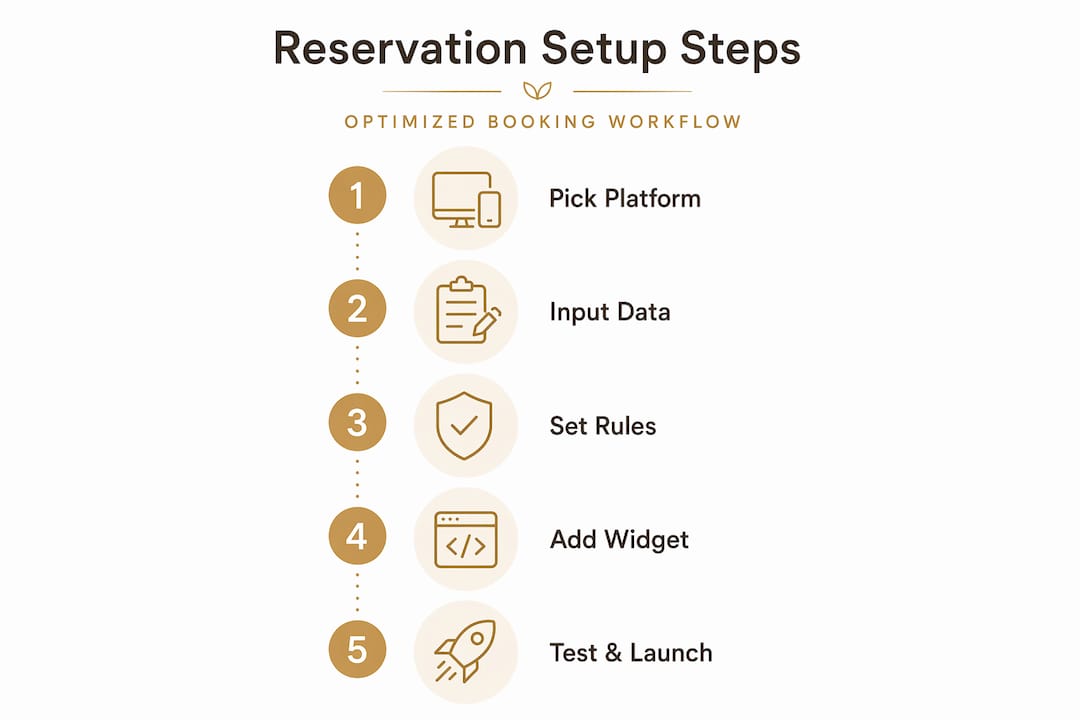
A practical workflow for online booking confirms that the correct starting sequence is: choose a reservation system, configure real availability, set booking rules, embed the booking widget, then test every channel. Following this order prevents the common mistake of marketing a booking link before the back end is actually ready.
Step-by-step table reservation setup workflow
Once your tools and data are ready, follow this step-by-step workflow to set up your system efficiently.
Step 1: Choose your reservation platform
Evaluate platforms based on three criteria: guest discovery potential (does the platform have a marketplace guests already browse?), customizability (can you mirror your floor plan and policies exactly?), and operational fit (does it integrate with your POS and your staff’s existing workflow?). A platform that scores well on discovery but poorly on customizability can create just as much host-stand chaos as a paper log.
For deeper context on how order process integration ties reservation and ordering together into one frictionless guest experience, consider platforms that unify both touchpoints under one dashboard.
Step 2: Configure real availability
Input your exact table count, capacity per table, meal period hours, and slot intervals. Slot intervals are the increments at which new reservations can start, for example every 15, 30, or 45 minutes. Set these based on your real average turn time, not an optimistic estimate. If lunch guests typically stay 55 minutes, a 45-minute slot interval will consistently stack tables and create delays.
Step 3: Set your booking rules
Define party size limits, advance booking windows, confirmation requirements, and cancellation terms. Add buffer time between slots if your team needs turnover time to reset a table. This buffer, often 10 to 15 minutes, is invisible to guests but invaluable to your floor team.
Step 4: Embed your booking widget
Most platforms provide a snippet of code or a link you can embed on your website, Google profile, and social media pages. Test the widget on both desktop and mobile before you go live. Reservation workflow best practices highlight that multi-channel embedding is one of the highest-impact steps operators often rush through or skip entirely.
Step 5: Test every scenario before launch
Run through at least these five scenarios: booking a table, modifying a booking, canceling a booking, triggering the waitlist, and verifying that automated confirmation and reminder messages actually send. One missed test here can mean guests arriving for a reservation that never registered in the system.
Setup step | Key action | Common mistake |
Platform selection | Evaluate fit on three criteria | Choosing by price alone |
Availability config | Use real turn time data | Using optimistic estimates |
Booking rules | Set all policies before launch | Leaving cancellation terms blank |
Widget embedding | Test on all devices and channels | Skipping mobile verification |
Full scenario testing | Cover all booking events | Only testing the booking flow |
Pro Tip: Use realistic dining durations for each slot rather than blanket averages across all meal periods. A weekday lunch crowd moves in 45 minutes; a Friday dinner party may linger for 90. Building separate configurations per meal period prevents host stand confusion and keeps your floor moving smoothly.
Avoiding common pitfalls: Table management and no-show prevention
Even with a great system, operational details including turn time and policies are crucial to avoiding classic pitfalls.
The most sophisticated reservation platform cannot rescue an operator who ignores the fundamentals of table management. The errors that cause the most damage are almost always rooted in misaligned turn times and vague guest policies, not software bugs.
Turn-time alignment is non-negotiable
Table management hinges on turn-time measurement and correct interval spacing, with the most painful edge cases appearing during peak periods when overlapping seatings collide. If your slot intervals are shorter than your actual turn times, you’ll be seating new guests while the previous party is still finishing dessert. That single misalignment erodes the guest experience for both tables and puts your servers in an impossible position.
Policies that protect your revenue
Establish a clear late arrival hold: for example, tables are held for 15 minutes past the reservation time, after which the booking is released to a waitlist guest
Require a credit card to secure bookings during peak periods, even if you don’t charge it unless there’s a no-show
Send automated reminders 24 hours and 2 hours before the reservation, which significantly reduce no-shows without requiring staff effort
Communicate your cancellation window clearly at the time of booking and again in the confirmation message
“The operators who manage reservations most efficiently aren’t using the fanciest software. They’ve defined their table windows precisely, communicated those windows clearly to guests, and aligned their slot intervals to real-world service rhythms.”
This kind of operational clarity, rather than platform feature sets, is what separates consistently full rooms from chronically chaotic ones. You can avoid table management mistakes most effectively when your policies are documented and enforced consistently, not improvised night by night.
The no-show problem is solvable
Industry data shows that deposit guarantees reduce no-shows from the typical 10 to 20% range down to under 5%. That shift is transformational for a 60-seat restaurant. If five tables no-showed on a busy Saturday before you implemented deposits, that’s potentially 15 to 20 lost covers per shift. With deposits in place, you recover the majority of that revenue through either fulfilled bookings or collected fees. Review effective no-show policies to find the right threshold and communication approach for your specific guest demographic.
Pro Tip: After your first two weeks of live operation, pull your slot fill data and compare your configured slot intervals against your actual turn times. You’ll almost certainly find at least one meal period where reality doesn’t match your original settings. Adjust immediately rather than waiting for a painful peak-service lesson.
Verification and optimization: Testing, monitoring, and adapting
After setup, it’s essential to check that all workflows run smoothly and keep evolving as your guest data and operations grow.
Going live is not the finish line. It’s the starting point for a continuous improvement cycle that sharpens your reservation operation over time.
Verification checklist before you go fully live
Run through each of these scenarios and confirm the system behaves as expected:
Book a table for each party size category (2 guests, 4 guests, 6+ guests) across different meal periods
Modify an existing booking and verify the change reflects instantly in the dashboard
Cancel a booking and confirm the slot reopens for new guests
Add a guest to the waitlist and check that the notification fires correctly when a slot opens
Trigger the automated reminder and confirm it arrives in both email and SMS as configured
Review a completed booking to verify guest data captures correctly for CRM and reporting purposes
Monitoring your system after launch
Real-time slot availability insights allow operators to adapt capacity and waitlists dynamically, monitoring platforms for new slot openings and logging detection times alongside party sizes. Use your platform’s built-in reporting to track how quickly each meal period fills, which slot times are consistently oversold, and where cancellations cluster. That data tells you where to tighten or loosen your availability rules.
Online reservation systems enable automated reporting and ongoing optimization, so you’re never flying blind. Use smarter reservation insights to understand guest behavior patterns, such as which party sizes book furthest in advance, which times attract last-minute cancellations, and what your true peak capacity looks like across different days of the week.
Metric | Review frequency | Benchmark to target |
Slot fill rate by meal period | Weekly | 80% or higher at peak |
No-show rate | Weekly | Under 5% with deposit policy |
Cancellation rate | Bi-weekly | Under 15% |
Average turn time vs. configured interval | Monthly | Within 5 minutes of each other |
Reminder open/click rate | Monthly | 60%+ open rate for SMS |
Adapting your configuration over time
Use what you learn. If your Friday dinner slots fill within 24 hours of opening, extend your advance booking window for that period or introduce a priority waitlist for premium guests. If your no-show rate remains elevated despite reminders, revisit your deposit policy and lower the threshold at which it applies. For deeper guidance on table management optimization, build a 30-day review cadence into your manager’s routine.
What most guides miss about table reservation success
Now that you know the mechanics, let’s address what separates efficient operators from overwhelmed ones.
Most reservation guides stop at software configuration. They walk you through dropdown menus and widget embed codes, then declare you ready for service. But the operators who consistently run smooth, fully utilized rooms have solved something deeper: they’ve aligned their human rhythms with their digital settings.
The real cause of reservation chaos isn’t a bad app. It’s turn-time misalignment. An interval spacing mismatch between what your system promises guests and what your team can actually deliver will undermine every other investment you make. A $300-per-month platform configured with optimistic turn times creates more damage than a free one configured with honest data.
The second thing most guides ignore is guest communication quality. Your platform can send automated messages, but if those messages are generic, they don’t prevent no-shows or late arrivals. Guests who receive a clear, specific reminder explaining your hold policy and what happens if they’re late will respect it. Guests who get a bare booking confirmation will treat it as loosely as they treat any calendar invite.
There’s also a real tradeoff between discovery and control that deserves honest attention. Third-party booking marketplaces amplify your visibility and can fill seats you’d otherwise lose, but they come with commission costs and less control over how your brand is presented. Direct booking through your own widget costs less per cover and lets you own the guest relationship from the first touchpoint. The smartest operators don’t choose one path exclusively. They use marketplaces strategically for new guest acquisition and their direct channel for returning guests, loyalty, and higher-margin experiences. Building that dual strategy into your full reservation workflow optimization plan from day one saves you from expensive pivots later.
The final overlooked element is staff training. Your team is the last mile of your reservation system. If your host doesn’t know how to release a held table, add a walk-in to a waitlist, or read the floor status at a glance, the most elegant platform in the world will still produce chaos at 7:30 on a Friday. Technology empowers people. It doesn’t replace the clarity that comes from a well-briefed, confident host.
Streamline your reservations with My Menu solutions
Ready to upgrade your reservation system? Here’s how My Menu can make the process seamless and future-proof.
You’ve seen the mechanics. Now imagine running all of it from a single platform designed specifically for restaurants and cafes like yours. The My Menu reservation platform brings together table management, real-time availability, automated guest communication, and CRM data under one intuitive dashboard, so your team spends less time managing logistics and more time delivering memorable experiences.

Pair your reservation setup with a contactless digital menu to create a guest journey that flows beautifully from booking confirmation to table-side ordering. Or start even faster with an instant QR menu setup that requires no app downloads and works on any guest device. My Menu makes the leap from manual to digital feel less like a system overhaul and more like switching on a light.
Frequently asked questions
How do I set up a table reservation system for my café?
Choose a reliable digital reservation platform, configure your table counts and hours, set booking policies, and integrate the booking widget on your website, following the practical workflow of choosing a system, configuring real availability, setting booking rules, and embedding the widget.
What minimum setup data do I need for online booking?
You need your floor plan, real table counts, service hours, average dining durations, and party size limits, as operators must configure real availability including accurate table counts, capacities, meal periods, slot intervals, buffer time, and max covers per slot.
How can I prevent overlapping bookings during peak times?
Set reservation intervals to match your true average turn times and build in buffer periods when needed, since turn-time and interval spacing are the primary factors preventing overlapping seatings.
What is the industry average no-show rate and how do I reduce it?
Typical no-show rates are 10 to 20%, but deposit guarantees reduce no-shows to under 5% compared to venues that rely on confirmation messages alone.
Can I track and adapt my reservation policies after setup?
Yes, monitor performance using your system’s reporting tools to adjust availability and rules, as real-time slot insights and reporting empower operators to adapt capacity management based on live and historical data.
Recommended
Comments