
What Does POS Integration Cost for a Digital Menu?
- Abhi Bose
- 22 hours ago
- 7 min read

Expect to budget roughly $500 to $1,500 for a native POS integration, $1,500 to $5,000 plus monthly middleware fees for a connector-based setup, and $5,000 to $20,000+ for a custom API build. Where you land inside those ranges depends on integration type, developer hours, and how much staff training the rollout demands.
The number that actually determines your final bill isn’t the sticker price on a vendor’s website. It’s a mix of:
Integration path: native plug-in, third-party middleware, or custom API
Developer hours needed to map menu modifiers and item hierarchy
Staff training and menu programming time
Ongoing middleware or per-order fees after go-live
Pro Tip: Ask every vendor how they handle modifier logic before you sign anything. Restaurant technology analyst Marcus Rivera points out that when systems don’t sync cleanly, staff end up acting as the “human integration layer,” manually reconciling orders. That labor cost quietly outpaces the software subscription far more often than owners expect.
A clean, well-mapped integration pays for itself fast. Restaurants processing about 60 orders daily can save roughly 45 hours a month once manual order entry disappears from the workflow.
Key Takeaways
POS integration cost depends far more on integration type and hidden staff labor than on any single software subscription price.
Point | Details |
Headline ranges vary by path | Native runs $500–$1,500, middleware $1,500–$5,000 plus monthly fees, custom API $5,000–$20,000+. |
Hidden labor often costs more than software | Staff manually reconciling mismatched orders can exceed subscription fees over time. |
Clean integrations save real hours | Restaurants handling ~60 daily orders can save about 45 hours monthly with proper sync. |
Gather inputs before requesting quotes | Menu item count, terminal count, order volume, and sync needs shape accurate pricing. |
Mydigimenu offers integration-ready tools | Built-in menu mapping and webhook support reduce the custom development typically required. |
Table of Contents
What Are the Line-Item Costs Behind a POS Integration Quote?
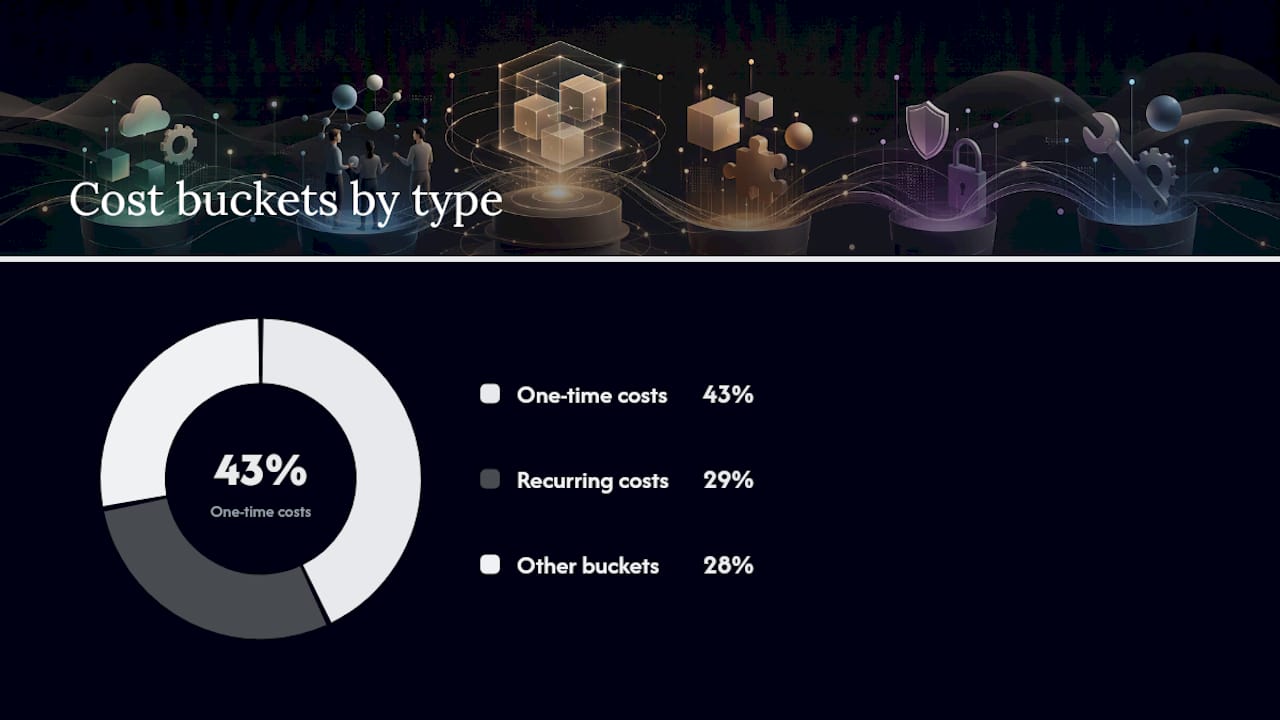
A vendor quote that lists one flat number is hiding something. Real POS integration pricing breaks into distinct buckets, and knowing them helps you catch what’s missing before you sign a contract.
Initial setup and onboarding: account configuration, credential exchange, and initial system handshake between the digital menu platform and your POS
Menu programming and mapping: translating your existing menu, categories, and pricing tiers into a format the POS can read
Middleware or connector fees: a recurring charge if a third-party layer sits between your menu platform and POS
Custom development: API mapping and transform logic when your POS and menu system don’t speak the same data language natively
Testing and QA: verifying orders route correctly across every terminal and kitchen display before launch
Staff training: teaching front-of-house and kitchen staff the new order flow
Ongoing maintenance: support, updates, and troubleshooting after go-live
Setup, mapping, and custom development are typically one-time costs. Middleware fees and maintenance are recurring, and they often scale with the number of terminals or locations you’re connecting. Industry breakdowns put menu programming at roughly $100 to $500 and onboarding fees anywhere from $0 to $800 or more depending on scope.
Pro Tip: Before comparing quotes, ask each vendor point-blank whether modifier logic and item hierarchy map directly from your current POS. When they don’t, developer hours can double, since someone has to manually rebuild that logic rather than import it.
How Much Do Native, Middleware, and Custom Integrations Cost?
Integration approaches generally fall into three buckets, and each one carries a distinct cost and risk profile. Guides on connecting online ordering to POS systems consistently group them the same way: native integration, third-party middleware, and custom developer builds.

Native or plug-in integration works when your digital menu platform already has a built-in connector for your POS brand. Setup is largely configuration, not coding, so hidden-friction risk stays low. You’re mostly paying for onboarding and menu mapping, not developer time.
Third-party middleware connectors sit between your menu platform and POS, normalizing modifiers and syncing orders across multiple channels. These come with setup fees plus a recurring monthly connector charge. Hidden labor tends to show up here when modifier mismatches slip through and staff have to manually correct orders during service.
Custom API integration becomes necessary when your POS has no native connector and no middleware option covers your specific setup. This route demands real developer hours for API mapping, transform logic, and extensive testing, which pushes both cost and timeline higher than the other two paths.
Integration type | Technical complexity | Typical one-time setup | Typical recurring fees | Who does the work | Timeline to launch | Hidden-labor risk |
Entry-level (native) | Low | $500–$1,500 | Minimal to none | Vendor | 1–2 weeks | Low |
Mid-market (middleware) | Moderate | Moderate setup fees | Recurring monthly fees | Middleware provider | several weeks | Moderate |
Enterprise (custom API) | High | higher setup fees | Variable recurring costs | Third-party developer | extended timeline | High |
Those ranges are estimates, not fixed quotes. Location count, POS vendor, and how many modifiers your menu carries will all push you toward the higher or lower end of each band.
How Do You Estimate Your Own Integration Budget?
Before you request quotes, gather these inputs so vendors can price accurately instead of guessing:
Total number of menu items and modifiers you need mapped
Number of terminals, kitchen display systems, or screens the order needs to route to
Expected daily order volume coming through digital channels
Whether you need real-time webhook events or can tolerate delayed sync
Whether two-way inventory sync is required
Whether guest payments or payment-on-file need to route through your existing POS
A sample calculation: $1,500 setup + 20 developer hours at $100/hour ($2,000) + $200 first-month middleware + $400 staff training + 15% contingency for unexpected mapping issues lands you around $4,600 as an internal working budget for a mid-complexity project. The Total Cost of Ownership approach that industry cost calculators recommend applies directly here: never compare vendors on subscription price alone.
Copy this checklist into your first vendor email:
Menu item and modifier count
Terminal and KDS count
Daily digital order volume
Webhook vs. polling requirement
Two-way sync needed (yes/no)
How Can You Get a More Accurate POS Integration Quote?
The fastest way to control cost is asking better questions before you sign anything. Push every vendor for a breakdown of setup hours, not a single lump figure, and confirm exactly who performs the menu mapping work.
Ask whether the platform supports webhooks and two-way sync, or relies on slower polling
Get exact middleware fees in writing, not a rough estimate
Ask about rollback procedures if the integration needs to be paused mid-launch
Bundle menu programming with onboarding to avoid paying two separate setup fees
Request staged payments tied to milestones rather than paying the full amount upfront
Push for a fixed-scope development quote instead of an open-ended hourly estimate when custom work is involved
Watch for these red flags on any quote: no mention of testing time, no webhook support, vague support response times, or no explicit plan for handling modifiers and split orders. Vendor quotes that focus purely on software price while glossing over integration overhead are the ones that blow past budget three months in.
How Long Does a POS Integration Take From Start to Launch?
Native integrations typically go live in one to two weeks. Middleware connectors run three to six weeks once mapping and modifier normalization are accounted for. Custom API builds often take six to twelve weeks or longer, depending on testing complexity.
Several roles touch a typical rollout:
Venue manager (project ownership and staff coordination)
Kitchen lead (validating order routing to the right stations)
POS admin (system access and configuration)
Vendor integrator or third-party developer (technical build)
QA tester (order accuracy checks before launch)
Run this pilot checklist during week one after go-live:
Confirm every modifier and combo item routes correctly
Verify kitchen display timing matches order placement
Spot-check a sample of digital orders against POS records daily
Why These Cost Ranges Hold Up
The biggest driver of surprise expense isn’t the software line item. It’s the gap between what a quote covers and what the integration actually requires once modifiers, terminal count, and staff workflow get factored in.
These ranges draw on documented industry cost breakdowns and TCO frameworks, not a single vendor’s price sheet. Precise numbers still require your specific inputs and the vendor checklist above.
What Restaurant Owners Get Wrong About Integration Pricing
The most common mistake I see is treating the middleware or connector fee as the whole cost. It’s rarely more than a third of it. The real expense hides in modifier mapping and staff retraining, especially when a POS system doesn’t support webhooks and the integration has to rely on polling instead.
Pro Tip: Run a two-week parallel test where staff use both the old and new order flow before fully switching over. It catches modifier mismatches before they become refunds.
Mydigimenu’s own integration work has repeatedly shown that the cleanest launches happen when menu mapping gets done before, not during, the training phase.
How Mydigimenu Keeps Integration Costs Predictable
Mydigimenu is built as an integration-ready platform from the start, which means less of your budget goes toward custom developer work and more toward simply getting your menu live. Webhook support, pre-built menu mapping tools, and existing delivery connectors cut down the manual reconciliation work that Marcus Rivera flags as the real hidden cost of a mismatched setup.

Instead of guessing at developer hours or waiting weeks for a custom API build, you can request an integration estimate directly and see how your menu, terminal count, and order volume map to a Mydigimenu plan. If you’re still deciding between a tablet menu setup or a lighter QR menu start, both paths connect to the same POS integration backbone. Check Mydigimenu’s plans and pricing to see which tier matches your integration scope, and request a quote before your next budget cycle closes.
Sources
This article is general information, not a substitute for advice from a qualified financial advisor. Consult a qualified financial professional about your own circumstances before acting on anything here.
Recommended
Comments