
6 Factors to Choose Dynamic or Static QR Codes for Restaurants
- Abhi Bose
- 3 days ago
- 7 min read

Dynamic QR codes are the default choice for marketing and most operational printed materials because they’re editable and measurable. Static QR codes still earn their place, but only when the embedded data will never change and you need zero dependency on an outside service. Everything else in this decision comes down to those two facts.
TL;DR:
Dynamic QR codes require an internet connection and rely on a provider’s server, which can lead to service disruptions if the provider has an outage or cancels the account.
Static QR codes are permanent, offline-capable, and suited for fixed data like Wi-Fi passwords or contact info, but can become slower to scan with longer URLs.
Dynamic codes provide analytics on scans, support content updates, and are ideal for marketing campaigns or locations that require frequent changes.
Static codes are best for long-term, unchanging assets where offline access and permanence are priorities, such as engraved tags or simple vCards.
Consider the expected lifespan, need for analytics, reprint costs, and provider reliability to choose appropriately between static and dynamic QR codes.
Table of Contents
Dynamic Vs Static QR Codes: How Dynamic Codes Actually Work
A dynamic QR code doesn’t store your final destination. It stores a short redirect URL that points to a provider’s server, and that server forwards the scanner to wherever you’ve told it to go today. That’s the entire mechanism behind why dynamic codes can be edited after printing: you’re never changing the printed code, only what it redirects to inside the provider dashboard.
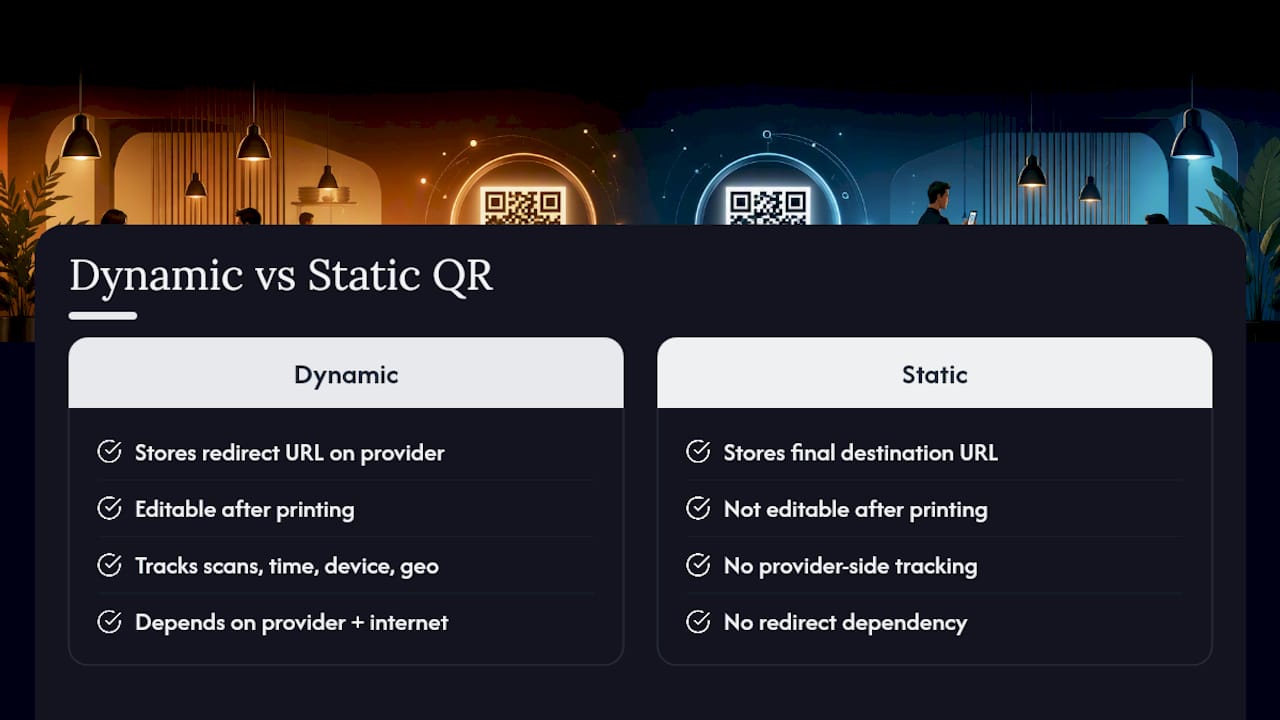
That redirect layer is also what makes tracking possible. Every scan passes through the provider’s server first, so the system logs scan count, timestamp, device type, and sometimes rough geolocation before the guest ever lands on your menu or landing page. The analytics and editability enterprises rely on both come from this same architecture. The trade-off is dependency: since the redirect lives online, a dynamic code needs a functioning provider and an internet connection at the moment someone scans it.
What Makes a Static QR Code Different?
A static QR code skips the middleman entirely. The final URL, Wi-Fi password, or contact card gets baked directly into the black-and-white matrix at creation, with no server, no redirect, and no way to change it later once it’s printed.
That permanence is a feature, not just a limitation. Static codes work completely offline, which makes them genuinely useful for things like Wi-Fi credentials on a router or a vCard on a business card, where you want the data to resolve instantly with nothing to fetch. The catch shows up with long URLs: encoding more data increases the visual density of the pattern, per the QR code model specifications from Denso Wave, and a busier pattern can slow scanning from small surfaces or from a few feet away.
Dynamic Vs Static: A Side-by-Side Comparison
Six factors decide which type belongs on your next print run:
Editability: Dynamic lets you change the destination anytime; static locks it in permanently at print. If you might need to update it, go dynamic.
Analytics: Dynamic tracks scans, timing, and device data; static gives you nothing. Need to prove ROI on a campaign? Dynamic wins by default.
Cost model: Dynamic typically runs on a subscription with tiered limits; static is usually a one-time generation with no ongoing fee.
Scan reliability: Static codes with long encoded URLs get visually denser and can scan slower; dynamic’s short redirect URLs stay lean.
Offline capability: Static works with zero internet connection; dynamic needs the provider’s server to be reachable.
Scale suitability: Dynamic handles large print runs and rotating content well; static suits a single, fixed, low-volume asset.
The Real Benefits of Dynamic QR Codes
The appeal isn’t just flexibility for its own sake. It’s what that flexibility unlocks operationally.
Built-in analytics show scans broken down by time, device, and sometimes location, giving marketing teams real performance data instead of a guess.
Editability supports A/B testing, rotating seasonal offers, and same-day fixes to a broken link, all without reprinting a single asset.
Shorter encoded URLs reduce visual density, which means faster scans and a cleaner-looking code on tight packaging or table tents.
Integration potential with analytics platforms, tagging systems, and marketing tools turns a QR code into a data source, not just a doorway.
Pro Tip: Before your next print run, set up two dynamic codes pointing to different landing pages and split your signage between them. You’ll get real A/B data on which offer performs better, at zero extra printing cost.
The Downsides Nobody Mentions About Dynamic Codes
Flexibility comes with strings attached, and they’re worth knowing before you commit thousands of printed pieces to a single provider.
Platform dependency is the big one: if your account gets canceled or the provider has an outage, every printed code tied to it stops resolving.
Subscription and scan limits matter more than people expect. Know your projected monthly scan volume before you pick a free tier.
Internet is required at scan time, and any analytics you collect on guests raise privacy questions worth addressing in your own policy.
When Should You Use Static vs Dynamic QR Codes?
Match the code type to how long it needs to last and whether you’ll ever touch it again.
Use static for anything truly permanent. Engraved equipment tags, fixed signage with information that will never change, and simple vCards that don’t need analytics are all solid static use cases, since permanence and offline reliability are the priority here.
Use dynamic for anything that might change or needs proof of performance. Packaging, printed ads, restaurant menus, event signage, and loyalty promotions all benefit from the ability to update content and measure results.
Run this three-question checklist before you print anything: How long will this asset stay in circulation? Do you need scan data to justify the spend? Can you afford to reprint if the content changes?
How to Tell If a QR Code Is Dynamic or Static
You don’t need special software to spot the difference, just a phone camera and a few seconds.
Check the scan preview. A short redirect domain (often a branded short link) usually signals dynamic; a long, specific brand URL in the preview typically points to a static code.
Look at the pattern density. A busier, more complex-looking grid often means a longer string of data is baked in directly, a telltale sign of static.
When in doubt, ask the generator. If you have dashboard access or can contact whoever created the code, verifying the type takes one message.
What Do Dynamic QR Codes Cost, and When Do They Expire?
Most providers run freemium pricing: free tiers cap the number of codes and monthly scans, while paid plans remove those limits and add scan history, exports, and custom domains. Budget accordingly if you’re printing at scale.
“Expiry” for a dynamic code rarely means the code itself times out. It usually means the account behind it does. If a subscription lapses, an account gets deleted, or the provider shuts down the service, every printed code tied to that account stops resolving overnight, with no visual warning on the printed piece itself.
Estimate your break-even point by comparing subscription cost against the price of reprinting static materials every time content changes.
Keep a backup export of your redirect list so you’re not starting from zero if a provider disappears.
How Restaurants Use Dynamic QR Codes in Daily Operations
Hospitality is one of the clearest proving grounds for dynamic codes, and Mydigimenu’s own implementation work shows why. Restaurants running dynamic QR code menus can push a price change, swap a daily special, or pull a sold-out dish the moment it happens, all without touching a single printed table tent.
The same QR-driven flow that shows a guest tonight’s menu can also feed into POS and CRM systems, capturing opt-in guest profiles that power loyalty programs and targeted promotions. Menu edits happen instantly, printing costs drop because nothing needs reprinting for a price update, and marketing teams get to target repeat guests based on what they’ve actually ordered before.
A Practical Rule of Thumb for Choosing Between Them
Default to dynamic unless you can prove the content will never change and you’re willing to accept zero analytics in exchange for zero platform risk. Before printing anything, run through four questions: expected lifespan of the asset, cost of reprinting if you’re wrong, whether you actually need scan data, and whether your provider has redundancy if the service goes down.
— Abhi
Bring Dynamic QR Menus Into Your Restaurant
If you run a restaurant, cafe, bar, or hotel, the flexibility this article just walked through is exactly what Mydigimenu builds for hospitality teams. Its QR menu platform gives you dynamic codes that update instantly, integrate with POS and CRM systems, support loyalty programs, and let guests order without downloading an app, matching every use case marketers and operators actually need from a printed code.

For hospitality teams weighing broader guest-experience upgrades, pairing digital menus with smarter reservation workflows rounds out the contactless experience end to end. If tabletop hardware fits your service style better than paper table tents, Mydigimenu’s tablet and iPad menu options cover that too. Ready to see it running on your own menu? Check out the QR menu generator and get a live demo of how fast a menu update really is.
Sources
Recommended
Comments