
Why Use Customer Feedback in Cafe Menus: 2026 Guide
- Abhi Bose
- 2 hours ago
- 10 min read


TL;DR:
Embedding customer feedback into cafe workflows boosts retention, reduces waste, and improves menu relevance.
Prompting responses within 48 hours of a visit is crucial for recovering at-risk new guests.
Embedding customer feedback directly into your cafe menu workflow drives faster recipe-market fit, cuts food waste, and lifts repeat visits — and the numbers back it up. Cafes that actively solicit feedback have 10–15% higher daily customer retention because they catch and fix problems before those problems harden into habit changes. Platforms like Mydigimenu make this workflow practical by connecting QR-based menus to feedback prompts, CRM data, and loyalty hooks in one place.
Start here this week:
Attach a single-question prompt to your QR menu immediately after order placement
Run a soft-launch tasting for any new item before it goes live on the full menu
Train every barista to offer an immediate remake, no manager approval needed
TLDR: Set up a 48-hour first-visit feedback prompt and an immediate-redo policy — those two moves alone protect more lifetime revenue than most marketing campaigns.
Table of Contents
Why customer feedback belongs inside your cafe menu
The business case for feedback-driven menu design is concrete. Community-driven menu adjustments can yield a 10–20% increase in loyalty and repeat business when operators implement changes visibly. Higher repeat visits mean a larger base of regulars, and regulars spend more per visit than first-timers by a wide margin.
Waste reduction is the second lever. When you test a new dish with a small tasting group before printing it on the menu, you identify failures cheaply. Early-stage feedback lowers financial risk by catching problems before full-scale production, sparing you the cost of ingredients, labor, and reprints on an item guests never wanted.
The third gain is advocacy. Customers who see their suggestions reflected in real changes become vocal promoters — more reliably than paid advertising.
“It’s about striking a balance — shaping customer tastes while also learning from their feedback. You have to stay true to your principles; new ideas take time for customers to understand. Meet them halfway — sometimes leading with your vision, sometimes adapting to theirs. That’s where healthy, sustainable brand growth happens.” — Samayesh Khanna, Co-founder, Beanly Coffee
Pro Tip: Visible action on feedback increases future participation by roughly 30%. Post a small sign or a digital menu banner that says “You asked, we changed it” — that single gesture closes the loop and invites more input.
When is the best time to collect feedback from cafe guests?

Timing determines whether feedback is useful or noise. Three moments deliver the highest signal.
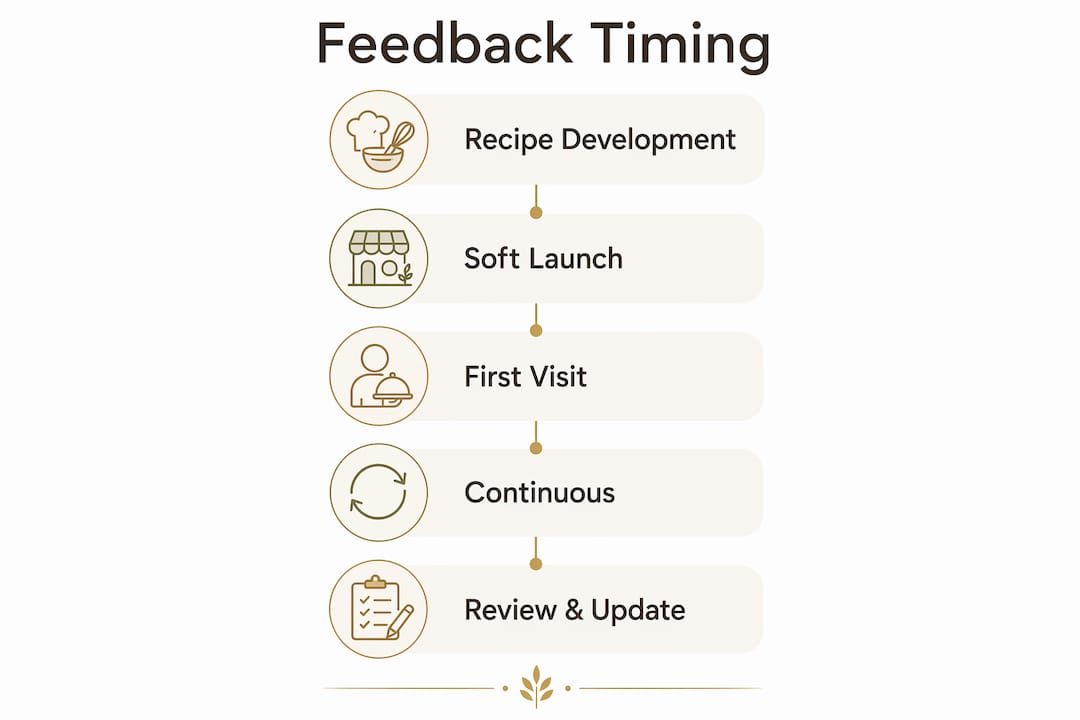
Recipe development and tasting. Before a new item touches the printed menu, run a small in-person tasting with regulars or staff. This is the cheapest possible test — a few portions, a one-question card, and an honest conversation.
The soft-launch window. The first two weeks after an item goes live are the most informative. Guests are encountering it fresh, and their reactions are unfiltered. A short digital prompt tied to that specific item captures data while the experience is still vivid.
Within 48 hours of a first visit. Only 20–30% of first-time coffee customers return within 30 days, but reaching out within 48 hours recovers 15–20% of those at-risk new guests. That window is narrow and enormously valuable.
For regulars, a lightweight check-in every fifth visit keeps the relationship warm without triggering survey fatigue. Lapsed customers — those who haven’t returned in 30 days — deserve a direct, empathetic prompt that shows you noticed their absence.
“When mistakes happen, we own them — acknowledge, apologize, and fix. Customers don’t need excuses; they need solutions.” — Gaurav Wadhwa, Founder & Director, Theos Foods
Pro Tip: Prioritize the first-visit touchpoint above all others. A guest who leaves quietly after a mediocre first experience is nearly impossible to win back without that 48-hour outreach. The role of feedback collection in dining shows why that window is so critical.
What collection methods work inside a digital menu?
Low friction is everything. A prompt that takes more than 15 seconds to complete will be ignored by most guests. The formats that work best inside QR and tablet menus:
1–5 star rating on a specific item, triggered right after the order is placed
Thumbs up/down for speed and simplicity, ideal for high-volume periods
Single NPS-style question (“How likely are you to recommend us?”) sent via SMS 24 hours after a first visit, linked to your loyalty program
One open-text field (“What would make this dish better?”) shown only after a 3-star or lower rating
Follow-up SMS or email for lapsed customers, triggered automatically by your CRM when a guest hasn’t visited in 30 days
POS-integrated feedback captures response rates of 40–60% compared with traditional paper or email-only methods, which typically see just 5–15%. Tying the prompt to the transaction is the single biggest response-rate lever available.
“Customers may not share their concerns with you directly. Some customers may leave without voicing their dissatisfaction, and you may never know what went wrong.” — Spokk Blog
Keep prompts contextual. Reference the exact item: “How was your oat milk latte today?” outperforms “How was your visit?” by a significant margin because it signals that the question is specific and answerable. For effective survey design, one question per interaction is the ceiling — never stack multiple prompts in a single session.
How do you turn feedback into actual menu changes?
Raw responses become useful only when you categorize and quantify them. Tag every piece of feedback by dimension: taste, portion size, temperature, speed of service, or price perception. Once you have 20 or more responses on a single item, patterns become clear.
Prioritize by frequency and revenue exposure. A complaint that appears in 40% of responses about your top-selling item demands immediate attention. A one-off comment about a slow-moving seasonal dish can wait.
Feedback Signal | Recommended Action | Test Window |
Recurring taste complaints (40%+ of responses) | Adjust recipe; A/B test two versions | 2 weeks |
Portion-size concerns | Test two portion sizes at same price | 2 weeks |
Price resistance on a new item | Test revised description before cutting price | 1 week |
Single one-off complaint | Log, monitor; no immediate change | Ongoing |
A/B testing inside a digital menu is straightforward: show version A to half your guests for two weeks, version B to the other half, then compare item-level sales and ratings. Menu optimization tied to guest input consistently shows engagement lifts when changes are data-driven rather than intuition-driven.
“Collecting feedback is just the beginning. Your response plays a significant role in customer satisfaction and retention.” — Spokk Blog
Close the loop publicly. Update the menu description to reflect the change, brief your staff so they can mention it naturally, and schedule a follow-up prompt two weeks later to confirm the fix landed well.
Which KPIs tell you if feedback-driven changes are working?
KPI | What to Measure | Target Signal |
30-day repeat rate | % of first-visit guests who return within 30 days | Lift of 10–15% after feedback program launch |
Item-level sales lift | Unit sales of updated item vs. prior 2-week baseline | Positive lift within 2-week A/B window |
Average check | Revenue per transaction | Upward trend as preferred items replace low-performers |
Kitchen waste | Ingredient yield vs. portions sold | Reduction after removing low-demand items |
Feedback response rate | % of prompted guests who respond | 40–60% with POS-integrated prompts |
First-visit recovery | % of new guests re-engaged within 48 hours | 15–20% recovery rate |
A simple revenue example: if your cafe serves 200 new guests per month and 20–30% currently return, that’s 40–60 regulars. If reaching out within 48 hours recovers 15–20% of at-risk new guests, you can add 6–12 more regulars per month. At an average monthly spend of $60 per regular, that’s $360–$720 in incremental monthly revenue — from one feedback workflow change.
Technical and privacy checklist for U.S. cafe operators
Launching a feedback system responsibly requires a few non-negotiable steps.
Map your POS integration. Confirm your POS can trigger a feedback prompt at transaction close and pass item-level data to your analytics dashboard.
Connect your loyalty and CRM system. Guest profiles should link feedback responses to visit history so you can segment by new, regular, and lapsed guests.
Add brief consent language. A single line — “By sharing feedback, you agree to our privacy policy” — satisfies most U.S. state requirements for data collection. Link to a policy that states what you collect, how long you keep it, and how guests can opt out.
Capture minimal PII. An email or phone number for follow-up is sufficient. Avoid collecting data you won’t use.
Set a data retention limit. Ninety days is a reasonable default for raw feedback responses; aggregated trend data can be kept indefinitely.
Write a staff script for immediate remakes. Every barista should be able to say: “I’d love to remake that for you right now — no problem at all.” The immediate redo costs a few dollars in ingredients and preserves years of lifetime value.
Schedule a weekly feedback review. Thirty minutes every Monday morning to tag new responses and flag any emerging patterns is enough for most independent cafes.
“If people rated badly, we contact them and ask them about the issue and ensure we solve it. I reply to every one of them in the morning. We generally do not encourage the customer to remove the negative feedback unless they feel it’s been resolved.” — Samayesh Khanna, Co-founder, Beanly Coffee
Pro Tip: Start with a single opt-in, one-question prompt for all guests. Reserve multi-question surveys for lapsed customers or high-value regulars who have already shown willingness to engage. Cloud-based menus make it easy to update prompt logic without touching your hardware.
How a digital menu platform supports feedback-driven menu work
Mydigimenu maps directly to every step in this workflow. The platform’s QR and tablet menus embed feedback prompts at the item level, so guests rate a specific dish in the same session they ordered it. CRM integration ties those responses to guest profiles, enabling targeted follow-ups via SMS or email without manual exports.
Workflow Step | Mydigimenu Feature |
Collect item-level ratings | QR/tablet menu with embedded prompt |
Trigger follow-ups | CRM and loyalty integration |
Publicize changes | Real-time menu content updates |
Measure impact | Analytics exports and item-level reporting |
Reward engaged guests | Digital stamp card loyalty program |
A practical example: a cafe introduces a new seasonal oat-milk cortado. Using Mydigimenu’s QR menu, they attach a single-question rating prompt to that item for the first two weeks. Forty-three responses come in; 60% flag the sweetness as too high. The recipe is adjusted in week two, the menu description is updated instantly via the platform’s cloud editor, and a follow-up prompt confirms satisfaction improved. No waste from a full-scale rollout. No reprints. The rich media capabilities in the menu also let the cafe add a short video of the updated preparation, which drives curiosity and reorders.
“Feedback is a tool for deepening emotional connections; customers who see changes become brand advocates more effectively than traditional advertising.” — Crimson Cup
What are the most common feedback mistakes cafe owners make?
The pitfalls are predictable, and most are avoidable with a simple rule: less, but better.
Survey fatigue is the fastest way to kill response rates. Prompting guests on every visit trains them to ignore the request. Limit prompts to first visits, post-update windows, and lapsed-customer outreach.
Overreacting to one-off comments wastes kitchen resources and confuses regulars. A single complaint about portion size is not a signal; twelve complaints in two weeks are.
Ignoring context distorts the data. A spike in negative temperature feedback on a Monday morning might reflect a broken espresso machine, not a recipe problem. Always cross-reference feedback with operational notes.
Failing to close the loop is the most damaging mistake of all. Guests who share feedback and see no visible response stop sharing — and often stop visiting. Maintaining engagement through feedback loops requires that the loop actually closes.
“Menu development must balance artistic vision and consumer demand — use feedback to guide, but not dominate, your brand’s menu identity.” — Restaurant India
Do:
Limit feedback prompts to 1–2 per guest per month
Reference the specific item in every prompt
Publicize changes with a brief menu note or social post
Use small A/B experiments before sweeping changes
Don’t:
Ask customers to remove or edit negative reviews
Act on feedback that contradicts your core brand strengths
Stack multiple questions in a single session
Ignore recurring themes because they’re inconvenient
Key Takeaways
Cafes that embed feedback into their menu workflow — not just their review-response process — see measurable gains in retention, waste reduction, and average check within a short time frame.
Point | Details |
First-visit window is critical | Reaching new guests within 48 hours recovers a significant portion of at-risk customers who would otherwise leave silently. |
POS-integrated prompts outperform | Transaction-triggered feedback achieves much higher response rates compared to traditional methods. |
Visible action multiplies participation | Publicizing menu changes driven by feedback increases future response rates noticeably. |
A/B test before full rollout | Run 2-week controlled tests on updated items before committing to a full menu change. |
Mydigimenu closes the loop | The platform connects QR feedback prompts, CRM follow-ups, and real-time menu updates in one workflow. |
“Customers who see their suggestions reflected in real changes become vocal promoters — more reliably than paid advertising.” — Crimson Cup
The feedback habit that actually moves the needle
Most cafe owners treat feedback as a reputation management task — something to handle after a bad review lands. The operators who grow fastest treat it as a daily design tool. Spending 20 minutes each morning reviewing overnight responses, flagging any taste or temperature patterns, and briefing the opening barista on one specific thing to watch for — that habit costs almost nothing and compounds over months into a menu that guests feel genuinely shaped. When a customer notices that the cortado they complained about last month now tastes exactly right, they don’t just come back. They bring someone with them. That behavioral ROI is what no ad spend can replicate.
Mydigimenu brings your feedback loop to life
Cafe owners who want to act on everything above without building custom integrations have a direct path forward with Mydigimenu. The platform’s digital menu and tablet solution embeds feedback collection at the item level, connects to your CRM for targeted follow-ups, and lets you update menu content in real time the moment a recipe changes. Loyalty hooks and digital stamp cards keep engaged guests coming back, while analytics exports give you the item-level data you need to run meaningful A/B tests.

The setup is designed for independent operators — no engineering team required, no long onboarding process. You can launch a QR menu with embedded feedback prompts and start collecting responses within the same week. Check current U.S. plans and pricing to find the tier that fits your cafe’s size and volume, and see exactly which feedback features are included at each level.
Sources and further reading
Customer Feedback for Coffee Shop: Complete Guide | Regulr
Why customer feedback matters when adding new dishes | TheFoodHaunt
POS-Driven Guest Feedback Surveys to Improve Cafés | Omega Software
Brewing Hot: Importance of Customer Feedback to a Cafe’s Success | Restaurant India
How customer feedback can help your coffee business thrive | Crimson Cup
The impact of community feedback on café menu development | The Blue Angel Cafe
The Role of Feedback Collection in Dining: 2026 Guide | Mydigimenu
Menu optimization for guest engagement | Mydigimenu
Rich media in digital menus | Mydigimenu
Cloud-based menus and engagement | Mydigimenu
Recommended
Comments