
Best BuonMenu.com Alternatives for Restaurant Owners


TL;DR:
Mydigimenu is the best comprehensive alternative for U.S. restaurants seeking contactless QR menus, tablet ordering, and integrated payments. It offers full customization, CRM, loyalty, multi-language support, and POS integrations, covering various business needs from cafes to multi-location chains. Choosing the right platform depends on your ordering setup, POS system, and staffing, with POS compatibility being the top priority.
For U.S. restaurants that need contactless QR menus, tablet/iPad ordering, and integrated payments, Mydigimenu is the recommended BuonMenu alternative — it covers the full stack from QR code menus to CRM and loyalty, with multi-language support and POS integrations built in. Platforms handling PCI DSS-compliant pay-at-table and no-app online ordering are the category to prioritize.
Here is the practical shortlist by business need:
Entry-level QR-only builders for single-location cafes and pop-ups that need a fast, low-cost digital menu without ordering
Tablet/iPad menu platforms for sit-down restaurants and hotels that want rich, visual menus on in-venue hardware
Integrated ordering + POS stacks for multi-channel venues that need online ordering, pay-at-table, and real-time POS sync
Meal-planning/meal-prep content sites (tools like Mealime or Eat This Much) for operators whose need is recipe content, not guest ordering
Managed services or agencies for multi-location rollouts that require white-glove configuration
One important note: aggregators like SaaSHub list more than ten BuonMenu alternatives, but they mix consumer meal-planning apps with genuine B2B restaurant platforms. Separate the two categories before you spend time on demos.
Table of Contents
How do BuonMenu alternatives compare on features and pricing?
The table below maps the functional differences that matter most when replacing BuonMenu. Category labels replace vendor names to keep the focus on what you actually need.
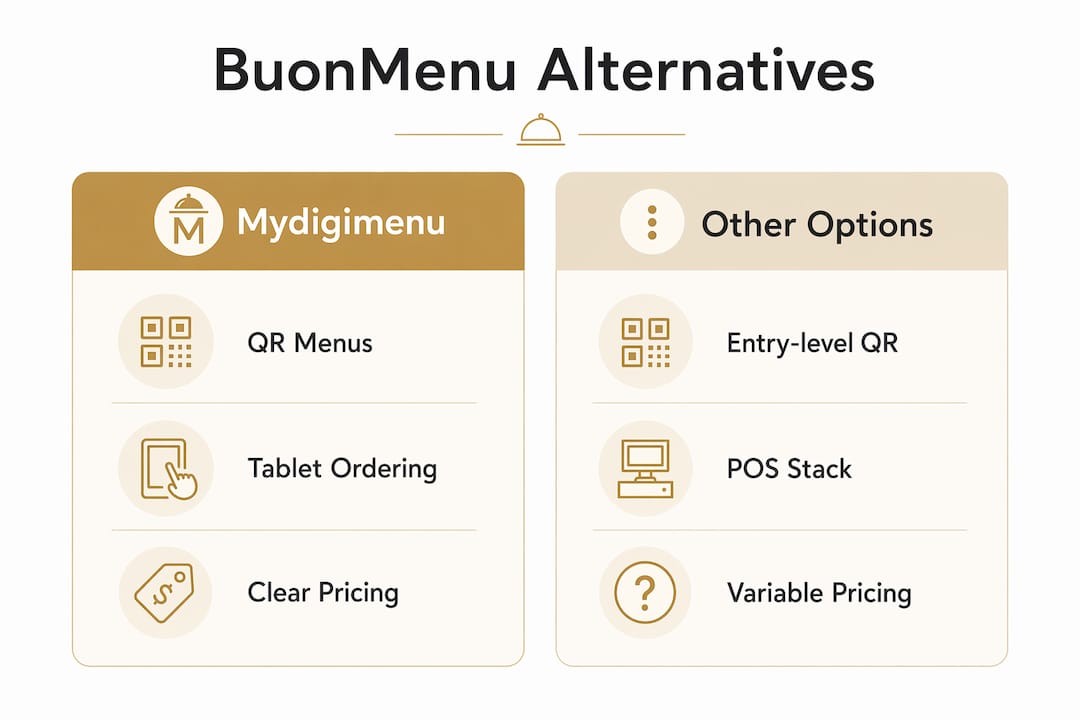
Evaluation Dimension | Mydigimenu | Entry-Level QR Builders | Integrated POS Stacks |
Best for | Cafes, restaurants, bars, hotels (single to multi-site) | Single-location cafes, pop-ups | Multi-channel chains needing deep POS sync |
Contactless QR menu + tablet/iPad | Yes — QR, tablet, mobile app | QR only | QR + limited tablet |
Online ordering (no app) + pay-at-table | Yes — both, no app download required | No ordering | Yes, varies by platform |
POS + payment integrations | Open API + native connectors; common U.S. POS partners | Minimal or none | Native connectors; deep POS focus |
Customization (layouts, video, nutrition) | Full — multimedia, food videos, nutritional info | Basic layout only | Moderate; menu content secondary |
Loyalty / CRM / marketing | Full — digital stamp cards, CRM, targeted campaigns | None | Basic loyalty; limited CRM |
Pricing model + free trial | Tiered subscription + transaction fees; demo available | Low flat fee or freemium | Higher subscription; demo required |
Multi-language / multi-currency | Yes — global localization built in | Rarely | Sometimes, varies |
Onboarding / support / SLA | White-glove onboarding available | Self-serve only | Varies; often enterprise-only support |
On pricing transparency: Mydigimenu publishes tiered plans with clear subscription and transaction-fee structures. Entry-level QR builders often advertise a free tier but charge for ordering or integrations. Enterprise POS stacks rarely publish pricing publicly.
On free trials: Always request a sandbox or demo account before committing. Mydigimenu offers a demo; confirm the scope covers your actual POS before you invest setup time.
On PCI and security: Any platform handling card payments must be able to articulate its PCI DSS scope. If a vendor cannot answer that question in a demo, that is a red flag worth taking seriously.
Pro Tip: Narrow your shortlist to two vendors in one week by running this filter: does the platform support your current POS natively or via open API? If yes, book a demo. If no, move on. POS compatibility is the single fastest eliminator.
How do you choose the right BuonMenu alternative for your restaurant?
The right choice depends on your ordering architecture, not your feature wish list.
If you run a single-location cafe or pop-up, an entry-level QR builder covers the basics at low cost. You do not need CRM or pay-at-table yet, and the simpler setup means faster deployment.
If you operate a sit-down restaurant or hotel, a tablet/iPad-first platform like Mydigimenu gives guests a richer, more visual experience. The tablet and iPad menu format also supports upselling through food videos and nutritional detail in ways a static QR link cannot.

If you run multiple locations or need online ordering, prioritize platforms with open APIs, native U.S. POS connectors, and documented pay-at-table flows.
Selection criteria checklist:
Core ordering needs: QR only, tablet, online ordering, pay-at-table, or all four
POS integration: which system you run today and whether the vendor has a tested connector
Offline/tablet support: does the platform work if Wi-Fi drops?
Content richness: food videos, nutritional info, allergen flags
Loyalty and CRM: digital stamp cards, guest profiles, targeted campaigns
Languages and currencies: critical for venues with international guests
Budget shape: flat subscription vs. transaction fees at scale
Onboarding capacity: do you have in-house IT, or do you need white-glove setup?
Top questions to ask during a demo:
What is your uptime SLA, and how is downtime communicated?
What is your PCI DSS scope, and do you have a current certification?
Do you offer an open API, and what is the typical integration time with Square, Toast, or Lightspeed?
Who owns the menu data, and can I export it in CSV or JSON at any time?
What does the trial or demo account include, and what is excluded?
What does your migration support look like, and what is the estimated timeline?
Red flags to watch for:
Pricing that requires a sales call to unlock basic plan details
No mention of PCI scope or payment compliance anywhere on the site
No data export or portability options
Poor or absent localization for non-English menus
12–24 month contracts with no exit clause
Always ask for a written onboarding plan before you sign. A vendor confident in their process will provide one without hesitation.
What should you expect when you switch platforms?
A typical small-venue switch from discovery to full rollout takes several weeks, with the main cost buckets being subscription fees, optional setup fees, hardware (tablets), integration work, and staff training.
Sample migration timeline:
Discovery and scoping (1 week): audit your current menu data, POS system, and ordering flows
Trial/pilot (1–2 weeks): run a sandbox account with real menu content on one station
Configuration and menu import (1–2 weeks): upload items, images, videos, and nutritional data; request CSV/JSON export from your current provider
POS/payment integration and testing (1–3 weeks): this varies most by POS; allocate more time if your POS requires custom API work
Staff training and soft launch (3–7 days): tablet menu training typically takes longer than QR-only; budget a full day per station type
Full rollout (1–2 weeks after pilot): go live across all locations once pilot metrics are clean
Integration tasks and who handles them:
Menu data export and formatting: in-house manager or vendor migration team
POS connector setup: vendor professional services or your IT team
Payment gateway configuration: vendor support, with your payment processor on standby
Hardware provisioning (tablets, stands): in-house procurement
Cost callouts:
One-time setup fees: vary by vendor; confirm in writing before signing
Tablet hardware: budget per device based on your venue size
Transaction fees: apply on gift vouchers and some ordering flows; Mydigimenu uses a tiered subscription plus transaction model — check the USD pricing page for current plan details
Ongoing subscription: tiered by features and locations
For menu migration, always request your data in CSV or JSON. Validate image and video file compatibility early — large video files are the most common delay in menu imports.
When should you pick Mydigimenu vs. a category alternative?

Choose Mydigimenu when your venue needs QR menus, tablet ordering, no-app online ordering, and loyalty/CRM in one platform. Consider a QR-only builder when budget is the primary constraint and ordering is not required. Consider a dedicated POS-driven ordering stack when your operation is already deeply integrated with an enterprise POS and you need that system to remain the ordering source of truth.
A practical scenario: a three-location bistro that wants tablet menus for in-dining, online ordering without forcing guests to download an app, and a loyalty stamp card for repeat guests is exactly the use case Mydigimenu is built for. The platform handles all three in a single subscription, with menu digitization support and CRM tools that most QR-only builders do not offer.
When a lighter alternative makes sense:
Single location, no ordering needed, very tight budget: a freemium QR builder works
Enterprise chain with an existing POS-driven ordering system: a dedicated POS stack may be a better architectural fit
Pro Tip: Before your demo, map out the three guest interactions that matter most to your operation (ordering, payment, loyalty). If one platform covers all three natively, that is worth more than a longer feature list spread across integrations.
The clearest next step: book a Mydigimenu demo, request a written onboarding plan, and run a 7–14 day pilot on one location before committing to a full rollout.
Shortlist of best BuonMenu alternatives for U.S. businesses
SaaSHub’s BuonMenu alternatives page surfaces a broad mix of platforms, which makes it a useful starting point for market research. The challenge is that the list includes consumer meal-planning apps alongside genuine restaurant ordering platforms. Tools such as MealPrepPro, Eat This Much, and RecipeOK are excellent for personal meal planning and grocery automation, but they do not offer QR menus, POS integrations, or pay-at-table. They belong in a different buying decision entirely.
For U.S. restaurant and hospitality operators, the practical shortlist narrows to platforms that offer contactless ordering, POS connectivity, and some form of guest engagement. Within that filtered set, the named platforms from the SERP consensus worth evaluating include Mydigimenu, qReveal, MenusM, Apetito Menu, QR2Z, QRMenu.com, and Ultimate Meal Plans. Mydigimenu stands out for covering the widest feature range, from guest engagement tools and loyalty programs to multi-language support and CRM, in a single subscription built for hospitality.
Key Takeaways
Mydigimenu is the strongest all-in-one BuonMenu alternative for U.S. restaurants that need QR menus, tablet ordering, no-app online ordering, and loyalty/CRM in one platform.
Point | Details |
Separate content from ordering tools | Consumer meal-planning apps are not restaurant platforms; filter them out before comparing vendors. |
POS integration is the top deal-maker | Confirm native or API-based POS compatibility before booking any demo. |
Migration takes several weeks | Budget time for POS integration and staff training; tablet menu training takes longer than QR-only. |
Verify PCI DSS scope in the demo | Any platform handling card payments must articulate its PCI compliance; no answer is a red flag. |
Mydigimenu covers the full stack | QR menus, tablet ordering, online ordering without app downloads, loyalty, CRM, and multi-language support in one subscription. |
Why POS integration beats a feature list every time
The most common mistake operators make when switching digital menu platforms is prioritizing visual features over operational plumbing. A mouthwatering food-video menu is genuinely exciting, and it does influence guest decisions. But if the platform cannot sync reliably with your POS, every order becomes a manual reconciliation problem. That friction compounds fast across a busy dinner service.
What operators consistently underestimate is staff training time for tablet menus specifically. A QR code menu requires almost no training. A tablet menu, especially one with ordering and pay-at-table, changes how front-of-house staff interact with guests. Allocate at least a full day per station type, and run the soft launch during a low-traffic period. The gastronomy technology trends shaping 2026 all point toward deeper digital integration, which means the platforms you choose now will carry more operational weight over time, not less.
Mydigimenu: the digital menu platform built for operators
If the comparison above confirmed that you need more than a static QR code, Mydigimenu delivers exactly what busy hospitality operators need: contactless QR menus, tablet and iPad ordering, online ordering without app downloads, POS and payment gateway integrations, loyalty programs with digital stamp cards, CRM and targeted marketing, and multi-language/multi-currency support for venues with international guests.

White-glove onboarding means you are not configuring integrations alone. The platform supports a 7–14 day pilot so you can validate order accuracy and guest feedback before full rollout. Visit the pricing page to review current subscription tiers, or book a demo to see QR menus, tablet ordering, and POS integrations running live in a test environment.
Sources and vendor pages worth checking
SaaSHub BuonMenu Alternatives — market aggregator listing QR menu builders and integrated platforms
Mydigimenu QR Menu Generator — product page for QR code menu capabilities
Mydigimenu Tablet/iPad Menu — product page for in-venue tablet ordering
Mydigimenu USD Pricing — current subscription tiers and transaction fee details for U.S. operators
Mydigimenu Menu Digitization Guide — operational guidance on switching to digital menus
The Role of Food Delivery in Hospitality: 2026 Guide — partner coverage of delivery and digital ordering trends
Alternative.to BuonMenu page — community-sourced list of QR menu and digital ordering alternatives
Recommended
Comments