
Step-by-Step Guide to Menu Customization for Engaged Guests

TL;DR:
Digital menus increase order value by 20-30% and improve profitability by 10-15%.
Effective customization relies on data analysis, strategic design, and regular updates.
Success depends on discipline, leadership, and integrating technology with operational strategies.
Picture a Friday evening rush at your restaurant. Your servers are fielding questions about seasonal specials that haven’t been printed yet, a guest asks about allergens on a dish you modified last week, and your printed menus look nothing like the elegant experience you’ve worked hard to create. Static menus don’t just frustrate guests—they quietly erode your profits. Digital menus boost average order value by 20-30%, with profit gains reaching 10-15%. This guide walks you through every stage of digital menu customization, from laying the groundwork to fine-tuning for peak performance, so you can transform your guest experience and bottom line.
Table of Contents
Key Takeaways
Point | Details |
Boost guest engagement | Tailored, digital menus lead to higher sales and a better dining experience. |
Increase operational efficiency | Cloud-based, POS-integrated tools streamline updates and reduce labor costs. |
Data-driven optimization | Quarterly reviews and menu engineering help maximize profit and prevent menu bloat. |
Rapid ROI | Digital menu systems typically pay for themselves within 6 to 18 months. |
Understanding digital menu customization
Digital menu customization is the practice of tailoring your restaurant or hotel menu through a cloud-connected platform, enabling real-time updates, data-driven item placement, and rich visual presentation. Unlike static menus, digital versions respond to your business in real time. Price changes, seasonal additions, and sold-out items update instantly, keeping guests informed and staff confident.
The operational impact is tangible. Globally, properties adopting digital menus for engagement are seeing measurable lifts in average order values and dramatic reductions in printing costs. One of the most cited examples: 90% of orders at Grand Hyatt Singapore are now digital, saving $3,600 per month in labor alone. The Prague IRIS deployment tells a similar story, with faster table turns and higher upsell rates becoming the new baseline.
For managers tracking profitability, menu engineering boosts profit by 10-15% when implemented with discipline. This discipline becomes far easier to execute through a digital platform, since the menu engineering basics of identifying your stars, plowhorses, puzzles, and dogs can be fed directly by live POS data rather than guesswork.
Key benefits at a glance:
Instant updates without reprinting costs
Higher average order values through strategic item placement
Reduced labor hours spent on menu management
Rich media presentation, including food photography and video
Guest-facing dietary and allergen information, always current
Multilingual support for international guests
“A well-engineered digital menu is not just a list of dishes—it is an active revenue tool that works every shift.” — Hospitality technology analyst, 2025
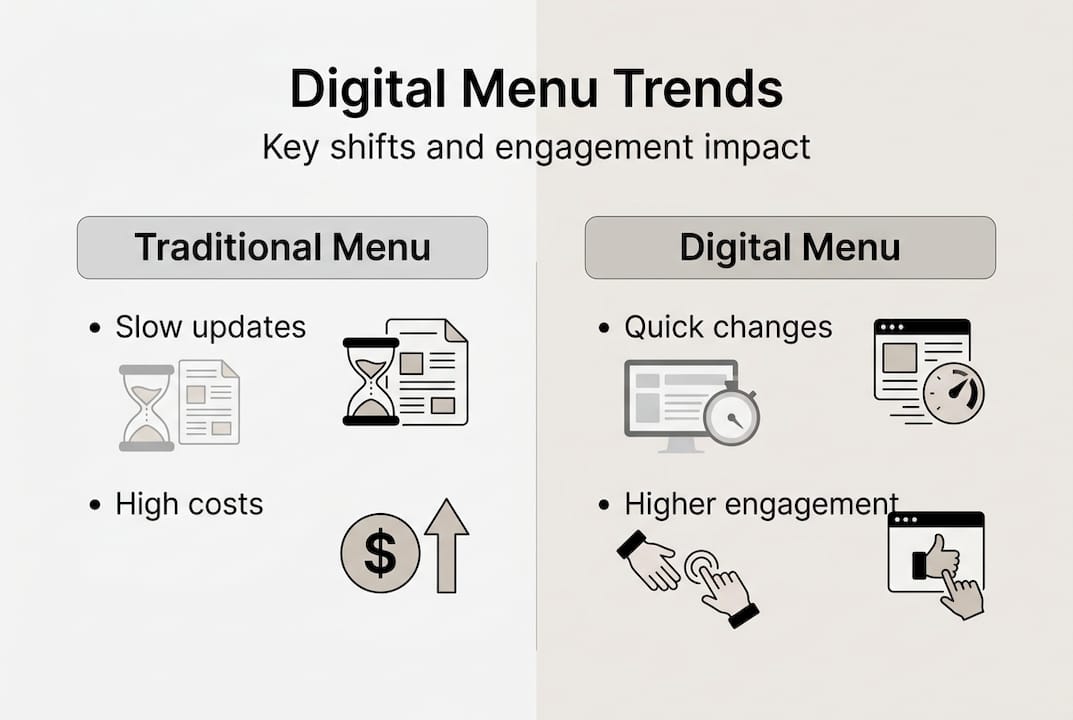
Metric | Traditional Menu | Digital Menu |
Update speed | Days to weeks | Minutes |
Printing cost | Recurring | Eliminated |
Average order value lift | Baseline | +20-30% |
Profit improvement | Baseline | +10-15% |
Allergen/dietary info | Static | Always current |
The shift toward digital menu adoption trends shows no signs of slowing, with guest expectations increasingly shaped by seamless, visually rich browsing experiences.
Preparing for menu customization: Tools and requirements
Now that you know the ‘why,’ let’s get practical with the ‘what you need’ before customizing your menu. Preparation is where most managers stumble, either underestimating the technology required or overlooking the human side of the rollout.
At the core, you need a reliable digital menu platform that integrates with your existing POS system. POS-integration and cloud platforms enable seamless real-time menu updates, eliminating the gap between what’s in your kitchen and what guests see on screen. Beyond software, you’ll need quality hardware: tablets for table-side ordering, a stable Wi-Fi network, and high-resolution images of your dishes.
Feature | On-premise solution | Cloud-based solution |
Setup cost | High upfront | Low subscription |
Update flexibility | Limited, manual | Instant, remote |
Multi-venue management | Complex | Centralized dashboard |
Scalability | Requires hardware upgrades | Scales on demand |
Offline capability | Usually available | Depends on provider |
Operationally, assign clear user roles before launch. A head chef should control item availability and descriptions. A marketing lead should manage photography and layout. A manager should hold admin permissions for pricing and promotions. This prevents conflicting edits and keeps your menu consistent across all touchpoints.
Pro Tip: For hotel groups managing multiple outlets, centralize your menu control through a single admin dashboard. You can push global updates, such as pricing changes, while still allowing each venue to customize its own daily specials and layout through customizable menu layouts.
Here’s a practical checklist to confirm you’re ready:
POS integration confirmed and tested
Stable Wi-Fi coverage throughout dining area
High-resolution dish photography completed
User roles and permissions assigned
Staff trained on platform navigation
Backup offline menu plan in place
Guest-facing device screen cleanliness protocol set
Review the menu engineering matrix overview before your first customization session—it will sharpen how you think about item placement from day one.
Step-by-step process for customizing your menu
With the right tools in place, you’re set for hands-on menu customization. The sequence matters. Jumping straight into design without a data foundation leads to beautiful menus that don’t actually sell.
Step 1: Analyze your POS data. Pull sales volume and gross profit margin for every item over the last 90 days. This is your raw material for every decision that follows.
Step 2: Apply the engineering matrix. The 2x2 menu matrix guides decisions on keeping, promoting, or removing items based on their profitability and popularity. Stars are high-profit and high-popularity items. Plowhorses sell well but carry thin margins. Puzzles are profitable but rarely ordered. Dogs are both low-margin and low-volume.
Step 3: Design with intent. Use your digital platform’s layout tools to give stars prime visual real estate: top of section, accompanied by mouthwatering high-resolution photography. Apply color and bold typography to draw the eye. Use icons for dietary indicators such as vegan, gluten-free, or chef’s recommendation to help guests navigate quickly. Explore menu design for engagement principles to sharpen your visual hierarchy.
Step 4: Limit section depth. Limiting menu sections to 7 items and using descriptive labels can increase sales by 27%. This is the sweet spot between enough choice and the paralysis that comes from overwhelming guests.
Step 5: Add rich media. Short looping video menus for engagement of your signature dishes can ignite curiosity and dramatically increase attachment rates on high-margin items.
Step 6: A/B test and review. Push two versions of a section layout to different table zones and compare order data after two weeks. Let the numbers guide your final decision.
Stat callout: Menu engineering alone, when applied consistently, drives a 10-15% lift in overall restaurant profitability.
Pro Tip: Avoid menu bloat by scheduling a quarterly review session. Items that underperform for two consecutive quarters deserve removal, not redesign.
Troubleshooting and optimizing for success
Even a well-executed menu needs regular upkeep—here’s how to spot and solve common issues, then keep improving.
The three most common problems are Wi-Fi instability disrupting guest-facing menus, permissions errors where staff accidentally override pricing or availability, and menu overload where well-meaning additions have quietly made your menu overwhelming. Offline mode, permissions controls, and mobile-responsive menus are critical for resilience in all three scenarios.
Best practices for continuous optimization:
Run a quarterly item-level profitability review using live POS data
A/B test section layouts and featured item positions every 60 days
Monitor guest feedback scores tied to specific menu sections
Use dynamic pricing tools for peak and off-peak periods
Leverage AI-driven recommendation engines to surface personalized upsells
Act on negative feedback within 48 hours, adjusting descriptions or photography before removing an item
Issue | Likely cause | Fix |
Guests can’t load menu | Wi-Fi dead zones | Extend network or enable offline mode |
Wrong prices showing | Permissions conflict | Audit user role settings |
Low attachment on specials | Poor visual placement | Move to section top with rich media |
Menu feels overwhelming | Too many items | Apply 7-item-per-section rule |
For advanced menu layout optimization, the smartest operators treat guest data as a feedback loop. Every tap, scroll, and order is a signal. Over time, patterns emerge that reveal what guests want before they even know it themselves.
“The menu is no longer a static document—it is an operating system for your dining room. It should be updated with the same urgency you’d apply to any other business-critical software.” — Menu strategy consultant
Detailed menu optimization strategies show that operators who commit to consistent data reviews consistently outperform those who update only when forced by external pressures.
Why effective menu customization is bigger than just digital tools
Here’s the contrarian truth most technology vendors won’t tell you: the platform is the easy part. The hard part is the discipline to use it consistently and strategically.
From hands-on experience working with hospitality operators, the highest-performing properties are not those with the most sophisticated software. They’re the ones where a manager sits down every quarter, reviews item-level data, and makes ruthless decisions. Ongoing quarterly analysis prevents menu bloat by focusing high-margin stars and culling underperformers, creating streamlined operations and stronger guest engagement.
Digital tools are force-multipliers. But without leadership buy-in, a culture of data curiosity, and staff who understand why certain items are featured, customization efforts plateau quickly. The technology enables the strategy. It does not replace it.
The managers who see the greatest ROI treat their digital menu like a living brand asset, not a software task. They use menu engineering insights to spark conversations with their culinary team, align marketing campaigns to high-margin items, and train servers to reinforce what the menu is quietly communicating. That alignment—between digital design and human behavior—is where the real transformation happens.
Take the next step with digital menu solutions
Ready to put menu customization into action? MyDigiMenu.com gives hospitality operators a powerful, intuitive platform to design, update, and optimize menus across every outlet and daypart.

From a digital tablet and iPad menu experience that wows guests at the table to instant QR code menus that require no app download, MyDigiMenu puts real-time control in your hands. POS integration, rich media support, centralized multi-venue management, and built-in analytics mean you’re not just going digital—you’re building a smarter, more profitable dining experience. Reach out for a personalized demo and start turning your menu into your most powerful revenue tool.
Frequently asked questions
What is menu customization in a digital context?
Menu customization means tailoring your restaurant or hotel menu via digital tools, allowing quick updates, item management, and data-driven design for better guest engagement. Menu engineering boosts profitability and streamlines ongoing updates far beyond what printed menus allow.
How does menu engineering support digital customization?
Menu engineering uses sales and margin data to categorize dishes, informing smart decisions about which items to highlight or remove. The 2x2 menu matrix guides digital menu choices by identifying your most profitable and popular items.
What are common mistakes to avoid when customizing menus?
Avoid menu bloat, neglecting performance data, and skipping regular reviews. Quarterly reviews and item culling prevent guest confusion and protect your profit margins.
Can hotels with multiple outlets use one menu system for all venues?
Yes, advanced digital platforms support centralized control with tailored menus for each outlet or daypart. Hotels benefit from multi-venue management through a single dashboard that still allows local customization.
How quickly can I see ROI from digital menu customization?
Most restaurants and hotels see measurable ROI within 6-18 months, driven by labor savings, increased order values, and faster menu changes. Early adopters have reported ROI reaching 200-900% when customization is paired with consistent menu engineering discipline.
Recommended
Comments