
SMS Marketing for Restaurants: A Practical Owner's Guide

Yes — restaurants should use SMS marketing because it reliably reaches guests at decision moments. Start today by enabling compliant opt-ins at your point of sale or QR menu, then set up one automated welcome flow with a first-visit offer. Three immediate steps:
Enable compliant opt-ins at checkout, on receipts, or via QR code with clear consent language and a “Reply STOP to opt out” instruction.
Register your 10DLC campaign with your carrier or SMS platform before sending any promotional traffic, or your messages will be filtered before they arrive.
Choose a platform that fits your size: Mydigimenu is the recommended starting point for restaurants that want guest capture, CRM, loyalty, and campaign automation built into one digital menu platform. SlickText and Textedly work well as standalone SMS tools for operators who already have a separate POS and CRM stack.
Key Takeaways
SMS marketing for restaurants delivers its strongest returns when compliant opt-in capture, behavior-triggered automation, and promo code attribution are built into the program from the start.
Point | Details |
Start with compliant opt-ins | Enable TCPA-compliant capture at QR menus, POS, and receipts before sending any promotional messages. |
Register 10DLC immediately | Unregistered campaigns face carrier filtering; registration protects deliverability from day one. |
Automate the welcome flow | Send a welcome offer within minutes of opt-in to maximize first-visit redemption rates. |
Limit broadcasts to 2–4 per month | Behavior-triggered messages (reminders, win-backs) are exempt; frequency caps apply to promotional blasts only. |
Mydigimenu as central platform | Mydigimenu captures guest opt-ins at the digital menu, feeds a built-in CRM, and runs loyalty and campaign automation in one place. |
Table of Contents
How do you compare SMS platforms built for restaurants?
Not every SMS platform is built with a restaurant’s workflow in mind. The features that matter most to a food-and-beverage operator are different from what a retail brand needs, so the comparison framework below focuses on the dimensions that actually move the needle for dining businesses.
What to evaluate when choosing a platform:
Best for: Single-location independents need simplicity and low monthly cost. Multi-location groups need centralized campaign management and per-location segmentation. Marketplace-integrated operators (those on DoorDash or ChowNow) benefit from platforms that sync order data to trigger behavior-based messages.
Key features: Look for MMS support (food photos convert), keyword/shortcode opt-ins, QR code capture, automated sequences, and list segmentation by visit frequency or spend.
Integrations: POS sync, online ordering platforms, CRM, and reservation systems are the integrations that turn a broadcast tool into a revenue attribution engine. Online ordering integration feeds guest data directly into your SMS list, closing the loop between order behavior and follow-up messaging.
Ease of setup: Restaurant teams are not marketing agencies. Platforms with pre-built restaurant templates and guided onboarding reduce time-to-first-send from weeks to days.
Pricing model: Most platforms charge a monthly base plus per-message fees, or offer bundled message credits. Pay-as-you-go suits seasonal operators; monthly plans with included credits suit high-frequency senders.
Compliance support: TCPA requires express written consent and a clear opt-out path. Platforms that automate consent capture, honor STOP replies instantly, and maintain opt-in records reduce your legal exposure significantly.
Reporting and attribution: Delivery rate, click-through rate on short links, and promo code redemption are the three metrics that tell you whether a send drove revenue.
Short vendor overview:
Mydigimenu is the recommended platform for restaurants that want guest capture, loyalty, CRM, and campaign automation integrated with their digital menu and ordering system. It captures opt-ins at the QR menu or tablet, feeds guest data into a built-in CRM, and supports targeted campaigns and loyalty flows without requiring a separate SMS tool.
SlickText is a strong standalone SMS platform with restaurant-friendly features including keywords, automations, and MMS. It suits operators who already have a POS and CRM and want a dedicated texting layer on top.
Textedly offers a clean interface and competitive per-message pricing, making it a practical choice for single-location operators running straightforward broadcast campaigns.
Mailchimp covers SMS alongside email in one dashboard, which appeals to owners who want a single tool for both channels. Its SMS feature set is less specialized than dedicated platforms but works for operators who prioritize simplicity over depth.
DoorDash Commerce Platform and ChowNow both surface SMS or push notification capabilities tied to their ordering ecosystems. If a significant share of your orders flow through either marketplace, their native messaging tools can trigger behavior-based messages without a separate integration.
Why does SMS marketing work so well for restaurants?
The answer comes down to timing. Industry benchmarks report SMS open rates are very high, with click-through rates on links that run materially above email equivalents. A promotional email might sit unread until Thursday; a text sent at 11:30 AM lands in a guest’s pocket during the exact window they’re deciding where to eat lunch.
Stat to know: Nearly half of consumers prefer to connect with restaurants via text for timely updates, which means the channel has genuine consumer acceptance, not just marketer enthusiasm.
That timing advantage is most visible in three specific scenarios:
Slow-shift fills: A Tuesday at 5 PM with empty tables becomes an opportunity. A text sent at 4:00 PM offering a limited-time special can move guests who were undecided.
Reservation reminders: A confirmation text sent 24 hours before a booking, followed by a reminder two hours out, cuts no-shows without requiring a phone call.
Loyalty reminders: A guest who earned a reward three weeks ago and hasn’t returned is a win-back waiting to happen. A single text reminding them their reward expires soon often closes the loop.
The ROI case is equally direct. Conservative program modeling shows that at modest scale, with tracked promo codes and a reasonable redemption rate, the channel economics can deliver returns that are multiples of the send cost. The math only works, though, when opt-in flows, 10DLC registration, and attribution are in place from day one.
Six high-value SMS campaigns every restaurant should run
Behavior-triggered messages consistently outperform generic blasts and produce lower opt-out rates. The six campaigns below cover the full guest lifecycle, from first visit to long-term loyalty.
Welcome (with incentive): Send within minutes of opt-in. “Welcome to [Restaurant]! Show this text for 15% off your next visit. Valid 7 days. Reply STOP to opt out.” Track with a unique code. Best window: immediate automation trigger.
Slow-shift flash promo: Send 60–90 minutes before the target meal period. “Slow night special: half-price apps tonight 5–7 PM only. Show this text. [Restaurant] — Reply STOP to opt out.” Use a single-use code per send to measure redemption precisely.
Win-back for lapsed guests: Target guests with no visit in 60–90 days. “We miss you! Come back this week and get a free dessert on us. Show this text. Reply STOP to opt out.” Segment by last-visit date in your CRM.
Loyalty/reward reminder: Trigger when a guest reaches a reward threshold or when a reward is about to expire. “Your free entrée reward expires in 3 days! Redeem at [Restaurant]. Reply STOP to opt out.” Pair with a tracked short link to your online ordering page.
Menu or seasonal launch (MMS option): A photo of a new dish with a one-line description converts better than text alone when the item is visually striking. “New on the menu: our summer truffle pasta. Available now. [link] Reply STOP to opt out.” MMS adds cost per message, so reserve it for launches that justify the visual.
Event and reservation reminders: Send a confirmation immediately after booking and a reminder 2 hours before the reservation. “Reminder: your table at Restaurant] is at 7 PM tonight. Questions? Call us at [number]. Reply STOP to opt out.” Pair with [reservation management best practices to reduce no-shows.
Keep every message under 160 characters to avoid message splitting, and include one clear call to action per text.
How do you grow a compliant SMS subscriber list quickly?
List quality matters more than list size. A thousand engaged, opted-in guests outperform ten thousand cold contacts who never asked to hear from you. These capture tactics consistently produce the highest-quality subscribers:
QR code on receipts and table tents: Print a QR code that opens a mobile opt-in form pre-populated with the offer. Pair it with a clear incentive (“Scan to get 10% off your next visit”) and compliant consent language.
POS checkout prompt: Train staff to ask at payment: “Can I text you a discount for your next visit?” A verbal prompt followed by a tablet form captures consent cleanly.
Website and online ordering popup: A timed popup on your ordering page with a first-order discount converts well because the guest is already in a buying mindset.
Keyword shortcodes: Promote a keyword on signage, menus, and social (“Text TACOS to 12345 for a free side”). Easy to track by source.
Staff scripting: Give your team a two-sentence script. Consistency matters more than persuasion; most guests say yes when asked clearly.
Sample compliant opt-in language (place on receipt, tablet form, or web popup): “By entering your phone number, you agree to receive promotional text messages from [Restaurant Name]. Message and data rates may apply. Reply STOP to opt out at any time.”
Pro Tip: Send the welcome text within minutes of opt-in. A welcome message delivered immediately after sign-up produces materially higher offer redemption than one sent hours later. Automate this trigger before you run your first broadcast.
Capture rate ranges vary by method. POS prompts with a clear incentive tend to perform better than passive QR codes without an offer attached. The incentive is the conversion lever, not the channel.
What automations and integrations does a restaurant SMS program need?
POS and CRM integration is what separates a marketing send from measurable revenue. Without it, you’re broadcasting into a void. With it, you can test whether a send created an incremental visit or simply accelerated one that was already coming.
Integration priority order:
POS and order timestamps — feed visit frequency and spend data into your CRM so you can segment by recency, frequency, and value.
Reservation system — sync booking data to trigger confirmation and reminder flows automatically. Online reservation systems that push guest data to your SMS platform eliminate manual list management entirely.
CRM — store opt-in records, consent timestamps, and campaign history. This is your compliance backbone and your segmentation engine.
Payment flow or checkout — capture opt-ins at the moment of highest guest engagement: when they’re paying.
Automation flows to build first:
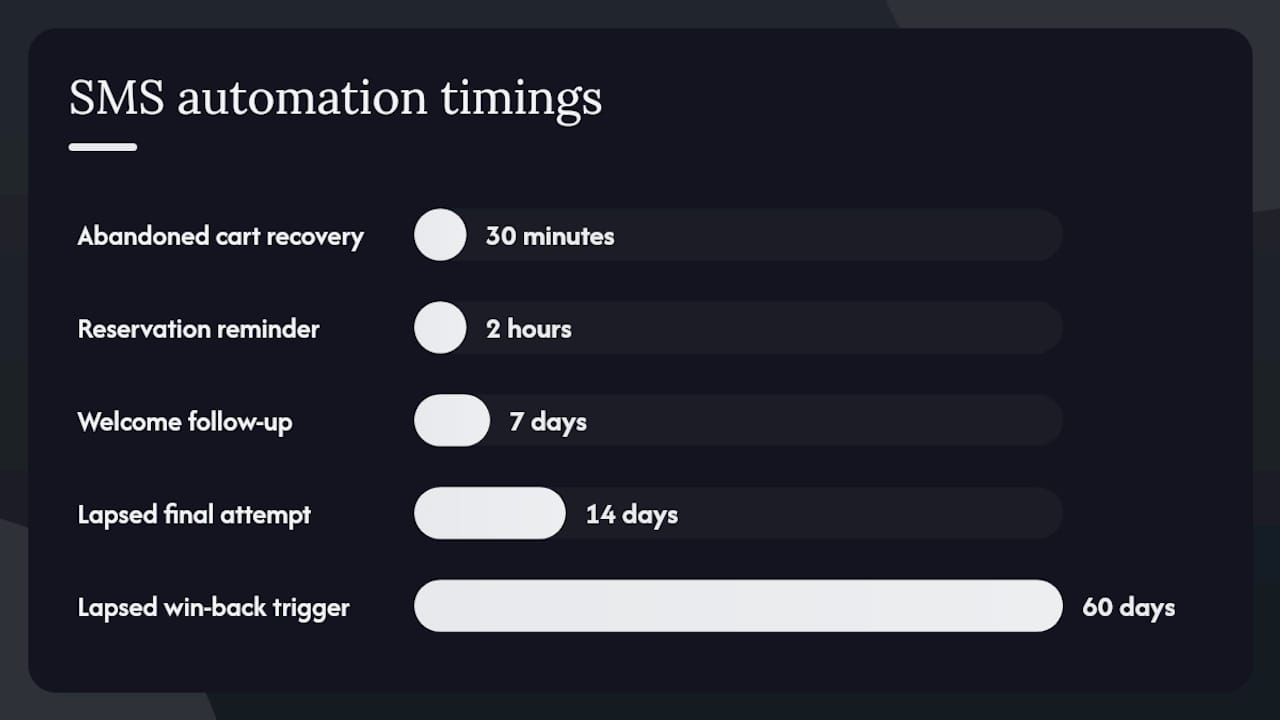
Welcome sequence: Trigger on opt-in. Send offer immediately, follow up in 7 days if not redeemed.
Lapsed-guest win-back: Trigger at 60 days of no visit. One message with a strong offer; if no response in 14 days, one final attempt.
Reservation confirmation and reminder: Trigger on booking creation (confirmation) and 2 hours before the reservation time (reminder).
Abandoned online order recovery: If your ordering platform supports it, trigger a text 30 minutes after an abandoned cart with a small incentive to complete the order.
For attribution, assign a unique promo code to each campaign send. When that code appears in your POS, you have a direct line between the text and the transaction. Automation in guest experience at this level turns SMS from a one-off tactic into a repeatable revenue system.
Copy, timing, frequency, and TCPA compliance checklist
Getting the legal and operational basics right protects your program from both deliverability failures and statutory liability.
TCPA compliance checklist:
Obtain express written consent before sending any promotional text. Verbal consent alone does not satisfy TCPA requirements.
Include “Reply STOP to opt out” in every promotional message. Honor opt-outs immediately and permanently.
Maintain records of consent: date, time, method, and the exact opt-in language the guest saw.
Register your 10DLC campaign with your carrier or SMS platform. Unregistered promotional traffic faces higher filtering and blocking; registered campaigns get higher throughput and better deliverability.
Never send to purchased lists. Every number must have opted in to hear from your specific restaurant.
Copy guidelines:
Stay under 160 characters to avoid message splitting, which can break formatting and confuse recipients.
One CTA per message. Two asks in one text dilute both.
Personalize where your platform allows it: a guest’s first name in the opener lifts engagement.
Always identify your restaurant by name. Guests receive texts from many businesses; make yours instantly recognizable.
Timing and frequency:
Best send windows for restaurant promotions: 10:30–11:30 AM for lunch offers, 3:30–4:30 PM for dinner. Avoid sending after 8 PM or before 9 AM.
Limit promotional broadcasts to roughly 2–4 per month to keep opt-out rates low. Behavior-triggered messages (welcome, win-back, reminders) do not count against this cap because they are expected and relevant.
Use MMS when a food photo genuinely adds value to the message. For text-only offers, plain SMS performs well and costs less.
How do you measure whether SMS drove real revenue?
Everything else tells you whether the channel is actually working.
KPIs to track for every campaign:
Delivery rate: percentage of messages successfully delivered. Below 90% signals list hygiene or registration issues.
Click-through rate (CTR): percentage of recipients who tapped a short link. Benchmark against your own prior sends, not industry averages.
Redemption rate: percentage of recipients who used the promo code or showed the text. This is your direct revenue signal.
Opt-out rate: spikes above 2–3% on a single send indicate a frequency, relevance, or targeting problem.
Visits within attribution window: guests who visited within 48–72 hours of a send, matched via POS timestamps.
Revenue per message: total attributed revenue divided by messages sent. Even a modest figure compounds quickly at scale.
Attribution methods that work:
Unique promo codes per campaign send, redeemed at POS.
Tracked short links (UTM-tagged) for online orders.
POS timestamp matching: compare visit frequency in the 72 hours post-send against a baseline period.
Control group testing: withhold a send from a random 10–20% of your list and compare visit rates between the two groups.
If opt-outs spike after a send, check three things first: was the message sent outside recommended hours, was the offer irrelevant to the segment, or was it the third or fourth message that month?
How Mydigimenu supports guest capture and targeted campaigns
Mydigimenu is built around the exact touchpoints where restaurant SMS programs live or die: the moment a guest scans a QR menu, places an order, or makes a reservation.
Feature mapping:
SMS program need | How Mydigimenu supports it |
Guest capture and opt-in | QR code menus and tablet ordering capture guest profiles via social login or form entry at the point of engagement |
POS and ordering integration | Native integration with third-party POS and online ordering platforms feeds order data into guest profiles |
Campaign automation | Built-in CRM and targeted marketing tools support welcome flows, loyalty reminders, and segmented broadcasts |
Loyalty program | Digital stamp cards and reward tracking trigger loyalty reminder messages when guests reach thresholds |
Multi-location management | Centralized platform supports multiple venues with per-location segmentation and reporting |
Analytics and attribution | Campaign reporting tracks engagement and redemption across guest segments |
Two use-case examples:
A guest scans the QR menu at a table, logs in with their social profile, and opts in to receive offers. Mydigimenu captures the profile, adds it to the CRM, and triggers a welcome SMS with a first-visit discount within minutes. No manual list import required.
A guest books a table through Mydigimenu’s reservation manager. The system triggers a confirmation text immediately and a reminder two hours before the reservation, reducing no-shows without any staff involvement. Pairing this with smarter reservation workflows creates a guest experience that feels attentive rather than automated.
When to choose Mydigimenu as your central platform: If you want guest capture, CRM, loyalty, and campaign automation in one place without stitching together three separate tools, Mydigimenu is the natural fit. If you already have a mature POS-connected CRM and just need a dedicated SMS broadcast layer, a standalone tool like SlickText or Textedly can complement your existing stack.
Data privacy and security beyond basic TCPA compliance
TCPA sets the legal floor, but a well-run SMS program needs a higher standard of data hygiene to protect guests and the business.
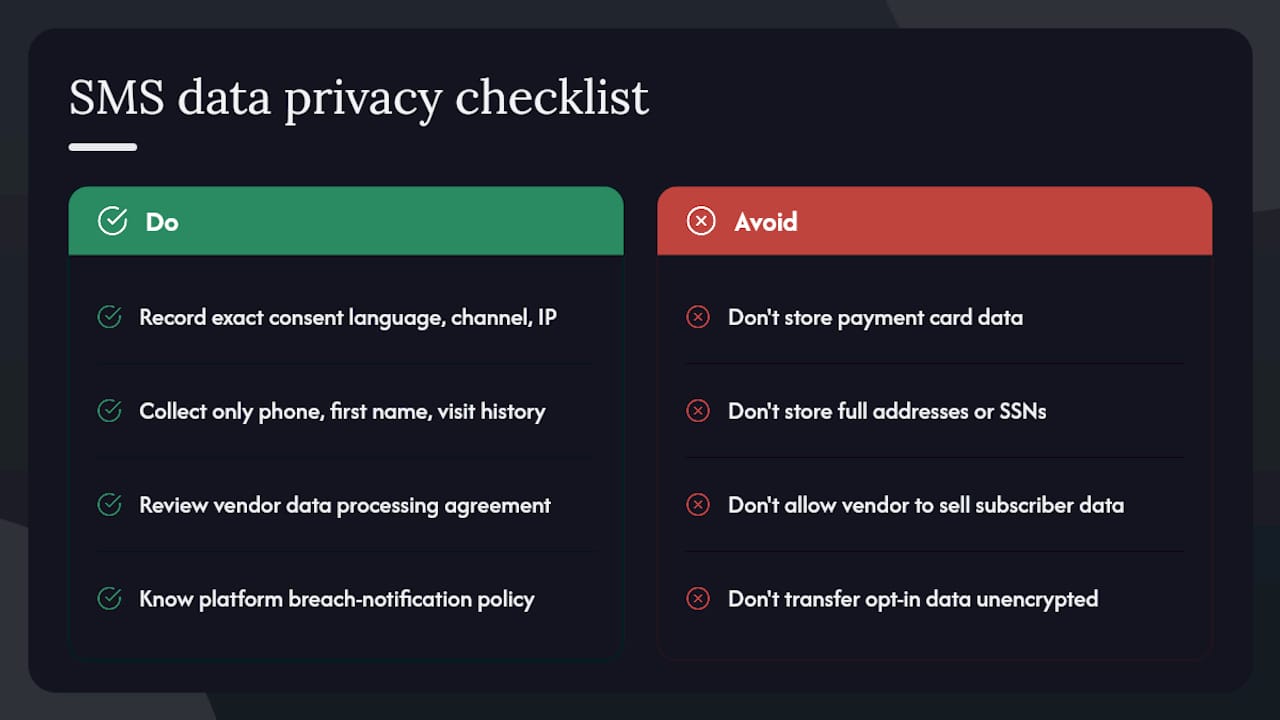
Consent recordkeeping in depth: Store not just the opt-in date and phone number, but the exact consent language the guest saw, the channel through which they opted in (QR code, POS form, web popup), and the IP address or device identifier where available. If a TCPA dispute arises, this record is your primary defense.
Data minimization: Collect only the data your SMS program actually uses. A phone number, first name, and visit history are sufficient for most restaurant campaigns. Storing payment card data, full addresses, or social security numbers alongside SMS opt-in records creates unnecessary liability.
Vendor data agreements: Your SMS platform processes personal data on your behalf. Review its data processing agreement before signing. Confirm it does not sell subscriber data to third parties and that it complies with applicable state privacy laws, including the California Consumer Privacy Act (CCPA) for restaurants with California guests.
State-level privacy laws: CCPA gives California residents the right to know what data you collect, request deletion, and opt out of data sales. Several other states have passed similar laws. If your restaurant serves guests from multiple states, your opt-in form and privacy policy should reflect these rights explicitly.
Breach notification: If your SMS platform or CRM experiences a data breach involving guest phone numbers or personal data, most states require notification within 30–72 hours. Know your platform’s breach notification policy before an incident occurs.
Secure data transfer: Opt-in data moving between your QR menu platform, CRM, and SMS tool should travel over encrypted connections. Ask your platform vendors to confirm TLS encryption on all data transfers.
What the numbers actually taught me about SMS timing
The most instructive campaign I’ve seen run was a Tuesday slow-night flash offer sent at 4:15 PM to a segmented list of guests who had visited on a weekday in the prior 90 days. The message was 142 characters, included a unique code for a complimentary appetizer, and went to 847 opted-in guests. By 7 PM, 94 codes had been redeemed.
What made it work wasn’t the offer itself. It was the segmentation. Sending a Tuesday dinner offer to guests who had never visited on a weekday would have produced a fraction of that result and a higher opt-out rate. The lesson: your list is only as valuable as your ability to slice it by behavior.
The one thing I’d change is the follow-up sequence. There was no second message for the 753 guests who didn’t redeem. Leaving that send on the table is a common mistake in early-stage programs.
Subscriber fatigue is real, but it’s almost always caused by irrelevance, not frequency. Two well-targeted messages a month produce lower opt-out rates than one poorly targeted blast. Segment first, then send.
Mydigimenu brings guest capture and campaigns together in one place
Most restaurant owners end up managing three or four separate tools to run an SMS program: a QR menu, a POS, a CRM, and a broadcast platform. Mydigimenu collapses that stack. Guest profiles captured at the digital menu flow directly into a built-in CRM, loyalty program, and campaign engine, so your welcome flow, loyalty reminders, and segmented broadcasts all run from a single dashboard.

Getting started takes four steps: register your account, enable guest capture at your QR menu or tablet ordering points, configure your welcome automation with a first-visit offer, and activate campaign reporting so every send has a redemption code attached. Mydigimenu’s onboarding support walks you through each step, and the platform’s multi-location management means a group operator can replicate the setup across venues without rebuilding from scratch. Check pricing and plan options to find the tier that fits your size, or use the location check tool to confirm feature availability for your market.
Sources
Recommended
The stylish hoverboards in Subway Surfers not only allow characters to move in style but also offer the chance to continue the run after certain collisions, making the quest for a high score more exciting than ever.