
The Best Digital-Menu.ai Alternatives for Restaurant Managers
- Abhi Bose
- 2 days ago
- 13 min read


For most hospitality managers replacing digital-menu.ai, Mydigimenu is the recommended single-platform alternative — it covers QR menus, tablet ordering, POS integration, loyalty programs, multilingual support, and reservation management in one subscription. If your needs are narrower, the right category depends on whether you prioritize speed of setup, depth of POS integration, or budget.
Digital menus now reach an 85% adoption rate across hospitality venues post-COVID, which means the switching cost of staying on a platform that no longer fits is real. The shortlist below maps the five platform categories worth evaluating:
QR-first builders — fast setup, limited POS depth; best for single-location cafes or pop-ups
POS-integrated platforms (e.g., Toast POS, Square for Restaurants) — deep payment and ordering integration; best for full-service restaurants already invested in a POS ecosystem
Tablet/iPad menu suites — rich visual menus on in-venue hardware; best for upscale dining or hotel F&B
Free/ordering-first services (e.g., GloriaFood) — zero upfront cost, transaction-fee model; best for budget-conscious operators
Digital-signage hybrids (e.g., ScreenCloud) — screen-based display menus; best for QSR or counter-service formats
Quick decision cues:
Best for low-cost QR only: free/ordering-first services
Best for full POS integration: POS-integrated platforms or Mydigimenu
Starting price: ranges from $0 (free tier) to $50+ per month depending on features
Free trial: available on Mydigimenu and several QR-first builders
Table of Contents
How the top digital menu software options compare side by side
The table below covers the six platform categories across the dimensions restaurant managers consistently flag as decision-critical. Aggregators tracking digital menu software options in 2026 confirm that pricing transparency, POS integration, and onboarding speed are the three sharpest differentiators.
Category | Best for | Starting price / free plan | Key features | Ease of setup | Branding flexibility | Integrations | Support |
Mydigimenu | Full-service restaurants, hotels, multi-location groups | Paid tiers; free QR plan available | QR + tablet menus, online ordering, POS sync, loyalty, analytics, multilingual, allergens, reservations | Self-serve in hours; managed onboarding available | Fully customizable layouts, food video support | POS, payment gateways, delivery platforms | Chat, email, account manager |
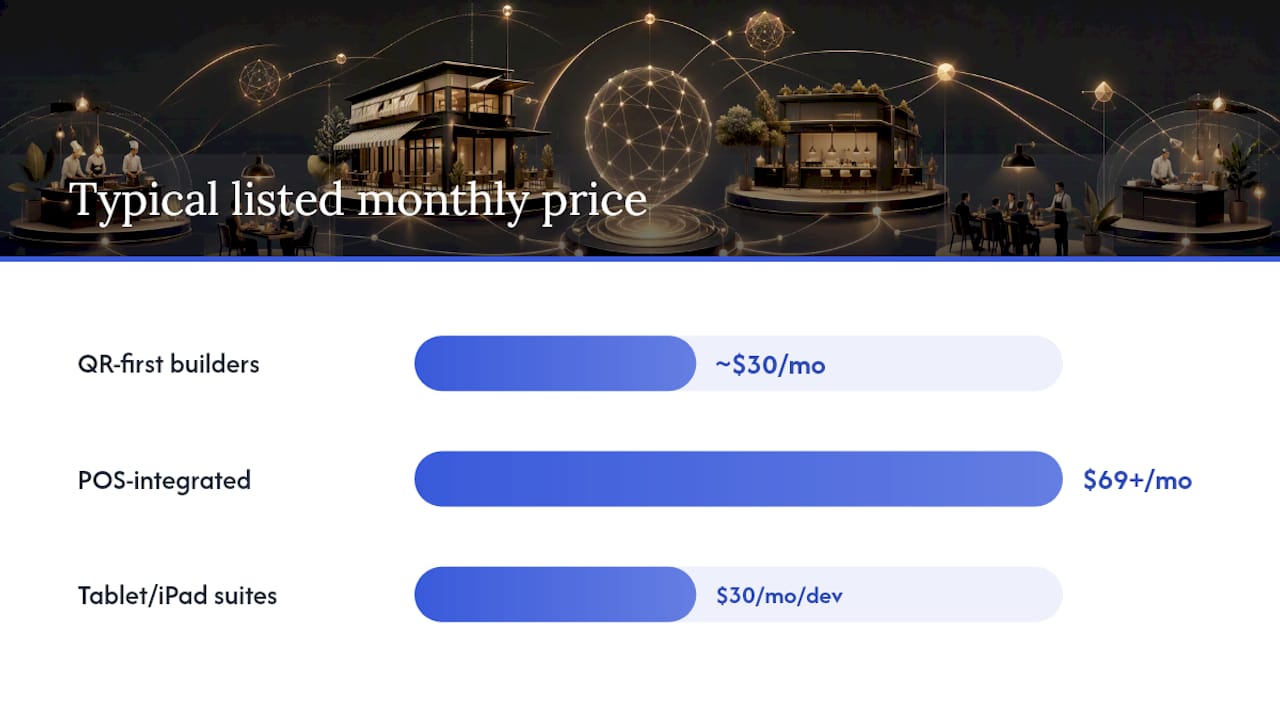
QR-first builders | Single-location cafes, pop-ups | Free tier to ~$30/mo | QR menus, basic analytics, AI translation | Minutes to hours | Template-based | Limited POS | Email only |
POS-integrated platforms | Full-service restaurants with existing POS | $69+/mo (Toast); free plan (Square) | Ordering, payments, POS-native menus, reporting | Hours to days; hardware setup required | Moderate | Native POS, major payment gateways | Phone, chat, in-person |
Tablet/iPad menu suites | Upscale dining, hotel F&B | $30/mo per device | Visual menus, upsell prompts, allergen flags | Hours; device provisioning needed | High (custom design) | POS via API | Email, chat |
Free/ordering-first services | Budget-conscious operators | Free (transaction fees apply) | Online ordering, QR menu, basic CRM | Minutes | Low | Limited | |
Digital-signage hybrids | QSR, counter-service, lobby displays | $20/mo per screen | Screen menus, scheduling, media playlists | Hours | Moderate | Limited POS | Chat, email |
Legend: Features marked as available reflect typical category-level capabilities; individual vendors within a category vary. Setup time estimates assume a single-location deployment with existing menu content in digital format. Multi-location rollouts typically add 2–6 weeks for API-based POS sync and staff training.
What to expect from each alternative category
Mydigimenu (recommended full replacement)
Mydigimenu is built specifically for hospitality — restaurants, cafes, bars, and hotels — and covers every dimension that digital-menu.ai buyers typically need in a replacement. Its QR menu generator works without app downloads, and the same platform supports tablet and iPad menus with high-quality food video and customizable layouts. Online ordering, pay-at-table, POS integration, delivery platform connections, and loyalty programs with digital stamp cards are all included in the subscription tiers. Multilingual support and detailed allergen/nutritional information make it viable for diverse guest bases.
Pros: Single platform for QR, tablet, ordering, loyalty, and reservations; no app download required for guests; multi-language and multi-currency; food video support; CRM and targeted marketing built in.
Cons: Subscription cost is higher than bare-bones QR-only tools; full feature depth requires onboarding time to configure correctly.
Pricing shape: Tiered subscription; free QR plan available; transaction fees apply on gift voucher sales.
QR-first builders
These platforms prioritize getting a scannable menu live in minutes. Most offer a free tier with basic QR code generation, and paid plans unlock custom branding, analytics, and AI-powered translation. Many now include allergen labeling and image enhancement as standard or add-on features, which raises the baseline expectation for mid-market buyers. The trade-off is shallow POS integration: most connect to payment processors but not to kitchen display systems or inventory.
Pros: Extremely fast setup; low or no upfront cost; AI translation increasingly standard.
Cons: Limited POS depth; loyalty and reservation features often absent or extra-cost; template designs can feel generic.
Pricing shape: Free tier common; paid plans typically $10–$30/month per location.
POS-integrated platforms (Toast POS, Square for Restaurants)
Toast POS and Square for Restaurants are not pure digital menu tools — they are full POS ecosystems that include menu management as a component. Toast starts at $69/month and is purpose-built for full-service restaurants, with kitchen display integration, tip management, and robust reporting. Square for Restaurants offers a free plan for basic setups and scales to $69+/month for advanced features. Both require hardware investment and days of setup for a full deployment.
Pros: Deep payment and ordering integration; reliable uptime; strong US support infrastructure; extensive third-party app marketplaces.
Cons: Higher monthly cost; hardware dependency; menu design flexibility is secondary to operational workflow; not a standalone digital menu product.
Tablet/iPad menu suites
Tablet-first menu tools like eMenu AI for iOS offer flexible subscription models, icon libraries, and visual design tools that make in-venue menus genuinely mouthwatering. They shine in upscale dining rooms and hotel restaurants where a physical device on the table replaces a printed menu. Setup involves device provisioning and typically a few hours of menu configuration. POS integration is available via API on most platforms but requires technical setup.
Pros: Rich visual experience; upsell prompts built into the browsing flow; allergen flags easy to surface.
Cons: Hardware cost and management overhead; not ideal for outdoor or high-turnover venues; guest-facing QR ordering is secondary.
Free/ordering-first services (GloriaFood)
GloriaFood offers a genuinely free online ordering system for restaurants, monetizing through optional paid add-ons and a white-label app. It is a strong fit for operators who need online ordering fast and have no budget for a monthly subscription. The menu interface is functional rather than visually rich, and loyalty or reservation features require upgrades or third-party tools.
Pros: Zero monthly cost; quick setup; solid ordering flow.
Cons: Limited branding control; no tablet menu; loyalty and analytics are thin without paid add-ons.
Digital-signage hybrids (ScreenCloud, BentoBox)
ScreenCloud is a digital signage platform that restaurants use to display menus on wall-mounted screens. It is not a guest-facing ordering tool — it is a broadcast display system. BentoBox sits closer to the restaurant website and online ordering space, with strong branding tools and a focus on direct ordering. Neither replaces a full QR or tablet menu platform for table-service environments, but both serve specific counter-service or marketing-focused use cases well.
Pros: ScreenCloud excels at lobby and counter displays; BentoBox offers polished restaurant websites with ordering built in.
Cons: Neither covers the full QR + tablet + loyalty + POS stack; ScreenCloud has no guest-ordering capability; BentoBox pricing is higher for smaller operators.
Pro Tip: When migrating menu data from digital-menu.ai, request a CSV export of your item names, descriptions, prices, and allergen flags before canceling. Map those fields to your new platform’s import template — most QR-first builders and Mydigimenu accept CSV uploads — to avoid manual re-entry and reduce table-disruption during cutover.
MenuTiger
MenuTiger is a QR menu platform with a focus on customization and multi-branch management. It supports online ordering, table-side ordering, and basic analytics. Setup is self-serve and typically takes a few hours. POS integration options are more limited than full POS platforms, but the menu design tools are more flexible than most QR-first builders.
Pros: Good branding flexibility; multi-branch dashboard; ordering and payment support.
Cons: Loyalty and reservation features are limited; POS integration depth varies; support is primarily email-based.
How to choose the right digital menu platform for your restaurant
The decision comes down to three variables: your current POS setup, the guest experience you want to deliver, and your budget for monthly fees versus transaction costs.
Step 1: Define your must-haves
Work through this checklist before any vendor demo:
QR menus — does the platform generate scannable codes that work without a guest app download?
Branding flexibility — can you match your restaurant’s visual identity, or are you locked into templates?
Step 2: Run a 20–30 minute demo audit
Test these specific flows during every vendor demo:
Edit a menu item (price change, photo swap, allergen flag) and confirm it goes live in under two minutes.
Complete a full guest ordering flow on a mobile device, including payment.
Export a sales report to CSV or PDF.
Switch the menu language and confirm allergen labels carry over.
Ask the vendor to show the POS integration live — not a slide, a live sync.
Step 3: Ask vendors these questions directly
What is your uptime SLA, and how do you communicate outages?
Can I export all menu data (items, descriptions, images, allergens) at any time?
What transaction fees apply beyond the monthly subscription?
How long does onboarding take for a single location versus five locations?
Do you have a dedicated onboarding contact or is setup self-serve only?
Red flags: no CSV/data export, no live POS integration demo, transaction fees buried in the contract, support limited to a ticketing system with no stated response time, and pricing that changes significantly at the second location.
Pro Tip: Ask every vendor for a reference from a US restaurant of similar size and service style. A platform that works beautifully for a food truck may struggle with a 200-cover full-service restaurant’s modifier complexity and split-check requirements.
How this comparison was built
This comparison draws on aggregator data from SourceForge and SaaSHub, vendor documentation, and product pages reviewed in 2026. Evaluation criteria weighted features, integration depth, pricing transparency, onboarding time, and support quality — the same dimensions SaaSHub’s 2026 digital menus roundup identifies as primary differentiation points across the category.
US market assumptions: All platforms listed are available to US-based operators. Pricing references are in USD. POS integration notes assume mainstream US POS systems. Implementation timelines reflect single-location US deployments unless noted; multi-location rollouts typically require 2–6 weeks for API-based POS sync. “Best for” labels reflect use-case fit based on feature depth and pricing, not a formal scoring model.
Per-vendor mini-profiles: standout features and trade-offs
Mydigimenu
Mydigimenu’s standout feature is breadth without fragmentation. QR menus, tablet menus, online ordering, POS integration, loyalty, analytics, multilingual support, allergen data, reservation management, and CRM all live in one platform. Food video support and social login for guest profile capture are features most competitors in the QR-first category do not offer at all. The menu design flexibility extends to custom layouts and branding that match a restaurant’s visual identity rather than a generic template.
Toast POS
Toast’s strength is its closed-loop ecosystem: ordering, payments, kitchen display, and reporting are tightly integrated. For restaurants already on Toast, the menu management tools are a natural extension. For restaurants evaluating it as a digital menu tool first, the hardware requirement and higher monthly cost are real friction points.
Square for Restaurants / Square Online
Square’s free plan makes it accessible for operators with tight budgets. The online ordering and QR menu tools are functional and well-designed. The ceiling is lower than Toast for complex full-service environments, but for a single-location casual restaurant, Square covers the basics without a monthly fee.
BentoBox
BentoBox focuses on the restaurant’s digital presence: website, online ordering, and marketing. Its menu tools are tied to the website experience rather than in-venue QR or tablet ordering. A good fit for operators who want a polished public-facing menu and direct ordering, less so for table-side digital menus.
GloriaFood
GloriaFood’s free tier is genuinely useful for online ordering. The guest-facing experience is clean, and setup takes under an hour. The trade-off is limited customization and thin analytics. Operators who outgrow the free tier often find the paid add-ons bring the total cost closer to subscription-based alternatives.
MenuTiger
MenuTiger offers solid QR menu customization and a multi-branch dashboard that appeals to small chains. Ordering and payment support are included, but the POS integration story is thinner than POS-native platforms. A reasonable mid-tier option for operators who want more design control than a basic QR builder but do not need deep POS sync.
ScreenCloud
ScreenCloud is a digital signage platform, not a guest-ordering tool. It excels at displaying menus on screens in lobbies, at counters, and on drive-through boards. For any venue that needs guest-facing ordering, it requires pairing with a separate ordering platform.
Security and compliance considerations
Payment security is non-negotiable for any platform that handles guest transactions. PCI DSS compliance is the baseline standard for platforms processing card payments — verify it explicitly with any vendor, not just assume it from marketing copy. POS-integrated platforms like Toast and Square maintain PCI DSS compliance as a core requirement of their payment processing infrastructure. QR-first builders that redirect to a third-party payment processor may handle compliance differently, so ask whether the platform itself is in scope or whether it passes payment handling entirely to the processor.
Data privacy matters too. Guest profile capture via social login, CRM data, and loyalty program enrollment all generate personal data subject to applicable US state privacy laws (California’s CPRA being the most stringent). Confirm that any platform you evaluate has a clear data processing agreement, supports data deletion requests, and stores guest data on servers with documented security practices.
Integration capabilities with other restaurant management systems
The depth of a platform’s integration story often determines its real total cost of ownership. A platform with a native POS integration eliminates manual reconciliation; one that requires a middleware layer adds both cost and a potential failure point. Multi-location rollouts typically require API-based POS sync and a dedicated onboarding timeline of 2–6 weeks, which materially affects how quickly you can go live.
Mydigimenu integrates with third-party POS systems, major payment gateways, and delivery platforms. POS-integrated platforms like Toast and Square are native to their own ecosystems and offer extensive app marketplaces for additional connections. QR-first builders and free/ordering-first services typically offer lighter integration options, often limited to payment processor connections and basic webhook support.
For operators running multiple systems — POS, reservation management, loyalty, and delivery — a platform that connects all of them through a single API layer is worth the higher subscription cost. The alternative is managing data across disconnected tools, which creates reconciliation work and gaps in guest analytics. Exploring how digital menu platforms connect to broader restaurant tech stacks can help clarify which integration architecture fits your operation.
Scalability and customization options
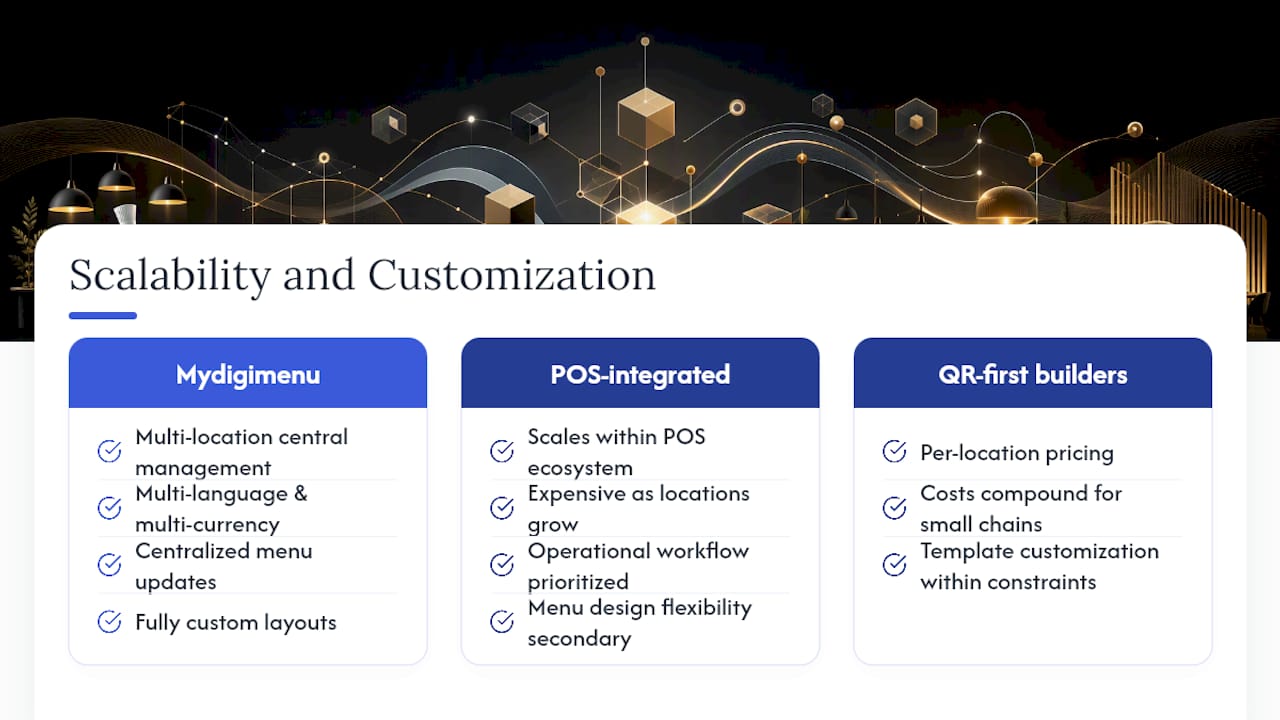
A platform that works for one location should not require a full re-implementation at five. Scalability shows up in two places: pricing architecture (per-location fees versus flat enterprise tiers) and technical architecture (whether menu updates push to all locations simultaneously or require manual replication).
Mydigimenu supports multi-location deployments with centralized menu management and multi-language, multi-currency configurations — useful for hotel groups or restaurant chains serving international guests. POS-integrated platforms scale well within their own ecosystems but can become expensive as location count grows. QR-first builders often have per-location pricing that compounds quickly for small chains.
Customization depth varies just as sharply. Mydigimenu allows fully custom menu layouts, food video integration, and branded guest experiences. Most QR-first builders offer template customization within defined constraints. POS-integrated platforms prioritize operational workflow over visual branding, so menu design flexibility is typically secondary. For operators where the menu is a brand expression — not just a list of items — that distinction matters when choosing a platform.
Online ordering trends continue to push restaurants toward platforms that can handle both in-venue and off-premise ordering from a single menu management interface, which further raises the bar for scalability expectations.
Key Takeaways
Mydigimenu is the strongest single-platform replacement for digital-menu.ai for full-service restaurants and hotels, covering QR menus, tablet ordering, POS integration, loyalty, and multilingual support in one subscription.
Point | Details |
Start with your POS situation | If you have an existing POS, confirm native integration before committing to any platform. |
85% adoption benchmark | Digital menus have reached 85% adoption in hospitality — staying on a weak platform has a real cost. |
Free plans exist but have ceilings | Free tiers cover basic QR menus; loyalty, analytics, and POS integration typically require a paid plan. |
Multi-location adds 2–6 weeks | API-based POS sync for multi-location rollouts requires dedicated onboarding time and budget. |
Mydigimenu covers the full stack | QR menus, tablet menus, ordering, loyalty, multilingual support, and reservations in one platform. |
Why Mydigimenu stands out as a full replacement
The case for Mydigimenu as the recommended replacement for digital-menu.ai is not about marketing claims — it is about feature coverage. Most alternatives in the QR-first or free/ordering-first categories require operators to stitch together separate tools for loyalty, reservations, multilingual menus, and analytics. Mydigimenu covers all of those in a single subscription, which means fewer vendor relationships, fewer integration failure points, and a more consistent guest experience.
What often gets underestimated in platform comparisons is the cost of partial solutions. A free QR builder plus a separate loyalty app plus a reservation tool plus a POS integration layer can easily exceed the cost of a full-service platform — and the operational overhead of managing four vendor relationships is real. The operators who get the most from a digital menu replacement are the ones who treat it as a guest engagement platform, not just a menu display tool.
Transparency note: This article is published by Mydigimenu. The platform is recommended based on feature coverage and fit for the audience described, and the comparison categories above are evaluated on neutral criteria.
Mydigimenu is the full-stack replacement your restaurant needs
Switching from digital-menu.ai does not have to mean choosing between a beautiful menu and a functional one. Mydigimenu gives you QR menus that guests scan without downloading an app, tablet and iPad menus with food video and custom branding, online ordering with POS integration, loyalty programs, and multilingual support — all from one platform built specifically for hospitality.

The pricing is transparent, the onboarding is supported, and the feature set covers everything from a single-location cafe to a multi-property hotel group. Check your location eligibility and explore the full tablet and digital menu platform to see which plan fits your operation. A free QR plan is available to get started today.
Useful sources and further reading
The sources below were used to build this comparison and are worth bookmarking for ongoing vendor research.
Source | What it covers |
Broad aggregator list of digital menu platforms with user ratings and feature comparisons | |
Category-level feature expectations and common competitor profiles | |
Roundup of QR, tablet, and POS-integrated solutions with market context | |
Feature benchmarks for QR-first builders including AI translation and allergen tools | |
Tablet/iPad menu suite capabilities and flexible subscription model details | |
85% adoption statistic and strategic context for digital menu decisions | |
Third-party perspective on digital menu platform comparisons for restaurants | |
Implementation guidance and migration best practices for restaurant operators |
Recommended
Comments