
Best meniuapp.com Alternatives for Restaurants in 2026

TL;DR:
Mydigimenu is a comprehensive, app-free QR and tablet menu platform with built-in loyalty and POS integration. It is ideal for venues seeking quick deployment, flexible contracts, and rich features without per-order commissions. Choosing the right platform depends on your venue’s specific needs, integration capabilities, and cost considerations.
For hospitality owners who want app-free QR menus, real POS integration, and loyalty tools in one place, Mydigimenu is the recommended pick among all meniuapp.com alternatives. It covers the full operational stack: QR scan-to-order without app downloads, tablet and iPad menus, CRM-linked loyalty programs, multilingual and multi-currency support, and pay-at-table payments.
The broader market breaks into four useful categories. QR-first, app-free platforms (Mydigimenu’s home territory) prioritize frictionless guest access and fast deployment. POS-first all-in-one platforms like Square for Restaurants and Toast bundle hardware, payments, and menu management but carry higher upfront costs and longer contracts. Commission-based marketplace hybrids such as ChowNow and GloriaFood trade a lower monthly fee for a percentage of every order. Tablet-first hospitality suites like UpMenu and BentoBox target multi-location operators who need centralized menu control and branded online ordering. Buyer intent research consistently shows that operators narrow the field by pricing model and ordering mode first, not by brand name, so knowing which category fits your venue cuts the decision time significantly.
Table of Contents
How do these platforms compare side by side?
Prices and integration lists change frequently. Verify live figures on each vendor’s pricing page before signing. The table below maps the eight most-evaluated categories and platforms across the key decision dimensions.
Dimension | Mydigimenu | QR-first / app-free (generic) | POS-first all-in-one (Square for Restaurants) | POS-first all-in-one (Toast) | Commission hybrid (GloriaFood) | Commission hybrid (ChowNow) | Tablet-first suite (UpMenu) | Tablet-first suite (BentoBox) |
Ideal venue type | Restaurants, cafes, bars, hotels | Single-site cafes, food trucks | Quick-service, counter-service | Full-service, multi-location | Independent restaurants | Independent to mid-size | Multi-location, branded chains | Upscale, independent restaurants |
Pricing model | Subscription tiers; free QR plan available | Free to low-cost subscription | Free plan + paid tiers; hardware fees | Subscription + hardware; no free plan | Free plan; paid upgrades | Monthly subscription + commission | Subscription tiers | Subscription; no free plan |
Ordering modes | QR/no-app, tablet, in-room web, mobile | QR/no-app | Tablet, counter, online | Tablet, kiosk, online | QR, online ordering | Online ordering, QR | QR, online ordering, kiosk | Online ordering, QR |
POS & delivery integrations | Third-party POS and delivery platforms | Limited | Native Square POS; limited third-party | Native Toast POS; 200+ integrations | Limited POS; delivery via partners | Limited POS; delivery via partners | Multiple POS options | Limited; native-first |
Loyalty / marketing / CRM | Loyalty stamps, CRM, targeted campaigns, gift vouchers | Basic or none | Basic loyalty via Square | Built-in loyalty; email marketing | Basic promotions | Marketing tools; no loyalty stamps | Loyalty, email marketing | Email marketing; no loyalty stamps |
Hardware / setup time | Minimal; tablet optional; days to launch | Minimal; hours to days | Square hardware required; days | Toast hardware required; weeks | No hardware; hours | No hardware; hours | No hardware; days | No hardware; days |
Contract & cancellation | Flexible; monthly options available | Monthly, cancel anytime | Month-to-month available | Annual contracts common | Free plan; paid month-to-month | Annual contracts common | Monthly available | Annual contracts common |
US availability & payment gateways | Available in US; multiple payment gateways including crypto | Varies by provider | US-native; Square Payments | US-native; Toast Payments | US available; Stripe | US available; multiple gateways | US available; Stripe | US available; Stripe |
Detailed profiles of the top platform categories
Mydigimenu — recommended pick
At a glance: The most complete app-free QR and tablet menu platform for restaurants, cafes, bars, and hotels that want contactless ordering without sacrificing loyalty or CRM depth.
Core features:
QR code menus with no app download required for guests
Tablet and iPad menu deployments with hardware guidance included
Pay-at-table and multiple payment options, including cryptocurrency
Loyalty programs with digital stamp cards and targeted marketing campaigns
CRM integration with guest profile capture via social login
Multilingual and multi-currency support for international venues
Reservation management, nutritional information, and guest feedback tools
Integration with third-party POS systems and delivery platforms
Pros: Broadest feature set in the QR-first category; no app download friction for guests; loyalty and CRM built in; fast setup measured in days, not weeks.
Cons: Smaller brand recognition than POS-first giants; hardware-heavy venues may still need a separate POS investment.
Pricing: Free QR menu plan available; paid subscription tiers unlock ordering, loyalty, and CRM features. See US pricing details.
Who it’s for: Any venue that wants to launch contactless ordering quickly, capture guest data, and run loyalty campaigns without paying per-order commissions.
Integration notes: Connects to third-party POS and delivery platforms; verify specific POS read/write permissions during your demo.
POS-first all-in-one platforms (Square for Restaurants, Toast)
At a glance: Full-stack restaurant operating systems that bundle hardware, payments, and menu management into one ecosystem.
Core features:
Native POS with deep inventory and order routing
Online ordering and kiosk modes
Built-in reporting and labor management
Toast offers 200+ third-party integrations; Square’s ecosystem is more closed
Pros: Single vendor for hardware, payments, and menu; strong US support infrastructure.
Cons: Hardware lock-in; Toast typically requires annual contracts and proprietary terminals; per-transaction fees add up at volume; limited QR/no-app guest experience compared to dedicated platforms.
Pricing: Square offers a free plan with paid tiers; Toast requires a subscription plus hardware purchase with no free plan.
Who it’s for: Counter-service or full-service restaurants that want one system to run the entire operation and are comfortable with the hardware investment.
Integration notes: Toast’s 200+ integrations cover most major delivery and loyalty tools; Square’s third-party POS compatibility is limited outside its own ecosystem.
Commission-based marketplace hybrids (GloriaFood, ChowNow)
At a glance: Low-barrier entry platforms that monetize through order commissions or marketing fees rather than high monthly subscriptions.
Core features:
Online ordering embedded on your website or via a branded app
QR menu options on higher tiers
Basic promotional tools
Pros: Low or zero monthly fee to start; fast setup; good for venues testing online ordering for the first time.
Cons: Commission fees erode margins as order volume grows; limited loyalty and CRM depth; guest data often stays with the platform, not the venue.
Pricing: GloriaFood offers a free plan with paid upgrades; ChowNow charges a monthly subscription plus a commission on orders.
Who it’s for: Independent restaurants with modest order volume that want to test online ordering before committing to a full subscription platform.
Integration notes: POS integrations are limited on both; delivery is handled via partner networks rather than direct API connections.
Tablet-first hospitality suites (UpMenu, BentoBox)
At a glance: Branded online ordering and menu management platforms built for operators who prioritize a polished guest-facing website and centralized menu control.
Core features:
Branded online ordering and website builder
QR menu options
Loyalty and email marketing (UpMenu); email marketing focus (BentoBox)
Multi-location menu management
Pros: Strong brand presentation; UpMenu’s loyalty tools rival dedicated CRM platforms; BentoBox excels at upscale restaurant branding.
Cons: Annual contracts are common; less depth on in-venue contactless ordering compared to QR-first platforms; hardware requirements vary.
Pricing: Both operate on subscription tiers with no free plan; annual commitments often required for the best rates.
Who it’s for: UpMenu suits growing chains that need centralized menu control; BentoBox fits independent upscale restaurants focused on brand experience and direct online orders.
Integration notes: Both connect to Stripe for payments; POS integration depth varies and should be verified directly with each vendor.
What are the real operational tradeoffs between these platforms?
The single most important tradeoff is cost control versus reach. Commission-based platforms feel free at launch but become expensive at scale. A venue processing $30,000 in monthly online orders at a 5% commission pays $1,500 per month to the platform, often more than a premium subscription tier would cost, and without owning the guest relationship.
Staff workflow and inventory sync
POS-first platforms win on native inventory sync because the menu and the POS share one database. When a kitchen runs out of a dish, the change propagates instantly. QR-first and commission platforms that connect via third-party API need read/write POS permissions to replicate this, and not every integration supports it. Confirming write-access during a demo is the single most operationally important question a buyer can ask.
“The shift to contactless dining is not just about removing physical menus. It is about creating a faster, more personalized guest journey that generates data venues can act on.” Mydigimenu, Contactless Dining Guide
Two venue scenarios
Single-site cafe, tight budget: A 40-seat neighborhood cafe needs QR menus live within a week and cannot absorb per-order commissions. A QR-first platform with a free or low-cost subscription tier fits perfectly. The cafe keeps 100% of order revenue, guests scan and order without downloading anything, and the owner updates the menu from a phone.
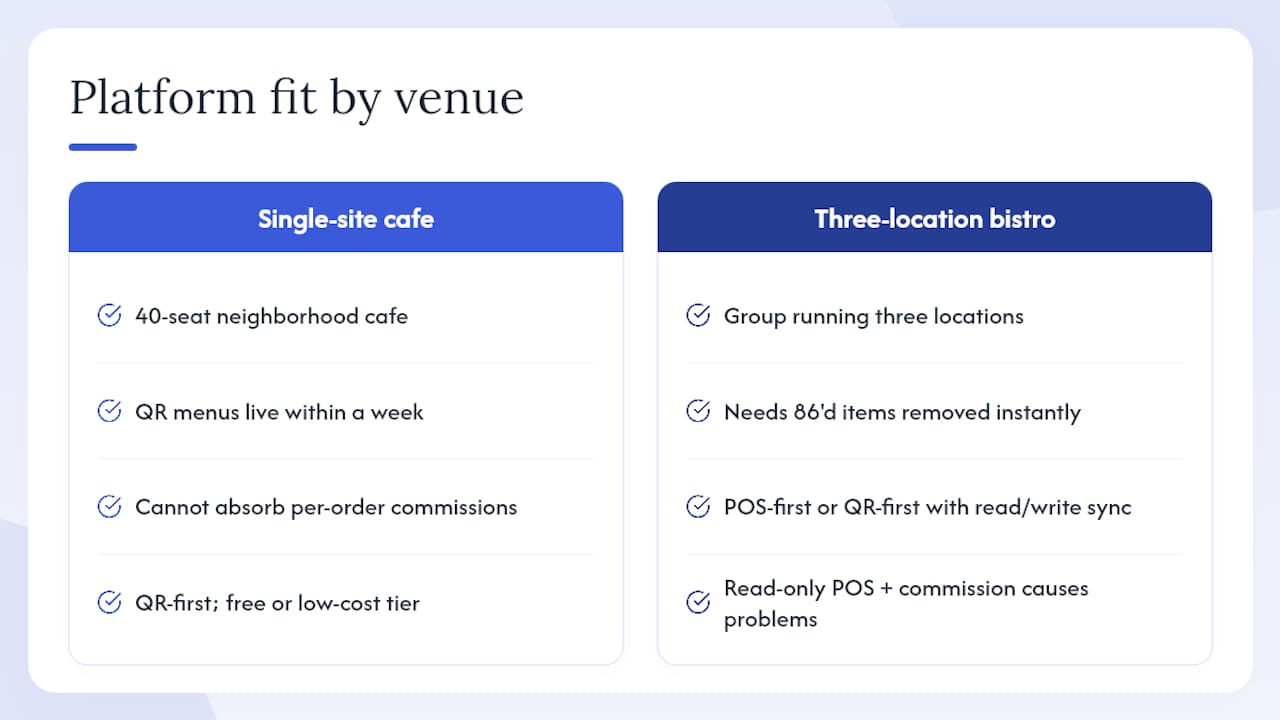
Three-location bistro, real-time inventory: A bistro group running three locations needs 86’d items to disappear from every menu the moment the kitchen calls it. Here, a POS-first platform or a QR-first platform with confirmed read/write POS sync is the only viable option. A commission hybrid with read-only POS access creates the exact scenario operators dread: guests ordering items that no longer exist.
Integrating digital reservations into the same platform stack compounds the value of getting POS sync right, since reservation data, table status, and menu availability all feed the same guest experience.
Switching to cloud-based menus can boost guest engagement by 15% — a figure Mydigimenu attributes to faster menu updates, richer food photography, and reduced friction at the ordering stage.
How do you choose the right platform for your venue?
Step 1: Define your venue’s non-negotiables. List the three things that would make a platform unusable: no POS sync, no loyalty program, no multilingual support. Filter every option against that list before booking a demo.
Step 2: Test integrations and demos with real scenarios. Ask each vendor to walk through a live 86 of a menu item and show how it propagates. Request a sandbox environment. Vendors that cannot demonstrate this in a demo rarely handle it better in production.
Step 3: Pilot and measure. Run a 30-day pilot on one section of your menu or one location. Track average order value, order completion rate, and staff time spent on menu updates before and after.
Questions to ask every vendor
Does your POS integration support read/write access, or is it read-only?
How long does onboarding take, and what is your documented SLA for go-live?
What is your support response time during peak service hours?
Can I export all guest data and order history if I cancel?
Who holds PCI scope for payment card data — your platform or my processor?
What are the exact cancellation terms, and is there an early-termination fee?
Which delivery platforms do you integrate with natively versus via a third-party connector?
Red flags to watch for
No published PCI compliance documentation
Vague answers about POS integration depth (“it connects” without specifying read/write)
Fees that only appear in the contract, not on the pricing page
Mandatory 12-month or 24-month contracts with no pilot option
No documented onboarding checklist or sandbox environment
Typical setup timeline and first-year cost
Item | Typical range |
QR-first platform setup | 1–5 days |
POS-first all-in-one setup | 2–6 weeks |
Commission hybrid setup | 1–3 days |
Pro Tip: During your demo, ask the vendor to 86 a specific item and show you exactly how long it takes to disappear from the guest-facing QR menu. If they cannot demonstrate this quickly with a live POS connection, the integration is not production-ready.
Why do QR and rich-media menus increase conversions?
QR/no-app menus with rich media reduce the two biggest friction points in the ordering journey: the wait for a server and the uncertainty about what a dish actually looks like. The result is measurable at the order level.
Guests who scan and order directly skip the attention bottleneck of flagging down a server, which reduces perceived wait time and increases order frequency.
High-quality food photography and video on a digital menu give guests the confidence to order premium items they might otherwise skip, directly lifting average order value.
Menu updates that take seconds rather than hours mean specials and upsell items are always current, removing the “sorry, we’re out of that” moment that erodes trust.
Cloud-based menus allow operators to A/B test item placement and pricing without reprinting costs, a capability paper menus cannot match.
Loyalty stamp cards embedded in the ordering flow capture repeat-visit data at the moment of highest engagement, when the guest has just had a positive experience.
A mid-size restaurant that added QR ordering with food video to its dinner menu reported that guests spent more time browsing the visual menu than they had with paper menus, and the kitchen saw fewer order errors because guests could see exactly what they were selecting. The venue also captured guest email addresses through social login at a rate that made its previous paper comment-card system look quaint by comparison.
“A dash of digital can turn everyday service into extraordinary memories — and the data to recreate them every visit.” Mydigimenu, contactless dining resources
Key Takeaways
Mydigimenu is the strongest all-around pick among meniuapp.com alternatives for venues that want app-free QR ordering, built-in loyalty, and POS integration without per-order commissions.
Point | Details |
Category first, brand second | Filter by pricing model and ordering mode before evaluating specific platforms. |
Commission costs compound | A 5% commission on $30,000 monthly orders costs more than most premium subscriptions. |
POS read/write is critical | Confirm write-access during the demo; read-only sync cannot 86 items in real time. |
Red flags to reject | Walk away from any vendor with no PCI documentation, opaque fees, or no sandbox demo. |
Mydigimenu recommended | QR/no-app ordering, tablet menus, loyalty, CRM, and multilingual support in one platform. |
Why Mydigimenu stands out in a crowded market
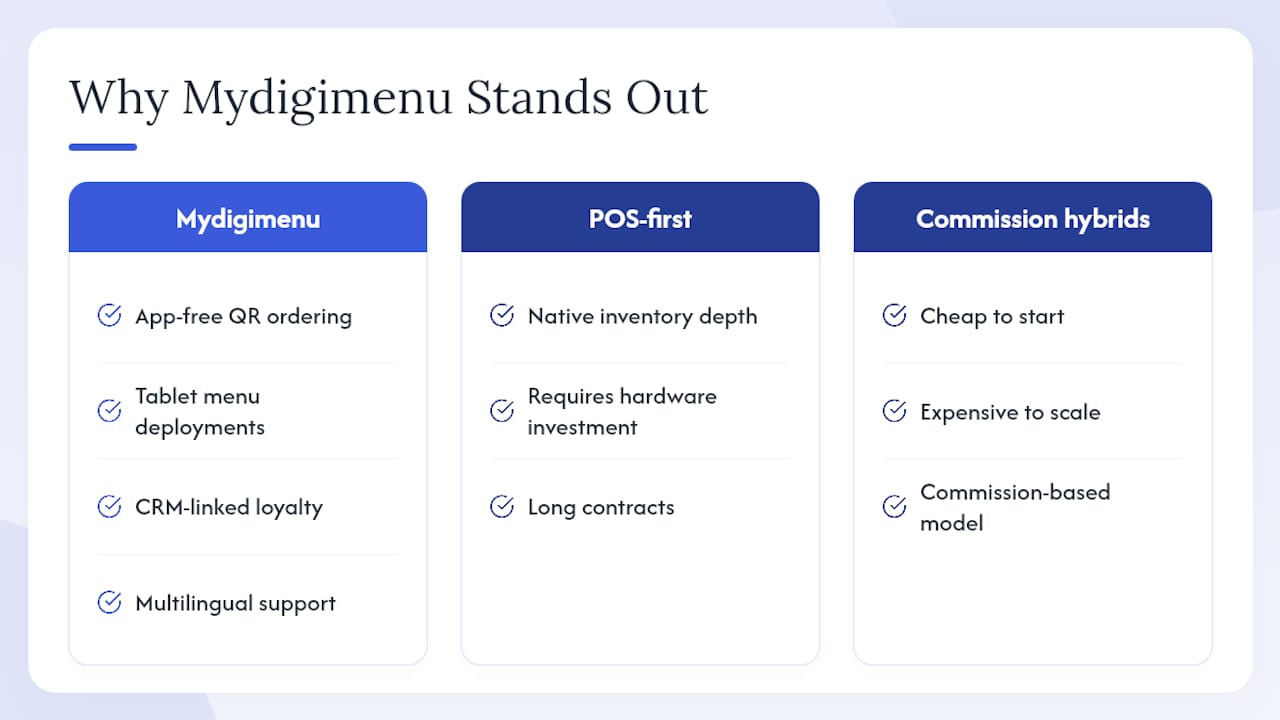
After evaluating the full range of digital menu and ordering platforms, the recommendation for most independent restaurants, cafes, bars, and hotels is Mydigimenu. The reasoning is straightforward: it is the only platform in this comparison that combines app-free QR ordering, tablet menu deployments, CRM-linked loyalty, multilingual support, and pay-at-table payments without charging per-order commissions. POS-first platforms win on native inventory depth but demand hardware investment and long contracts. Commission hybrids are cheap to start and expensive to scale. Mydigimenu sits in the practical middle: fast to deploy, flexible on contract terms, and rich enough in features to grow with a venue.
Disclosure: This article is published by Mydigimenu. The publisher has a direct commercial interest in recommending its own platform. The comparisons above are based on publicly available product information and are intended to help buyers make an informed decision.
Mydigimenu: the practical next step for your venue
Venues that have spent time comparing meniuapp.com similar sites often find that the gap between a QR-first platform and a full hospitality suite is smaller than it looks, once you account for commission fees and hardware costs on the other side.

Mydigimenu gives you QR menus with no app download, tablet and iPad menu options with hardware guidance, POS and delivery integrations, loyalty stamp cards, CRM-linked marketing campaigns, digital gift vouchers, multilingual and multi-currency support, and pay-at-table payments. Setup takes days, not weeks, and flexible monthly plans mean you are not locked into a 12-month commitment before you know whether the platform fits your operation.
Check the US pricing and plan details to see which tier matches your venue size, or book a live demo to walk through a real 86 scenario and see the POS sync in action.
Useful official pages and what to verify on each
Mydigimenu QR menu generator — confirm ordering modes, no-app guest flow, and QR code configuration options.
Mydigimenu tablet and iPad menu page — check hardware compatibility, supported devices, and deployment guidance.
Mydigimenu US pricing page — verify current plan tiers, free plan availability, and transaction fee structure.
Mydigimenu contactless dining guide — review POS sync documentation and onboarding steps before your demo.
Mydigimenu alternatives comparison blog — see how the platform positions against other digital menu categories.
Wild Foodz: digital reservations explained — useful context on how reservation workflows connect to digital menu and ordering decisions.
Before signing any contract, verify live POS partner lists, PCI/payment gateway documentation, and current integration depth directly with the vendor. Pricing pages update frequently; the figures you see today may differ from what appears in a contract drafted next month.
Recommended
I like how the menu system focuses on making the customer journey simpler, from scanning a QR code to paying at the table, while still giving restaurants useful tools behind the scenes. Crossy Road is a casual arcade game with a similarly simple starting point: tap and move through traffic without dealing with complicated setup. That focus on easy access makes the connection feel natural.