
What Is Table Ordering Technology for Restaurants?
- Abhi Bose
- 4 days ago
- 9 min read


TL;DR:
Table ordering technology integrates digital interfaces, POS systems, and kitchen displays to enhance order accuracy and efficiency. The system type chosen—QR code, tablet, or handheld—depends on service style, guest demographics, and budget. Success relies on seamless back-end integration and thorough staff training to optimize operational benefits.
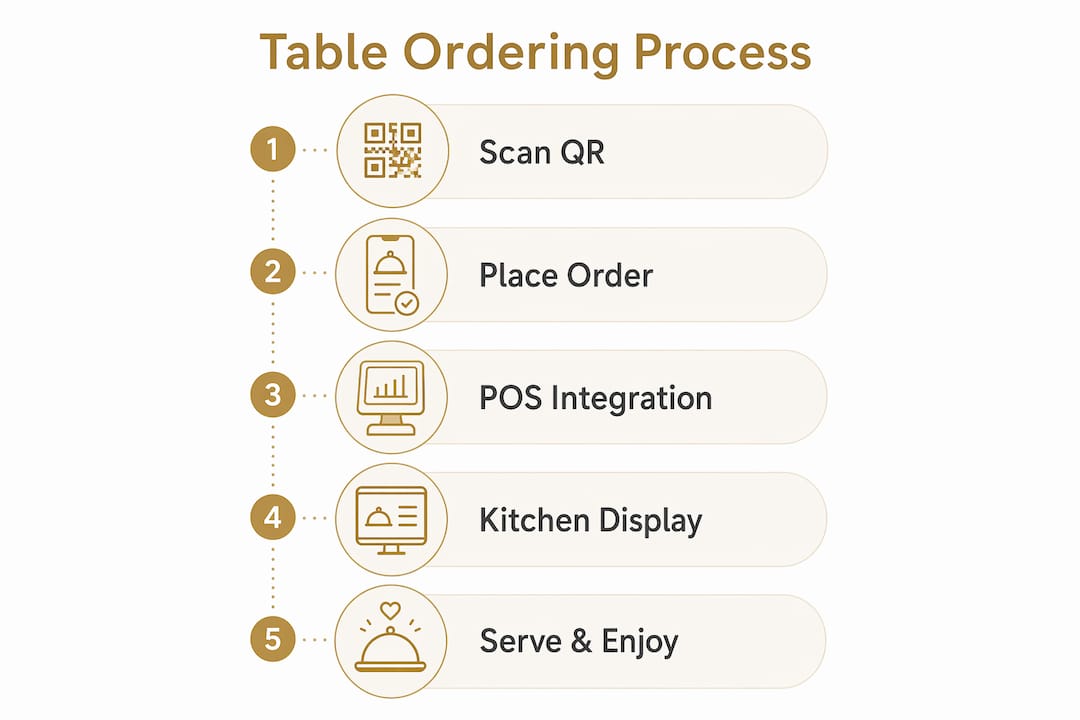
Table ordering technology is defined as an integrated digital system that enables guests or servers to place food and beverage orders directly from the table, routing those orders in real time to a point-of-sale system and kitchen display. The industry term for this category is tableside ordering technology, and it encompasses three core components: a front-end ordering interface, a POS integration layer, and a kitchen display system (KDS). Platforms like Toast, Square for Restaurants, and Mydigimenu each deliver this workflow through different form factors, including QR codes, table-mounted tablets, and server handheld devices. When all three components connect without gaps, orders placed at the table reach the kitchen in seconds, reducing verbal transcription errors and accelerating table turnover.
What is table ordering technology and how does it work?
Tableside ordering technology works as an end-to-end order pipeline that begins the moment a guest or server interacts with a digital interface at the table. The front-end interface captures the order, the POS integration layer translates it into the restaurant’s central system, and the KDS displays it at the correct kitchen station. Understanding each layer separately is the fastest way to diagnose where a system succeeds or fails.
The front-end interface
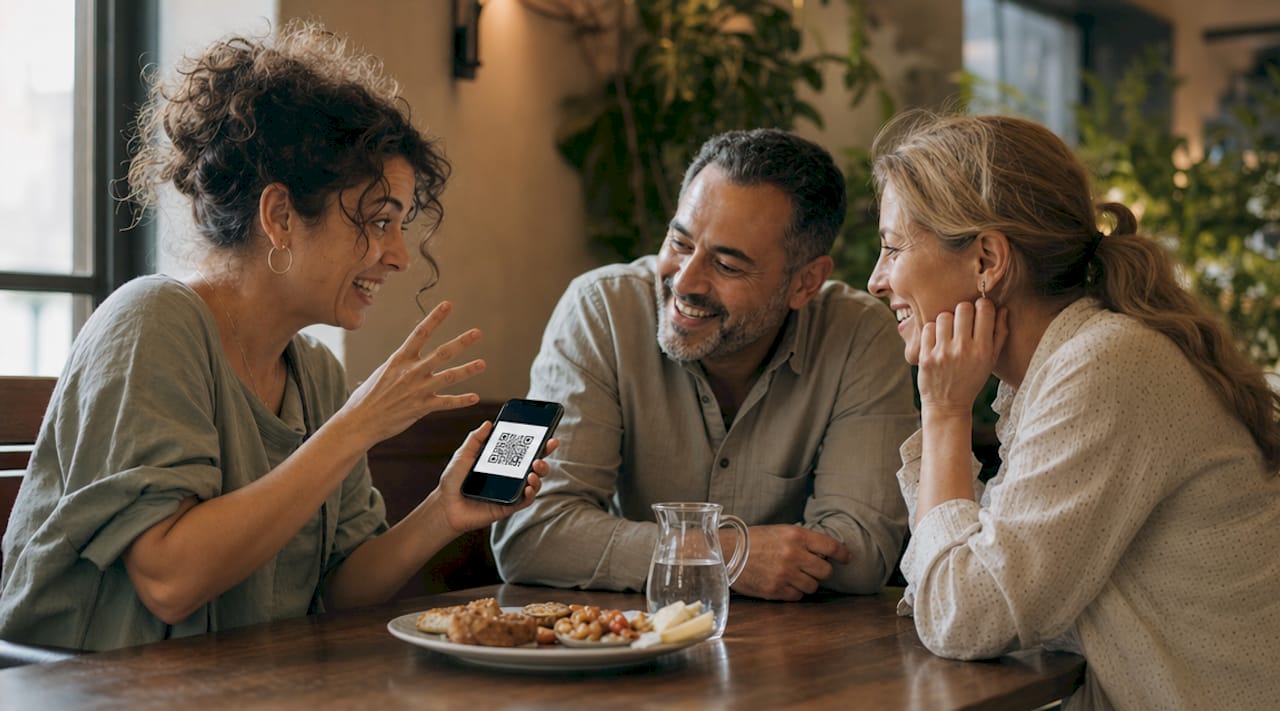
The front-end is what guests and servers actually touch. Options include QR code menus accessed through a smartphone browser, dedicated table-mounted tablets running a proprietary app, and handheld POS devices carried by servers. QR code ordering lets guests scan, browse, and submit orders from their own phones without downloading an app or creating an account. Table tablets offer a fixed, always-on interface that can display high-resolution food photography and upsell prompts. Server handhelds, like those running Toast’s mobile POS, keep staff in control of order entry while eliminating the walk back to a stationary terminal.
The POS integration layer
Once an order is submitted, the POS integration layer is the translator. It maps every item, modifier, and special instruction from the front-end interface into the restaurant’s central POS database. This step determines whether a gluten-free substitution actually appears on the kitchen ticket or disappears in transit. Weak integration at this layer is the single most common cause of tableside ordering failures, because the guest experience looks flawless while the back of house receives incomplete data.
The kitchen display system
Kitchen display systems replace paper tickets with dynamic screens that route orders by station, track preparation time, and flag modifications in real time. A multi-course dinner at a full-service restaurant, for example, requires the KDS to sequence appetizers, mains, and desserts across separate stations without a server manually coordinating timing. Restaurants increasingly adopt multi-station KDS setups to coordinate this kind of structured preparation, which would be nearly impossible to manage accurately with paper tickets during a full house.
Pro Tip: Before selecting any table ordering system, map your kitchen station layout first. A KDS that cannot route items to your specific stations will create more confusion than the paper tickets it replaces.
Order stage | What happens |
Guest or server input | Order entered via QR code, tablet, or handheld device |
POS transmission | Order mapped to POS database with modifiers and table number |
KDS routing | Items sent to correct kitchen stations in real time |
Preparation tracking | KDS flags timing and alerts staff to delays |
Payment processing | Check generated automatically from POS order record |
How do different table ordering system types compare?
Not every table ordering system fits every restaurant concept. The right choice depends on your service model, guest demographics, and how much hardware investment you can absorb. Three system types dominate the market today, and each makes a different trade-off between guest autonomy and staff involvement.
QR code browser-based ordering
QR code systems are the lightest infrastructure option. Guests scan a code printed on a table card or coaster, and the menu opens in their smartphone browser. Orders route instantly to the kitchen or department dashboards without staff relay, and no app download or account creation is required. This model gained significant traction during 2020 and 2021 as a contactless alternative, and it has since become a permanent fixture in casual dining, cafes, and hotel F&B outlets. The limitation is that QR ordering depends entirely on the guest’s phone battery and cellular signal, and some demographics, particularly older diners, find the experience less intuitive than speaking with a server.
Table-mounted tablet systems
Tablet systems install a dedicated device at each table, running a full-featured ordering app. They support rich media, including food videos, allergen filters, and real-time availability updates, without relying on the guest’s own device. The trade-off is hardware cost and maintenance. A 50-table restaurant deploying tablets at every seat faces significant upfront investment plus ongoing device management. Tablet systems work best in high-volume casual dining and quick-service environments where speed and upselling are priorities.
Server handheld POS devices
Handheld devices keep the server in the ordering loop while eliminating the trip back to a fixed terminal. Operators using handheld POS systems like Toast report reduced table turn times compared to traditional pen-and-paper methods, because orders transmit the moment they are entered. This model preserves the human hospitality element that many full-service restaurants consider non-negotiable. The downside is that it does not reduce labor costs the way guest-facing systems can, since servers still take every order.
System type | Hardware cost | Guest autonomy | Best use case |
QR code ordering | Low | High | Cafes, casual dining, hotels |
Table-mounted tablets | High | High | Fast casual, high-volume dining |
Server handhelds | Medium | Low | Full-service, fine dining |
QR code systems require zero hardware at the table but depend on guest device compatibility.
Tablet systems deliver the richest media experience and the highest upsell potential.
Server handhelds preserve hospitality quality while accelerating order transmission speed.
What are the real benefits of table ordering technology?
The benefits of table ordering extend well beyond the obvious convenience factor. When the system is properly integrated, it transforms how a restaurant collects data, manages labor, and builds guest loyalty. The gains are operational and experiential at the same time.
Tableside ordering improves order accuracy by allowing customers or staff to specify modifiers directly in the system, eliminating errors that arise from verbal transcription. Fewer errors mean less food waste, fewer comped dishes, and higher guest satisfaction scores. That accuracy improvement compounds over hundreds of covers per week into measurable cost savings.
Labor efficiency is another concrete gain. When guests order independently through a QR code or tablet, servers shift from order-takers to experience managers. They spend more time on wine recommendations, table checks, and upselling rather than ferrying orders to a POS terminal. This reallocation does not necessarily reduce headcount, but it raises the quality of every guest interaction.
Integrated table ordering technology also enables detailed data collection on ordering patterns, popular modifiers, and peak timing. That data empowers menu engineers to remove underperforming items, promote high-margin dishes, and time promotions to match real demand. A restaurant that previously guessed which appetizer to feature on a Tuesday night can now confirm it with order frequency data from the past 12 weeks.
Pro Tip: Use your table ordering system’s modifier data to identify your most-requested customizations. If guests consistently ask to add avocado to a dish, consider making it a standard menu option with a price adjustment. This turns a friction point into a revenue line.
The digital table ordering experience also gives guests a sense of control that translates directly into satisfaction. Diners who can browse at their own pace, filter by dietary preference, and submit orders without waiting for a server report higher satisfaction, particularly in casual and fast-casual settings where speed is a core expectation.
What challenges come with adopting a table ordering system?
Adopting tableside ordering technology is not simply a hardware purchase. It is an operational redesign, and restaurants that treat it as anything less tend to encounter the same set of avoidable problems.
Incomplete POS to KDS integration. Incomplete integration breaks workflow, causing delays and errors that frustrate both kitchen staff and guests. Before going live, test every modifier, split-bill scenario, and item 86 to confirm the data flows correctly end to end.
Insufficient server training. Servers who feel threatened by guest-facing ordering technology tend to underuse or actively discourage it. Frame the technology as a tool that frees them for higher-value interactions, and train them to guide guests through the interface during the first few visits.
Guest accessibility gaps. Not every guest is comfortable ordering from a screen. Restaurants should always maintain a verbal ordering option and ensure QR code menus meet basic accessibility standards, including adequate font size and contrast ratios.
Back-of-house routing failures. KDS and printer setups that do not reliably route items to the correct station create kitchen confusion even when the front-end experience is flawless. System bottlenecks most often reside at back-of-house order visibility, not at the guest interface.
Payment and split-bill handling. Guest-facing systems must handle split bills, partial payments, and multiple payment methods without requiring server intervention. Test these scenarios thoroughly before launch, because a smooth ordering experience that ends in a payment fumble erases the goodwill built during the meal.
Vendor selection and piloting. Run a controlled pilot on two or three tables before a full rollout. Collect feedback from both guests and kitchen staff, and use that data to adjust routing rules and interface settings before scaling.
The restaurant ordering workflow that emerges from a well-executed implementation is noticeably faster and more accurate than what any paper-based system can deliver. Getting there requires patience with the integration work, not just enthusiasm for the technology.
Key takeaways
Table ordering technology succeeds when the front-end interface, POS integration, and kitchen display system operate as a single connected workflow rather than three separate tools.
Point | Details |
Three-layer architecture | Every effective system connects a front-end interface, POS layer, and KDS to function correctly. |
System type selection | Choose QR, tablet, or handheld based on service model, guest demographics, and hardware budget. |
Accuracy and data gains | Direct modifier input reduces errors and generates ordering data that drives smarter menu decisions. |
Integration before launch | Test POS-to-KDS routing for every modifier and payment scenario before going live on the floor. |
Technology augments service | Guest-facing ordering frees servers for hospitality tasks rather than replacing human interaction. |
Why the back of house is where table ordering technology actually wins or loses
I have watched restaurants invest heavily in beautiful front-end interfaces, only to see the whole system unravel at the kitchen pass. The guest scans a QR code, customizes their order with care, and submits it with confidence. Then the KDS routes the main course to the wrong station, the modifier disappears, and the server has no visibility into what went wrong. The guest blames the technology. The kitchen blames the server. Nobody blames the integration gap that caused the problem.
My honest observation after working with hospitality operators across multiple markets is this: the front-end interface is the easiest part to get right. Vendors compete fiercely on UI quality, and most modern options are genuinely good. The hard work is in the back-end plumbing. POS compatibility, KDS station mapping, modifier routing, and real-time order status updates are where implementations succeed or fail. Operators who treat tableside ordering as a digital ordering workflow challenge rather than a device selection exercise consistently get better outcomes.
The future of this technology points toward AI-assisted personalization, where the ordering interface learns a returning guest’s preferences and surfaces relevant recommendations before they even scroll. That is genuinely exciting. But no amount of AI polish will fix a broken integration between your POS and your grill station. Get the foundation right first, then layer the intelligence on top.
— Abhi
How Mydigimenu brings table ordering technology to life
Mydigimenu is built specifically for restaurants, cafes, bars, and hotels that want to deploy table ordering technology without the complexity of enterprise-level implementations. The platform supports digital tablet menus and QR code ordering in a single system, with POS integration, contactless payment options, and multilingual support included. Setup is fast, the interface is intuitive for guests of all ages, and the platform scales from a single-location cafe to a multi-property hotel group.

Mydigimenu also supports high-quality food video presentation, loyalty programs with digital stamp cards, and CRM integration for targeted promotions. If you are evaluating QR menu solutions or tablet-based ordering for your venue, Mydigimenu offers flexible pricing plans designed to match where your operation is today and where you want it to grow.
FAQ
What is the difference between tableside ordering and online ordering?
Tableside ordering technology operates at the physical table inside the restaurant, routing orders directly to the kitchen and POS in real time. Online ordering typically refers to pre-arrival or delivery orders placed through a website or app before the guest is seated.
Do guests need to download an app to use QR code ordering?
No. QR code ordering systems open the menu in the guest’s smartphone browser, requiring no app download or account creation. This frictionless access is one of the primary reasons QR code systems have become widely adopted across casual dining and hotel F&B.
How does a kitchen display system improve order accuracy?
A KDS replaces paper tickets with real-time digital screens that route each item to the correct station and display modifiers clearly. This eliminates the handwriting misreads and routing errors that cause most kitchen mistakes in high-volume service.
What is the biggest implementation risk with table ordering technology?
Incomplete integration between the POS and KDS is the most common failure point. When modifier data or item routing does not transfer correctly, kitchen confusion persists even when the guest-facing interface works perfectly.
Can table ordering technology work in fine dining environments?
Yes, though server handheld devices tend to fit fine dining better than fully guest-facing systems. Handhelds preserve the human service element while still transmitting orders instantly to the kitchen, combining hospitality quality with the accuracy benefits of digital ordering.
Recommended
Comments