
What Is a Master Menu Template? A Guide for Restaurants
- Abhi Bose
- 8 hours ago
- 11 min read

TL;DR:
A master menu template centralizes product data to enable fast, consistent updates across all menu channels. It separates master item records from channel-specific display rules, simplifying menu management and reducing errors. Implementing this pattern improves speed, accuracy, and operational efficiency for multi-channel hospitality businesses.
A master menu template is a centralized, reusable set of master item records and display rules that separate your product data from how each item appears, prices, and behaves across every menu channel you operate. Think of it as the single source of truth for your entire menu universe: one place where a dish lives with its name, description, allergen tags, cost, media, and POS code, and from which every QR menu, tablet screen, delivery listing, and printed card draws its information. The two immediate payoffs are speed (a price change or new LTO updates everywhere at once) and consistency (allergen data and descriptions never drift between channels).
Table of Contents
What Is a Master Menu Template and Why Does It Matter?
Most operators run into the same painful pattern: a seasonal item gets added to the dining room menu but not the delivery app, a price change gets missed on the QR code, or an allergen correction takes three days to propagate across every channel. A master menu template solves all three problems at the root.
The core concept comes from enterprise POS architecture. Professional POS systems deliberately separate the master item record from the menu definition to avoid reporting errors and operational bottlenecks. The master item record holds the canonical data used for reporting and inventory; the menu definition controls how that item appears on a specific screen or channel. Multiple definitions can point to one master item, which means you update the source once and every channel reflects the change.
For restaurants, cafes, bars, and hotels, the practical benefits are direct:
Faster LTOs and seasonal changes: Launch a new item across QR, tablet, and delivery in minutes rather than days because the foundational data is already standardized.
Consistent allergen labeling: One correction to the master record propagates everywhere, reducing liability and guest confusion.
Accurate consolidated reporting: Because every channel references the same master item ID, your sales data rolls up cleanly without duplicate or mismatched entries.
Easier price management: A happy hour override or a cost-driven price increase applies at the definition level without touching the master record.
A hotel with three dining outlets, for example, can run a weekend brunch LTO on its rooftop bar’s QR menu while keeping the main restaurant’s menu unchanged, all from a single master item record. A bar can push a happy hour price to its tablet ordering system without altering the item’s base cost data. A cafe can correct a nut allergen tag once and trust that every guest scanning the QR code sees the accurate information immediately.
How the data model works: master item vs. menu definition
Understanding the two-layer structure is the key to getting a master menu template right. According to Oracle’s Simphony documentation, the master item record does not appear on touchscreens and carries no price. It is the property-level source of truth used for reporting. The menu definition is what guests actually see and what prints on receipts.
Field | Master Item Record | Menu Definition |
Internal item ID | ✓ Required | Reference only |
POS SKU / reporting code | ✓ Required | Inherited |
Canonical item name | ✓ Required | Can override for channel |
Base description | ✓ Required | Can override for delivery character limits |
Cost (COGS) | ✓ Required | Not displayed |
Allergen tags | ✓ Required | Displayed per channel rules |
Dietary flags | ✓ Required | Displayed per channel rules |
Nutritional data | ✓ Required | Optional display |
Media (photo/video) | ✓ Required | Inherited or channel-specific crop |
Category / subcategory | ✓ Required | Can remap per channel |
Base price | Optional | ✓ Set per definition |
Channel price override | — | ✓ Set per definition |
Display sort order | — | ✓ Set per definition |
Two quick examples show how this plays out in practice. A craft burger priced at $16 on the dine-in QR menu can carry a $17.50 definition on the delivery channel to cover platform fees, both pointing to the same master record. A “Smoked Salmon Flatbread” on the dine-in menu might appear as “Salmon Flatbread” on a delivery channel with a shorter description to meet character limits, again from the same master item.
How a master menu template maps to your channels
Once your master items are built, the template acts as a publishing engine. Each channel gets its own menu definition layer that inherits the master data and applies channel-specific rules on top.
Common channels and their constraints worth knowing:
QR menus: Support rich media and long descriptions; ideal for full allergen and nutritional display.
Tablet and iPad menus: Benefit from high-resolution images and upsell modifiers; tablet menu layouts often support video thumbnails that QR menus may not.
Delivery platforms: Typically impose character limits on item names and descriptions, and require modifier groups to be mapped explicitly.
POS systems: Require exact SKU matching; price overrides must sync without breaking reporting.
Printed menus: Pull from the same master data but need a separate export or PDF generation step.
Consider a real scenario: a rooftop bar runs happy hour pricing from 4–7 PM. The master item for “House Margarita” holds the base $14 price. Two definitions exist: one for the on-premises tablet at $14, one for the QR menu with a $10 happy hour override active during those hours. Neither change touches the master record or the delivery channel. Menu templates published and copied into accounts reduce setup time and keep structures consistent across properties, which is especially valuable when a hotel group launches a new outlet and wants to replicate an existing menu structure immediately.
For multi-location operators, the master template should centralize brand and inventory compliance while allowing unit-level pricing and local LTOs, so a corporate price change rolls out everywhere without requiring manual updates per site.
Step-by-step process to build and deploy your master menu template
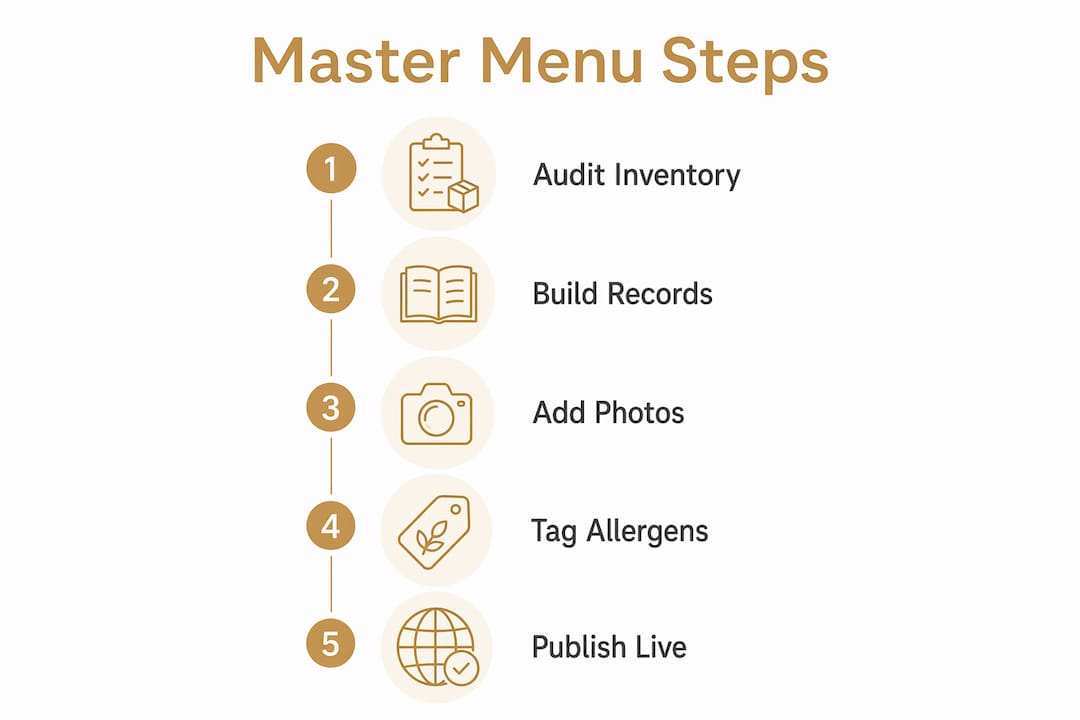
Audit your existing items. Pull every item from every channel (POS, delivery, printed menus) into a single spreadsheet. Flag duplicates, inconsistencies, and items with missing allergen or cost data.
Create master item records. For each unique item, build one master record with all required fields: internal ID, POS SKU, canonical name, base description, cost, allergen tags, dietary flags, and media.
Add media and nutritional data. Upload photos or videos to the master record. Add calorie counts and nutritional panels where required by local health codes (mandatory for chain restaurants with 20 or more US locations under FDA rules).
Tag allergens and dietary information. The FDA’s major food allergen list covers nine categories: milk, eggs, fish, shellfish, tree nuts, peanuts, wheat, soybeans, and sesame. Tag every item accurately at the master level.
Map menu definitions and price overrides per channel. Create a definition for each channel, inherit the master data, and apply channel-specific name variants, descriptions, prices, and display rules.
Test in a staging environment. Verify that allergen tags display correctly, prices match expected values per channel, POS SKUs sync, and order flow completes without errors.
Publish and verify live. Push to production, then immediately run a spot-check on each channel.
The minimum viable first publish needs: item name, base description, one photo, allergen tags, price, and POS SKU. Nutritional data, video, and upsell modifiers can follow in a second pass.
Pro Tip: Before going live, run a rollback drill. Know exactly which steps reverse a bad publish — whether that means reverting to a saved version in your platform or toggling a channel offline while you fix the issue. A five-minute rollback plan prevents a 45-minute guest-facing problem.
Best practices and governance for master menu templates
Good governance keeps the master template accurate over months and years, not just at launch.
Naming conventions: Use a consistent format for item IDs (e.g., CATG-001-ItemName) and version labels (e.g., v2.1-Summer26). Consistent naming makes bulk exports and audits far faster.
Access control: Limit who can edit master item records. A practical split: corporate or senior managers own the master record layer; location managers can create or edit definitions (prices, display rules) but cannot alter allergen tags or POS codes without approval. This mirrors the enterprise best practice of separating master data from display configuration.
Versioning and change approval: Log every change with a timestamp, the editor’s name, and the reason. For multi-location groups, route allergen or cost changes through a brief approval step before publishing.
Data hygiene: Run a quarterly audit. Prune items with near-zero sales velocity. A master menu works best as a living list of reliably deliverable dishes, not an archive of every item you have ever considered. Keeping it lean makes every future update faster.
What platform features do you need to support a master menu template?
Not every digital menu platform is built for this pattern. When evaluating options, look for:
Central master item database with field-level editing and bulk import/export (CSV or API)
POS integration with SKU-level mapping and two-way sync
API access for enterprise or multi-location rollouts that need programmatic updates
Price override rules at the channel or time-of-day level
Channel publishing controls so you can push to QR, tablet, delivery, or all at once
Allergen and nutrition fields built into the item record, not bolted on as a text note
Role-based access to separate master-record editors from definition editors
Staging environment for testing before publishing live
Mydigimenu implements all of these within a single digital menu platform designed for restaurants, cafes, bars, and hotels. The platform supports QR menus, tablet and iPad ordering, POS integrations, allergen and nutritional data fields, channel-specific price overrides, and role-based access controls. For operators managing multiple locations, its distributed update architecture means a single master change can propagate across every outlet simultaneously. You can read more about no-code editing options and why no-code menu tools reduce the technical barrier for smaller teams.
Typical timeline, effort, and cost considerations
A single-location restaurant with a focused menu of a moderate number of items can typically complete the audit, build master records, and publish a first version within a few days, assuming photos are already available and POS mapping is straightforward.
A multi-location group with many items, multiple POS systems, and localized pricing should budget several weeks for the full rollout, including time for data cleanup, master record creation, definition mapping, media production, testing, and staged publishing.
The primary cost drivers are item count, data cleanup effort (missing allergen data and inconsistent naming add hours), POS integration complexity, and media production. Platforms like Mydigimenu that support bulk CSV import can cut data-entry time significantly compared to manual item-by-item entry.
The ROI case is straightforward. If your team currently spends a significant amount of time updating menus across channels for each limited-time offer, and a master template reduces that time substantially, a restaurant conducting multiple LTOs per year recovers many hours of labor annually. That time compounds when you factor in fewer guest-facing errors and the revenue lift from dynamic pricing applied consistently across channels. Staying current with gastronomy trends also becomes easier when your menu infrastructure can respond quickly to what guests want.
Pre-launch checklist and who to notify before publishing
Before pushing any master menu update live, work through this checklist:
[ ] Allergen tags verified against the FDA’s nine major allergen categories for every new or modified item
[ ] POS SKU mapping confirmed for all items on the updated channel
[ ] Price overrides checked across every active channel definition
[ ] Order flow tested end-to-end in staging (add to cart, modify, checkout)
[ ] Media (photos/video) displaying correctly at correct aspect ratios per channel
[ ] Nutritional data complete for any items subject to FDA calorie-disclosure rules
Roles to notify: kitchen manager (new items, prep changes), floor manager (guest-facing changes), POS admin (SKU or pricing changes), marketing (if the update ties to a promotion), and corporate or franchise compliance (for multi-site groups).
Rollback triggers: If a POS sync error appears within 15 minutes of publishing, or if guests report incorrect pricing or missing allergen information, take the affected channel offline immediately and revert to the previous version. Verify the issue in staging before republishing.
Key Takeaways
A master menu template is the single most effective structural change a restaurant, cafe, bar, or hotel can make to speed up menu updates, protect allergen accuracy, and publish consistently across every channel.
Point | Details |
Separate data from display | Master item records hold canonical data; menu definitions control channel-specific pricing and presentation. |
Allergen accuracy starts at the master level | Tag all nine FDA major allergens on the master record so every channel inherits accurate data automatically. |
Phased rollout reduces risk | Build master records first, then add channel definitions; pilot with a small menu section before full deployment. |
Measure time-to-change | Track how long each menu update takes before and after; this metric proves ROI and guides future governance. |
Mydigimenu supports the full pattern | The platform provides central master items, POS integrations, channel publish controls, and allergen fields in one place. |
The operator mistake nobody talks about enough
The conventional wisdom around master menu templates focuses almost entirely on the technical setup: build the records, map the channels, publish. What gets far less attention is the content problem hiding inside the data model.
Operators frequently load their master template with aspirational items — dishes the kitchen could make, specials from three seasons ago, or concepts that looked great in a planning meeting but never moved consistently. The result is a technically correct master template built on a shaky foundation. When you run menu analytics after launch and find that 30% of your master items generate under 2% of revenue, the template has not failed; the item selection did.
The smarter approach: treat the master menu as a strategic asset, not a catalog. Start with your highest-velocity, most reliably executable dishes. Add items to the master record only when the kitchen can produce them consistently at volume. This discipline keeps the template lean, makes every future update faster, and aligns your digital menu with what guests will actually receive. A master template built on 60 reliable items outperforms one built on 120 aspirational ones every time.
Two warnings worth taking seriously before you launch. First, do not over-engineer the governance layer on day one. A complex approval workflow for a 50-item cafe will slow you down more than it protects you. Start with simple naming conventions and a single editor, then add access controls as the team grows. Second, align your LTO calendar with kitchen throughput before publishing. A beautifully mapped master template that pushes an item the kitchen cannot execute at Friday dinner volume creates a worse guest experience than no LTO at all.
Pilot with a limited section of your menu, measure the time-to-change metric before and after, and iterate from there.
How Mydigimenu brings your master menu template to life
Mydigimenu is built precisely for the pattern this guide describes: a central master item database where your canonical data lives, connected to channel-specific publishing controls for QR menus, tablet ordering, and delivery, with POS integrations that keep your reporting clean. Allergen and nutritional fields are native to the item record, not workarounds. Price override rules let you run happy hour or delivery surcharges without touching your master data. Role-based access means your kitchen manager and your marketing team each see exactly what they need.

For operators ready to move from scattered, channel-by-channel menu management to a centralized template, the fastest path is a limited pilot: pick one menu section, build the master records, publish to your QR menu and one additional channel, and measure the time savings over four weeks. From there, the full rollout is a matter of replicating the pattern. See the full platform and current plans to get started.
Useful resources for further reading
Mydigimenu Blog — practical operator guides on menu engineering, LTO tactics, and digital menu best practices (step-by-step)
Step-by-Step Menu Customization for Restaurants — a hands-on walkthrough for configuring menus in Mydigimenu (step-by-step)
Distributed Menu Update Systems: A Guide for Hospitality Managers — explains how centralized master templates power multi-location updates (conceptual + practical)
Oracle Simphony: Menu Item Master and Definitions — the enterprise POS architecture behind the master item vs. definition separation (conceptual, technical)
Food and Lodging Workflow Efficiency Guide — multi-department workflow guidance for hotels and lodging operators coordinating menu launches (practical)
Recommended