
Distributed Menu Update Systems: A Guide for Hospitality Managers


TL;DR:
A distributed menu update system centralizes menu management, ensuring accuracy across all locations and channels. It records changes as events, allowing offline edits and seamless synchronization when connectivity is restored. This technology reduces errors, speeds updates, and enhances guest satisfaction in multi-location hospitality businesses.
What is a distributed menu update system?
A distributed menu update system is a centralized platform that pushes menu changes across every location, channel, and device your operation runs, all from one place. Think of it as the master conductor of your digital menu orchestra: you update a price or swap out a seasonal dish once, and every connected endpoint, from your POS terminals to your delivery apps to your website, reflects that change automatically. The industry often calls this approach centralized menu management or menu synchronization, and it is the architecture that separates multi-location operators who sleep well from those who spend mornings chasing down stale prices on third-party platforms.
At its core, the system maintains a master menu at headquarters. Each item carries a unique product ID, which is the anchor that keeps data consistent as it flows outward. Location managers can apply overrides for regional pricing, local specials, or inventory availability without touching the master record. That balance of global consistency and local flexibility is what makes the architecture genuinely useful for restaurant groups and hotel groups with multiple locations across regions.
Key components of a distributed menu update system include:
Centralized item database with unique product IDs for every item, modifier, and modifier group
Master menu that serves as the single source of truth for all connected channels
Location-specific overrides for pricing, availability, and regional specials
Publishing controls that push approved changes to all endpoints simultaneously
Integration layer connecting POS systems, online ordering platforms, and delivery apps
How distributed menu update systems operate in multi-location settings
The operational architecture behind these systems is more thoughtful than a simple “save and sync.” Event sourcing is the technical backbone: rather than overwriting a database state, every menu change is recorded as a discrete, time-stamped event. A price update, an item going out of stock, a new modifier added — each becomes its own event in a chronological log. This approach keeps data consistent even when a location loses internet connectivity, because the events queue locally and sync to the central server the moment the connection returns.
Pro Tip: When evaluating platforms, ask specifically whether they use event sourcing or full-state syncing. Event-based systems handle network outages far more gracefully, which matters enormously for busy kitchens where connectivity can be unpredictable.
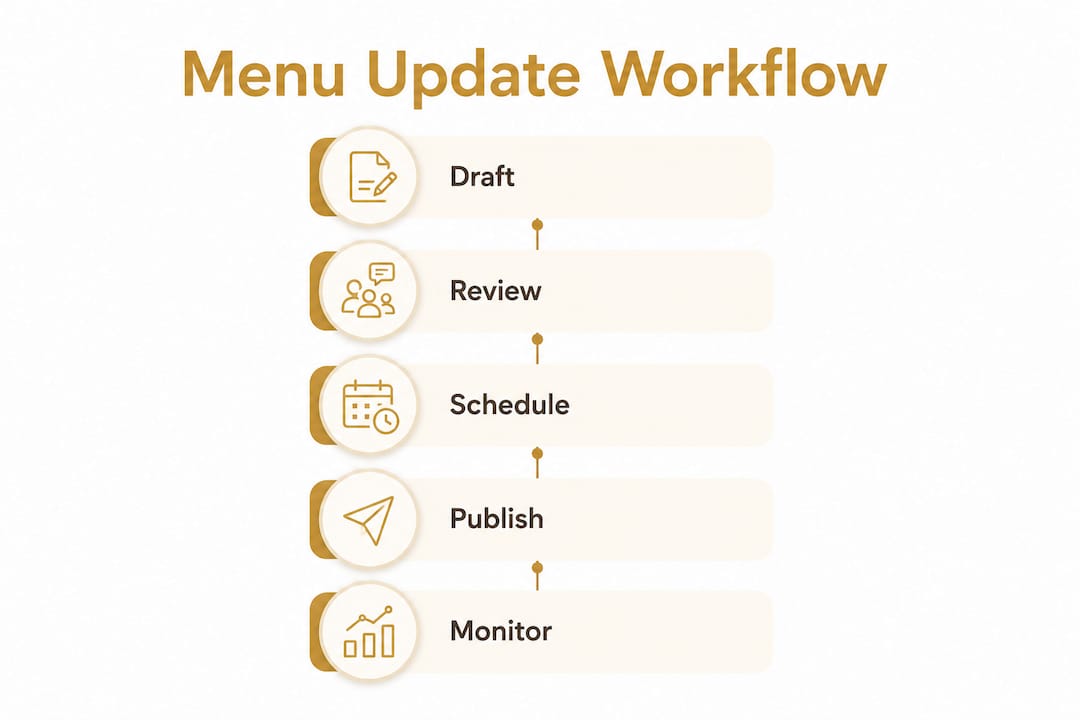
Here is how a typical update flows through the system:
A manager edits an item price or adds a new dish in the central dashboard.
The change is saved as a draft in the staging queue, not published immediately.
The manager previews a dry-run diff, seeing exactly what will change field by field.
A scheduled publish time is set, or the change is pushed live with one click.
The system’s plugin architecture translates the data into the exact format each connected platform requires.
Every endpoint updates, and the change is logged with a timestamp and the approving user’s identity.
If something goes wrong, a per-system rollback restores the previous state on that channel without touching others.
The staging and scheduled publishing capability is particularly valuable for limited-time offers. Coordinating a holiday promotion across a POS, a delivery app, and a website used to mean a flurry of manual updates and a prayer that nothing was missed. With a staging queue, the entire launch is prepared days in advance and goes live automatically at the right moment.
Workflow Stage | What Happens | Benefit |
Draft | Change saved, not published | No guest-facing impact until ready |
Preview | Dry-run diff shows current vs. new values | Catches errors before they go live |
Scheduled publish | Automatic rollout at a set date and time | Perfect for LTO and promotional launches |
Live sync | Data pushed to all connected endpoints | One action updates every channel |
Rollback | Per-system revert if issues arise | Limits damage to one platform at a time |
Benefits of implementing a distributed menu update system in hospitality

The motivation for adopting this technology goes well beyond saving time. Centralized menu control directly reduces the risk of discrepancies between your POS and your digital channels, and those discrepancies carry real costs: a guest orders a dish that no longer exists, a price on a delivery app is lower than your current cost, or a sold-out item keeps generating orders your kitchen cannot fulfill.
Operational benefits hospitality managers consistently report include services like Restaurant SEO Services that help fill more tables along with distributed menu systems:
Speed: A single update propagates everywhere within seconds, replacing a process that once required logging into four or five separate systems
Accuracy: One menu database eliminates the manual reconciliation that causes pricing errors and out-of-stock embarrassments
Guest satisfaction: Consistent, up-to-date menus across every touchpoint build trust and reduce order errors at the table
Labor savings: Staff who previously spent hours on manual menu updates can redirect that time to guest-facing work
Risk mitigation: Rollback features and audit logs mean a bad update is a recoverable event, not a crisis
For multi-location operators, the digital guest experience is only as strong as the accuracy of the menu a guest sees. A mouthwatering description paired with a price that does not match the POS erodes confidence fast.
Key features and functionalities to look for in distributed menu update systems
Not every platform marketed as a menu management tool actually delivers the architecture described above. When evaluating options, prioritize these capabilities:
Unique product IDs assigned to every item and modifier, enabling consistent syncing across all channels without duplication
Staging queue that saves every change as a draft, supports cherry-picking what to publish, and allows dry-run previews before anything goes live
Scheduled publishing for automatic rollouts tied to specific dates and times, ideal for promotional launches
Per-system rollback so a problematic update on one delivery platform can be reversed without affecting your POS or website
Plugin or adapter architecture that translates menu data into the exact format each third-party platform requires, handling different tax rules, image specifications, and character limits
Role-based permissions and audit logs that record every view, edit, approval, and publish action with user identity and timestamp
Multi-language and multi-currency support for properties serving international guests or operating across different markets
Dynamic pricing per location and channel so a downtown property can price differently from a suburban location without maintaining separate menus
Platforms built on a plugin architecture can add new integrations without restructuring the core system, which protects your investment as your tech stack evolves.
Considerations for choosing and implementing a distributed menu update system
Adoption goes smoothly when managers plan for the realities of multi-location environments rather than assuming ideal conditions. A few factors deserve honest attention before you commit to a platform.
Network reliability is the first. A fully centralized model that depends on constant internet connectivity becomes a liability at locations with unstable connections. Hybrid local-central architectures solve this by maintaining a local event queue at each branch; changes accumulate offline and sync to the central server when connectivity returns. For any U.S. operator running locations in areas with inconsistent connectivity, this is a non-negotiable design requirement.
Conflict resolution needs clear rules. When a price is changed from two different sources simultaneously, the system must know which takes precedence. Head office changes typically override branch-level edits, but some platforms route unresolvable conflicts to a supervisor queue for manual review. Knowing how your chosen system handles this before you go live prevents confusion during a busy service.
Additional considerations worth evaluating:
POS and ordering system compatibility: Confirm the platform supports your existing systems before signing anything
Training and role-based permissions: Limit who can publish live changes versus who can only draft, reducing the risk of accidental updates
Staging and preview workflows: Make these mandatory steps in your team’s process, not optional ones
Pro Tip: Use audit logs and rollback features from day one, even when nothing goes wrong. Familiarity with these tools means your team can act quickly and confidently when an unexpected issue does arise.
Why distributed menu update systems matter for hospitality professionals
Multi-location hospitality operations face a compounding coordination problem that manual processes simply cannot solve at scale. A distributed menu update system turns what was once a fragmented, error-prone workflow into a controlled, auditable process. The digital table ordering experience your guests expect depends entirely on the accuracy of the data behind it.
The core value proposition breaks down clearly:
Centralized control prevents the pricing errors and out-of-stock incidents that damage guest trust
Faster market responsiveness means a new promotion or price adjustment reaches every channel in minutes, not days
Consistent menus across all touchpoints create a coherent brand experience regardless of how or where a guest orders
Scalable growth becomes manageable because adding a new location means connecting it to an existing master menu, not rebuilding from scratch
Challenges and limitations of distributed menu update systems
No architecture is without trade-offs. Understanding the limitations of these systems helps managers set realistic expectations and plan accordingly.
Integration complexity is the most common friction point. Every POS, delivery platform, and online ordering system has its own data format, API behavior, and update cadence. A plugin architecture handles much of this translation work, but initial setup requires careful field mapping and testing per integration. Operators with legacy POS systems may face additional configuration work.
Conflict resolution gaps can surface when branch-level staff make changes directly in a connected system rather than through the central platform. If your Square catalog is edited locally, a centralized system that only pushes outward cannot automatically detect or reconcile that change. Clear operational policies about where menu edits are permitted matter as much as the technology itself.
Other limitations to plan for include:
Latency on some delivery platforms: Not all third-party apps accept real-time incremental updates; some require daily full catalog replaces, meaning a change made at noon may not appear on that platform until the next sync cycle
Training overhead: Staff accustomed to editing menus directly in each system need retraining to work through a central platform
Cost and setup time: Enterprise-grade distributed systems carry meaningful implementation costs, and the ROI calculation depends on the number of locations and the frequency of menu changes
Best practices for implementing and managing a distributed menu update system
A well-planned rollout makes the difference between a system your team trusts and one they work around. Start by auditing your current menu data before migration. Inconsistent naming, duplicate items, and missing modifiers in your existing POS data will create problems in any new system, so clean the data first.
Establish a clear change management workflow from the start. Define who can draft changes, who can approve them, and who has publish authority. Role-based permissions enforce this structure technically, but the policy conversation needs to happen with your operations team before go-live.
Additional best practices that experienced operators follow:
Run a pilot at one location before rolling out to the full portfolio, using the staging and preview tools to validate every integration
Document your field mapping for each connected platform so future integrations or staff changes do not require starting from scratch
Schedule regular audit log reviews to catch unauthorized or accidental changes early
Test rollback procedures during low-traffic periods so the team is confident using them under pressure
Use restaurant efficiency tools alongside your menu system to maximize the operational gains from centralized digital management
Real-world examples of multi-location hospitality businesses using these systems
The operational gains from distributed menu management are most visible at scale. A restaurant group operating 50 locations faces a straightforward math problem: a single menu change that takes two minutes per location manually consumes over an hour and a half of staff time, with each manual step introducing the possibility of error. A centralized system reduces that to a single action with a logged, auditable result.
Hotel groups with food and beverage outlets across multiple properties face a related challenge. Each outlet may have its own pricing, seasonal specials, and language requirements, yet the brand’s core menu must remain consistent. A master menu with location-level overrides handles exactly this structure, letting the corporate team control the brand standard while giving individual properties the flexibility they need.
Quick-service operators launching limited-time offers benefit from scheduled publishing in a particularly tangible way. A promotion that previously required coordinating manual updates across a POS, a delivery app, and a website on launch morning can instead be staged and scheduled days in advance. The launch happens automatically, and the audit log confirms every channel updated as planned.
Platforms like Mydigimenu bring this architecture to hospitality businesses of all sizes, combining digital menu management with QR code ordering, multilingual support, and POS integration in a single platform designed for the realities of modern restaurant and hotel operations.
Mydigimenu gives your operation a single source of truth for every menu, every location, and every channel. From QR code menus to tablet ordering and full POS integration, the platform is built for hospitality professionals who want accuracy and speed without the manual coordination. Explore Mydigimenu’s digital menu platform and see how centralized menu management transforms daily operations.

Key Takeaways
A distributed menu update system gives multi-location hospitality businesses centralized control over menu data, eliminating manual errors and keeping every channel accurate in real time.
Point | Details |
Master menu architecture | A single source of truth with unique product IDs syncs all locations while allowing local overrides. |
Event sourcing handles outages | Changes queue locally during connectivity loss and sync automatically when the connection returns. |
Staging prevents live errors | Draft, preview, and scheduled publishing workflows catch mistakes before guests see them. |
Rollback limits damage | Per-system rollback reverses a bad update on one channel without affecting any other platform. |
Hybrid models suit unstable networks | Local-central architectures keep individual locations operational even when central connectivity drops. |
Recommended
Comments