
Streamline online food ordering workflow: 80% fewer errors

TL;DR:
Workflow breakdowns during peak hours lead to costly errors, remakes, and guest dissatisfaction.
Automation and real-time menu sync significantly reduce errors and improve order accuracy.
Regular verification and staff training are essential for sustained error prevention and guest trust.
Picture a Saturday night rush: tickets stacking up, three delivery platforms pinging simultaneously, and your kitchen remaking a dish because a modifier never made it through. Sound familiar? Workflow breakdowns during peak online ordering are one of the most expensive problems restaurant managers face, costing real money in remakes, refunds, and lost guest trust. This guide walks you through a proven, step-by-step approach to auditing, building, and sustaining an online food ordering workflow that actually holds up under pressure. You will learn how automation, live menu sync, and smart verification work together to minimize costly errors and keep guests coming back.
Table of Contents
Key Takeaways
Point | Details |
Identify workflow errors | Pinpointing common bottlenecks is the foundation for process optimization in online food ordering. |
Select the right digital tools | Integrated tools and real-time menu management are crucial for reducing errors and enhancing efficiency. |
Automate for accuracy | Automation cuts remake and refund costs by up to 80%, streamlining order processing and guest satisfaction. |
Continuous verification | Regular workflow audits ensure sustained order accuracy and minimize disruptions during peak hours. |
Assess your current workflow and identify bottlenecks
With the problem outlined, let’s pinpoint where your current workflow falters. Most managers assume their ordering process is reasonably solid until they look at the numbers. Order errors spike during peak hours and across multiple platforms, and the impact compounds fast. According to error rates on 3+ channels, high-volume rushes cause missed and duplicate orders, with error rates increasing by 300% when operating on three or more channels simultaneously. That is not a small inefficiency. That is a structural problem.
The first step is to run a thorough audit of your current order flow. Use the following checklist to map every touchpoint:
Channels in use: List every platform accepting orders (your website, third-party apps, phone, in-house tablets).
Order intake method: Is each channel feeding into a single POS, or are staff manually re-entering orders?
Sync status: Do menu changes on one platform automatically update everywhere else?
Menu update speed: How long does it take to 86 an item across all channels during service?
Rush-hour performance: Track how many errors, remakes, and refund requests occur during your two busiest hours.
Guest feedback patterns: Are complaints clustering around specific items, times, or platforms?
Once you have completed this audit, you will likely see a clear pattern. Errors rarely happen randomly. They cluster around manual handoffs, unsynchronized menus, and channels that operate in silos. Reviewing digital ordering workflow tips can help you frame what a corrected flow should look like before you start rebuilding.
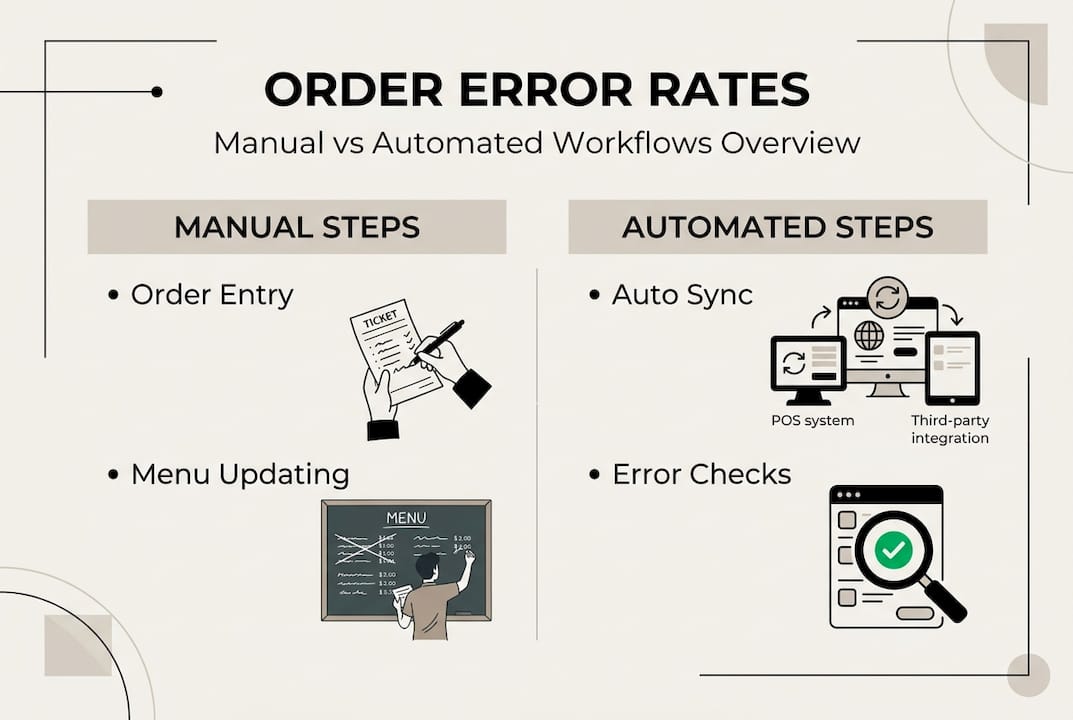
To sharpen your understanding, compare what a manual workflow costs versus what an automated one delivers:
Factor | Manual workflow | Automated workflow |
Average error rate | 8-12% of orders | 1-3% of orders |
Remake and refund cost | High, recurring | Reduced by up to 80% |
Menu update speed | Minutes to hours | Instant, real-time |
Guest satisfaction score | Variable, often lower | Consistently higher |
Staff workload during rush | Overwhelming | Streamlined and manageable |
Pro Tip: Before making any changes, benchmark your current error rate, average refund cost per week, and remake frequency. These numbers become your baseline, and they make the ROI of any new system immediately visible.
For a broader look at what a fully optimized process can achieve, the guide on optimizing online ordering offers a useful reference point as you plan your next steps.
Prepare your tools: Digital solutions and system requirements
Once you understand your bottlenecks, it is time to gather the right solutions. Choosing tools without first understanding your workflow gaps is like buying kitchen equipment before designing the kitchen. The sequence matters enormously.
Here are the essential tools every modern online ordering workflow needs:
POS integration layer: Connects all incoming orders to a single system, eliminating manual re-entry.
Live menu management software: Updates item availability and pricing instantly across every channel.
Channel sync platform: Aggregates orders from third-party delivery apps into one unified dashboard.
Guest tracking and CRM tools: Capture order history and preferences to personalize future interactions.
Real-time ingredient management: Flags low-stock items before they become 86 failures during service.
The data is compelling. Unified systems reduce errors by 60 to 80%, which translates directly into fewer remakes, fewer refunds, and measurably happier guests. That is not a marginal improvement. It is a transformation of your daily operational reality.

Here is a practical breakdown of leading solution categories and what to look for:
Solution type | Key feature | Core requirement | Primary benefit |
POS integration | Unified order intake | API compatibility | Eliminates manual entry errors |
Menu management software | Real-time sync | Multi-platform support | Prevents 86 failures |
Channel aggregator | Single dashboard | Third-party app connections | Reduces duplicate orders |
CRM and guest tracking | Profile capture | Social login or email capture | Enables personalized marketing |
Ingredient management | Live inventory alerts | Kitchen display integration | Stops out-of-stock orders |
Pro Tip: Prioritize tools that sync menus live across every platform the moment a change is made. A 10-minute lag between your POS and a delivery app is enough time to sell dozens of items you no longer have, creating a cascade of cancellations and frustrated guests.
Understanding online menu management in depth will help you evaluate which software features are truly essential versus which are nice-to-have extras. And if you are starting from scratch or reconsidering your entire setup, the ordering system guide provides a solid foundation for making an informed decision.
Execute the workflow: Step-by-step process for error reduction
With tools ready, here is how to implement a workflow that minimizes errors from the first order to the last. Execution is where most operations either gain momentum or lose it. A clear sequence removes ambiguity and empowers your team to move fast without making mistakes.
Centralize order intake. Route every incoming order, from your website, delivery apps, and in-house tablets, into a single POS or order management hub. This eliminates the risk of orders being missed because a staff member was watching the wrong screen.
Sync your menu in real time. Before service begins, confirm that all platforms reflect your current menu, including any items being 86’d, price changes, or limited-time specials. Automate this sync so it requires zero manual intervention during service.
Assign orders by channel priority. Configure your system to flag high-priority channels (such as dine-in or pre-paid delivery orders) so kitchen staff can sequence tickets intelligently rather than reacting to whatever arrives first.
Activate digital tracking for every order. Use kitchen display systems or digital ticket tracking to monitor each order from intake to fulfillment. This creates a visible paper trail that makes errors easy to catch before they reach the guest.
Trigger automated guest notifications. Send real-time status updates to guests at key milestones: order confirmed, order being prepared, order ready or out for delivery. This reduces inbound calls and builds trust.
Close the loop with post-order feedback. Automatically prompt guests for a rating or comment after delivery or pickup. This surfaces issues instantly rather than letting them fester into negative reviews.
Statistic callout: Automation decreases remake costs and refunds while boosting guest satisfaction, with some operations reporting up to an 80% reduction in error-related costs after full workflow automation.
Pro Tip: Before confirming any order, your system should automatically verify that all requested modifiers are available and that the item itself is in stock. A confirmation sent for an unavailable item is worse than a brief delay. It erodes trust fast.
For more granular tactics on keeping this execution tight under pressure, explore these workflow streamlining tactics that cover real-world scenarios your team will actually encounter.
Verify and troubleshoot: Ensuring ongoing accuracy and guest satisfaction
A streamlined workflow is not finished until errors are actively managed and prevented. Building the workflow is step one. Sustaining its accuracy over weeks and months requires deliberate, routine verification.
Here are the key checks every manager should run consistently:
Order confirmation logs: Review daily logs to identify any orders that were confirmed but not fulfilled, or fulfilled incorrectly. Patterns in these logs reveal systemic issues before they escalate.
Real-time menu update audits: Spot-check your live menus across all platforms at least once per shift to confirm that 86’d items and price changes are reflected everywhere.
Guest feedback reviews: Monitor ratings and comments from every channel. A sudden dip in scores for a specific item or time slot is a signal worth investigating immediately.
Modifier accuracy checks: Randomly sample completed orders against their original tickets to verify that customizations were captured and executed correctly.
Channel sync health reports: Most aggregator platforms provide sync error logs. Review these weekly to catch silent failures before they affect guests.
“When menu sync fails silently, guests order items that no longer exist on your actual menu. The result is a cancellation, a frustrated guest, and a refund that could have been prevented entirely with a real-time sync alert.”
Peak-hour accuracy drops without workflow verification, and missing or duplicate orders are a direct source of guest frustration that compounds quickly during rush periods. Establish a clear troubleshooting protocol so your team knows exactly what to do when a modifier error or sync failure occurs, rather than improvising under pressure.
For operations that also manage reservations alongside online orders, aligning both workflows pays dividends. Reviewing reservation workflow accuracy can surface overlapping inefficiencies you may not have connected to your ordering process.
Rethinking online food ordering: What most guides miss
Now that the technical steps are mapped out, let’s question some common assumptions. Most workflow guides treat automation as the finish line. Install the right software, connect your channels, and the problem is solved. But that framing misses something critical: automation amplifies whatever process it is built on. If your underlying workflow has gaps, automation will surface those gaps faster and at greater scale.
The operations that sustain low error rates over time are not just the ones with the best technology. They are the ones where managers routinely revisit their assumptions about menu design, order flow, and guest preferences. They treat their workflow as a living system, not a one-time setup. Staff training is equally non-negotiable. A well-configured system operated by an undertrained team will still generate errors.
Understanding the broader online platforms impact on restaurant operations reinforces why human oversight alongside automation is the only sustainable model. Operational flexibility, the ability to adapt quickly when a channel misbehaves or a menu item unexpectedly surges in demand, is just as vital as any digital integration.
Unlock smarter ordering workflows with My Menu solutions
If you are ready to take the next step, explore solutions that fit the workflow you have just learned. MyDigiMenu.com brings live menu sync, intuitive ordering tools, and seamless channel integration into one platform built specifically for hospitality.

With digital tablet menu solutions and a powerful QR menu generator, your team can update menus instantly and give guests a frictionless ordering experience. You can also connect delivery portals directly to your POS, unifying every channel into a single, error-resistant workflow. The result is fewer remakes, fewer refunds, and guests who feel genuinely taken care of every time they order.
Frequently asked questions
How can automation help avoid duplicate and missed online orders?
Automation syncs orders across all channels in real time, eliminating the manual handoffs where duplicates and missed tickets typically occur. Unified systems reduce errors by 60 to 80%, making automation one of the highest-impact investments an operation can make.
What is the best way to manage live menu updates to prevent 86’ing?
Use menu management software that pushes changes instantly across every platform the moment an item is marked unavailable. Real-time sync prevents the silent failures that lead to guests ordering items your kitchen can no longer produce.
How do I verify workflow accuracy during peak hours?
Audit order confirmation logs, monitor guest feedback scores, and review menu sync reports regularly to detect error spikes before they grow. Peak-hour accuracy drops without active verification, so building this into your pre-service and post-service routine is essential.
Can my workflow support orders from multiple restaurants simultaneously?
Yes, with platforms designed for multi-location workflows and real-time data synchronization across all sites. Multi-restaurant orders are unsupported in many legacy systems, but modern unified platforms resolve this with centralized dashboards and location-specific menu controls.
Recommended
Comments