
30-Day Post-Visit Text Pilot for Restaurants: Templates and Timing

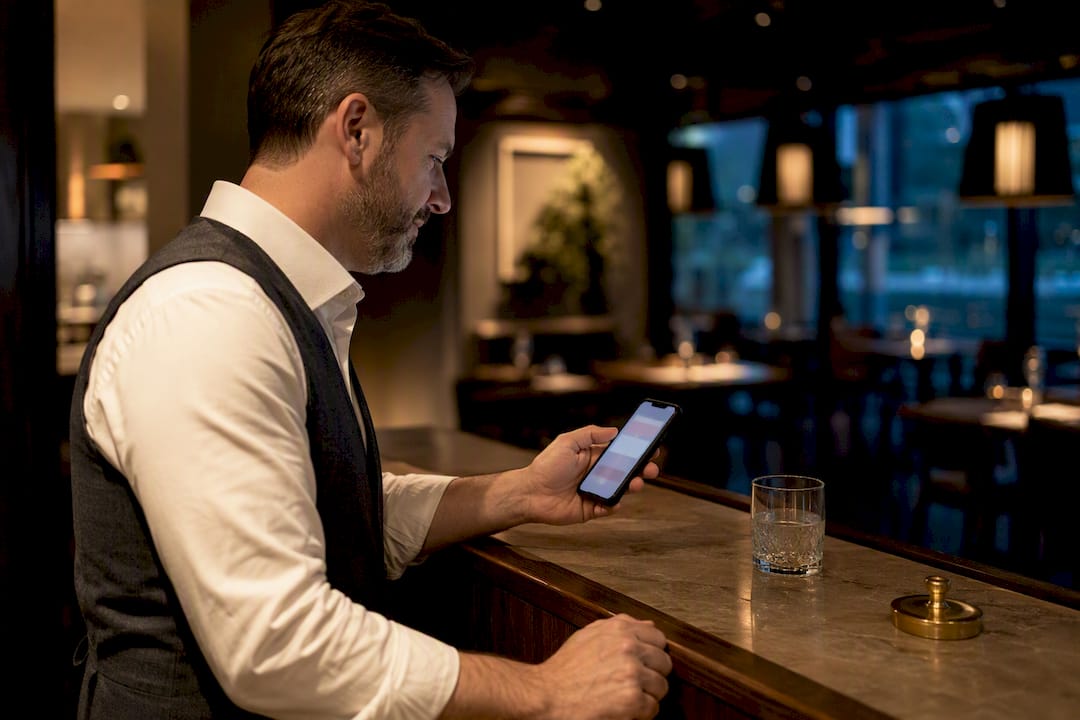
Send a thank-you text with one feedback question within two hours of a guest leaving, then follow up with a review request only if they rated the visit well. A referral or loyalty nudge two to four weeks later closes the loop. This sequence catches problems before they hit Google, lifts your review volume, and brings guests back, but only if you nail two things: timing and opt-out compliance.
TL;DR:
Timing is critical, with the best response rates achieved when feedback requests are sent within 30 minutes to two hours after the visit.
Use short, human-sounding messages that focus on a single action, like rating the experience or leaving a review, to increase engagement.
Only send review nudges to guests who already responded positively to the initial feedback request to avoid negative public reviews.
Ensure all messaging complies with opt-in consent rules, provide clear opt-out instructions, and track responses to avoid spamming repeat guests.
Automating through an integrated platform like MyDigimenu reduces staff workload and maintains sequence logic, improving response rates and data accuracy.
Table of Contents
What Is Post-Visit Messaging for a Restaurant?
Post-visit messaging is the automated or semi-automated text sequence a restaurant sends a guest after they’ve paid the check and walked out the door. It’s the digital version of a server checking in the next day, except it scales to every table instead of the ones you happen to remember. The mechanics are simple: a phone number captured at checkout or through a QR scan triggers a short message asking how the visit went, followed by conditional next steps based on the answer.
The term “post-visit messaging restaurant” gets searched a lot, but the industry itself usually calls this guest follow-up automation or post-dining SMS communication. Whatever you call it, the goal is the same: get honest feedback while the meal is still fresh in someone’s memory, and turn the good experiences into public reviews and repeat visits. Done right, it also functions as an early-warning system. A guest who had a rough time with a dish or a wait will often tell you privately in a text before they’ll tell the internet publicly in a review.
Copy-Ready Templates for Every Stage of the Sequence
You don’t need a copywriter for this. Short, plain, human-sounding texts outperform anything that reads like marketing copy. Here are templates organized by what they’re trying to accomplish.
Thank-you plus one-question feedback (send within 2 hours): “Thanks for dining with us tonight! On a scale of 1 to 5, how was your experience? Reply with a number.”
Conditional review nudge (only for 4s and 5s): “So glad you enjoyed it! Would you mind sharing a quick review? [link] Takes less than a minute.”
Recovery message (for 1s, 2s, and 3s): “Thanks for letting us know. We’d like to make this right. A manager will reach out shortly, or reply here and we’ll take care of it directly.”
Loyalty or milestone message (sent after repeat visits): “You’ve visited us 5 times this year! Enjoy a free appetizer on your next stop. Just show this text.”
Referral message (sent 2 to 4 weeks post visit): “Know someone who’d love [Restaurant Name]? Share this code for $10 off their first visit: FRIEND10.”
For high-volume venues, ultra-short variants matter more than clever wording. Something like “Rate us 1 to 5?” with a single follow-up link does the job without eating into your SMS character limits or your guest’s patience. An MMS version for a loyalty reward, a photo of the free dessert with a short caption, tends to get opened more than a plain text.
A few notes on sequencing:
The feedback question should always come before the review ask. Asking a guest who had a bad night to leave a public review is how one-star reviews happen.
Recovery messages need a real human on the other end, fast. A bot reply to a complaint reads as dismissive.
Referral and loyalty messages perform better when the incentive is dollar-specific (“$10 off”) rather than vague (“a special discount”).
Keep every template under 160 characters where possible; anything longer gets split into multiple texts by most carriers, which looks sloppy.
Practical operator guides on first-visit follow-up templates recommend adjusting the window based on the message goal, immediate for thank-yous, a slightly longer window for review nudges. The Akia guest satisfaction survey framework backs the same principle: keep feedback forms under a minute to complete, ideally around seven questions or fewer, and for a single-question SMS survey, that means one number and nothing else.
When Should You Send Post-Dining Follow-Up Texts?
Timing decides whether your message gets read or ignored. Send too early and the guest is still finishing dessert. Send too late and they’ve already forgotten the specific dish that disappointed them.
Here’s the cadence that works across most full-service and fast-casual formats:
Immediate to 30 to 120 minutes: Thank-you plus one-question feedback. This is the highest-response window.
Same day (within 2 to 4 hours): Conditional review nudge, only triggered if the feedback score was high.
24 to 72 hours: A gentle reminder, only for guests who never responded to the first text.
3 days: Recovery follow-up if a low score was flagged but the guest never replied to the manager outreach.
14 to 30 days: Loyalty or referral message, timed to when the guest is statistically due for another visit.
The Akia dataset on hospitality response timing shows that most guest responses to post-visit surveys happen within two days of the stay, with a sharp drop-off after that. That’s the entire argument for front-loading your sequence instead of spacing it evenly. A message sent five days later isn’t just less effective, it’s often confusing to a guest who has to think back to which visit you mean.
Smart skip logic keeps the sequence from feeling like spam:
Suppress the reminder text entirely if the guest already answered the first message.
Skip the review nudge if the guest already clicked the review link, even without confirming they left one.
Honor a STOP reply permanently across every future sequence, not just the current one.
Cap messaging frequency for regulars. A guest who eats at your restaurant three times a week doesn’t need the full sequence every single visit.
Pro Tip: If you’re running this for the first time, pilot the sequence on one shift or one location for two weeks before rolling it out chain-wide. It’s much easier to fix a bad cadence for 40 guests than for 4,000.
How Do You Write an Effective Post-Visit Text?
The best post-visit texts share a few traits: they’re short, they sound like a person wrote them, and they ask for exactly one thing.
Personalize the greeting. Use the guest’s first name and the restaurant name. “Hey Sarah, thanks for dining with us at [Restaurant]” outperforms a generic “Dear Customer.”
Keep it to one call to action. A text asking someone to rate the food, leave a review, and follow you on social media in the same message gets ignored. Pick one.
Send guests to a mobile-first landing page. A feedback form that loads slowly or requires zooming will get abandoned. Qualtrics’s guest experience guidance recommends QR or in-app browser forms specifically because they cut completion friction and let you catch complaints before they go public.
Watch your incentive wording. Offering a discount in exchange for “a positive review” crosses into review manipulation and damages trust in the review itself. Offer the incentive for leaving feedback, not for leaving praise.
The response window is your evidence base: most guests who respond to a post-visit survey do so within 48 hours, per Akia’s hospitality data. That single fact should shape every timing decision you make, and it’s why a short, single-question format beats a long survey almost every time.
Compliance isn’t optional, and it’s not complicated either. Run through this before your first send:
Confirm you have documented opt-in consent for every phone number in your list, ideally captured at checkout or through the reservation flow.
Include an opt-out instruction (“Reply STOP to unsubscribe”) in your first message and honor it immediately per FCC TCPA rules.
Follow CTIA’s messaging best practices for message transparency, meaning your business name should be identifiable in the text, not hidden behind a generic short code.
Keep records of consent and opt-outs. If a guest disputes receiving a message, you need to show when and how they opted in.
How Do You Automate the Sequence Without Adding Staff Work?
Four trigger patterns cover almost every restaurant setup, from a single counter-service shop to a multi-location group.
QR or receipt scan: A code printed on the receipt or table tent that opens the feedback form directly, no app download required.
POS ticket-closed webhook: The moment a table’s check closes in the POS, it fires the first text automatically.
Loyalty or stamp-card scan: Tied to a digital loyalty program, this triggers milestone and referral messages based on visit count.
Manual staff entry: A fallback for venues without integrated triggers, where a host or manager enters the guest’s number at checkout.
The sequence architecture itself is straightforward: trigger fires, feedback text sends, the system evaluates the response, and branches into either a review nudge or a recovery flow. Weeks later, a separate branch handles referral and loyalty messaging based on visit frequency.
For smaller operators, a shared inbox or SMS tool connected through a no-code service like Zapier gets the job done on a shoestring budget. The tradeoff is that you’re stitching pieces together yourself, and skip logic (avoiding duplicate messages to the same guest) often has to be built manually. An integrated platform that already links your QR code feedback flow to guest profiles handles that branching natively, along with tracking who’s already responded.
Pro Tip: Before you automate anything, train front-of-house staff on how the sequence works. If a guest mentions a bad experience at the table and then also gets a feedback text an hour later, your host should know that’s expected, not a system glitch to apologize for.
A short operational checklist keeps things clean: confirm phone numbers are captured correctly at the point of entry, review your opt-out list weekly, and audit for duplicate contacts across your POS and loyalty systems so the same guest doesn’t get double-messaged from two sources.
How Do You Know If Post-Visit Messaging Is Working?
Track five numbers and you’ll know within a month whether the sequence is earning its place in your operations.
Response rate: the percentage of guests who reply to the first feedback text.
Review conversion: how many of the guests who received a review nudge actually left one.
Average rating: whether your private feedback scores are trending up or flat over time.
Repeat-visit lift: whether guests who received the sequence return more often than those who didn’t.
Opt-out rate: a rising number here usually means your cadence is too aggressive or your first message came too early.
Two quick A/B tests are worth running in your first month. Split your list and send the initial feedback text at 30 to 120 minutes to one half and same-day to the other, then compare response rates directly. Separately, test a review nudge with a small incentive against one with none, since Mailchimp’s SMS research notes that concise, targeted texts already carry strong open rates, so an incentive should be measured against that baseline, not assumed to help.
For attribution, use unique referral codes or tracked coupons tied to each message so a return visit can actually be traced back to the text that prompted it, rather than guessed at. During a 30-day pilot, review your numbers weekly rather than waiting for the full month, since early cadence problems (too many messages, wrong timing) show up fast in the opt-out rate before they show up anywhere else. Pairing this with broader retention tactics gives you a fuller picture of whether guests are coming back because of the message or for other reasons entirely.
How an Integrated Digital Menu Platform Runs This Sequence
Running this manually across multiple triggers, a POS, a loyalty program, and a separate texting tool is where most operators lose momentum. An integrated system maps each part of the sequence to a feature you’re likely already using. The QR code on your table tent that guests scan to view the menu is the same mechanism that can launch the feedback form. A digital loyalty stamp card tracks visit counts automatically, which is exactly what triggers milestone and referral texts without anyone manually counting visits.
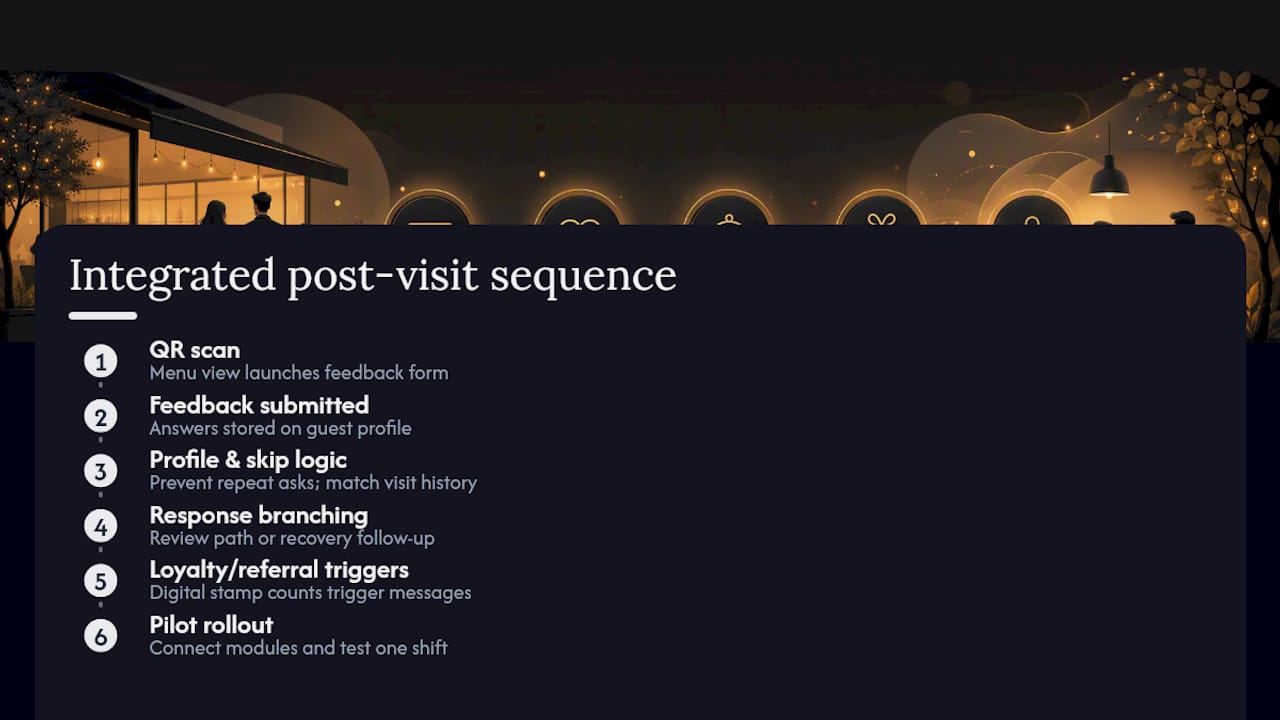
The operational win isn’t any single feature. It’s that skip logic, guest profiles, and campaign targeting all live in one place instead of three disconnected tools that don’t talk to each other. That means a guest who already left feedback doesn’t get asked again, and a regular’s fifth visit triggers the loyalty reward without a manager remembering to check a spreadsheet.
A pilot typically takes a few days to configure: connect your feedback forms, set up the reservations module if you want booking data to feed the sequence, and test the trigger on a single shift before rolling it wider.
A 30-Day Pilot Any Operator Can Run
Start with one location or one shift. Run just two messages, the feedback text and the conditional review nudge, and track results weekly rather than waiting for the month to end.
Give your staff a short script for handling negative feedback: acknowledge it immediately, loop in a manager within the hour, and never let a complaint sit overnight. Escalation speed matters more than the wording you use.
By day 30, expect a response rate in a reasonable double-digit range, an opt-out rate that stays low and flat, and a visible uptick in review volume among your 4 and 5 star responders. If opt-outs climb instead, your cadence is too aggressive, not your offer.
— Abhi
Automate the Sequence With MyDigimenu
You don’t need three separate tools stitched together with Zapier to run this. Mydigimenu bundles the QR trigger, the feedback form, the loyalty stamp card, and the guest profile that ties them all together into one platform, so the skip logic in this guide runs automatically instead of depending on someone remembering to check a spreadsheet.

Here’s how the features map directly to what you just read:
QR Menu triggers the feedback flow the moment a guest scans at the table, no app download needed.
Guest feedback tools capture the single-question rating and route low scores to staff for recovery.
Loyalty stamp cards track visit counts automatically and fire milestone or referral messages on schedule.
CRM integration keeps one guest profile across visits instead of scattering data across separate systems.
Reservations Module adds booking data into the same sequence for guests who reserve ahead.
Plans start with the StartUp Menu at $39 per month, with the Reservations Module available at $189 per month for restaurants that want booking data feeding the same guest profile. The compliance checklist and timing rules in this guide apply no matter which tool you use, but if you’d rather run the whole sequence from one dashboard, check current pricing and book a walkthrough to see it set up for your menu.
Sources
The claims in this guide rest on a small set of primary sources worth bookmarking directly:
FAQ
What Is the 30/30/30 Rule for Restaurants?
There’s no single standardized “30/30/30 rule” in restaurant operations; definitions vary by source and context. If you’ve seen it referenced for guest messaging specifically, treat it as a loose guideline rather than an industry standard, and default to the evidence-backed windows in this guide instead.
Is B2B Texting Legal for Restaurants?
Yes, business texting to consumers is legal in the United States as long as you follow FCC TCPA rules, which require documented consent and honoring opt-out requests like a STOP reply. Follow CTIA’s best practices as well to stay within industry norms for message content and frequency.
Can You Give Me an Example of a Post-Visit SMS Message?
A simple example: “Thanks for dining with us tonight! On a scale of 1 to 5, how was your experience? Reply with a number.” It’s short, asks one question, and sets up the next message in the sequence based on the answer.
How Should Restaurant Staff Communicate With a Guest Face-to-Face vs. by Text?
In person, staff should check in naturally during the meal and flag any issue to a manager immediately rather than waiting for a post-visit text to surface it. Post-visit messaging works best as a backup net, catching feedback guests didn’t mention at the table, not as a replacement for attentive service during the visit itself.
Does Mydigimenu Support Post-Visit Guest Messaging?
Mydigimenu supports the building blocks of this sequence through QR-triggered feedback forms, loyalty stamp cards, and CRM-linked guest profiles. Current plan pricing is listed on the Mydigimenu pricing page.
Recommended
space waves launches an arcade journey defined by a palpable sense of speed, where players pilot a small spacecraft through perilous zones filled with narrow flight paths and numerous obstacles.