
Stop Menu Drift: Multi Location Menus for Restaurant Chains

Multi-location menu management means running every location’s menu from one master source, then pushing updates, prices, and availability out to each outlet instead of editing them one by one. The direct payoff is speed and consistency: a single price change or seasonal rollout takes minutes across multiple stores rather than hours of manual re-entry at each terminal. Before you touch anything, confirm who holds edit permissions at the group level and understand how your locations are mapped in the system.
TL;DR:
Most issues with menu drift stem from permission mistakes rather than technical failures, making role management critical to prevent unintended overrides.
Using full sync repeatedly risks erasing local customizations, so it should be reserved for initial setups or major rebrands, while incremental sync is better for routine updates.
Assign a small, responsible team to manage the master menu with limited local permissions and conduct regular audits to maintain menu consistency across locations.
Planning for staged publishing, previewing changes, and establishing rollback procedures help catch errors early and prevent widespread menu discrepancies.
Digital menu platforms that support scheduled publishing, multi-language options, and remote management significantly reduce manual effort and increase menu accuracy at scale.
Table of Contents
What Is Multi-Location Menu Management, Exactly?
Three architectures dominate the market. A single-master model pushes one identical menu to every location, with no local variation allowed. A template-based model starts from a shared master but lets each site enable or disable specific items. A per-location override model flips that logic: locations manage their own menus but inherit updates from a central template unless they’ve explicitly overridden an item.
Each approach touches the same integrations: point-of-sale terminals, online ordering, self-service kiosks, and third-party delivery apps. Square’s documentation frames this as a single control point governing what buyers see across every channel, and defines two terms worth knowing before you configure anything:
Menu groups organize items for merchandising and reporting purposes.
Display groups control what actually appears on the POS screen versus the online ordering page.
Full sync replaces a location’s menu entirely with the master version.
Incremental sync updates specific items without touching everything else.
Get those definitions straight early. Confusing a menu group with a display group is the single most common reason an item shows up on the register but never appears online.
What Permissions Do You Need Before You Start?
Menu drift almost always starts with a permissions mistake, not a technical failure. A local manager makes what looks like a harmless price tweak, and it silently overwrites a group-level update pushed the same week. Lavu’s support documentation treats this as the leading operational failure point in multi-location systems, and clear role separation is the fix.
Before configuring anything, work through these steps in order:
Assign group-level edit rights to a small team responsible for master menu changes; give local managers item-level permissions only where variation is intentional.
Run a full initial sync so every location starts from an identical baseline before you introduce templates or overrides.
Map locations into logical groups (region, format, franchise tier) so future updates target the right subset instead of everything at once.
Import core data first: item IDs, modifier groups, allergen metadata, and image assets, in that order, so nothing downstream references a record that doesn’t exist yet.
Skipping step one is how a single Tuesday-afternoon edit turns into a chain-wide pricing error by Friday.
How Do You Create, Copy, and Version Menus?
Build your master menu once, using it as the template every new location or seasonal update draws from. Treat it as the canonical version of your brand’s food and beverage lineup, the one place item names, descriptions, and modifiers get decided.
From there, the day-to-day workflow looks like this:
Create the new item or price change on the master menu, not on an individual location.
Select the target locations or location group for the update, rather than pushing to every site by default.
Run the copy or clone action, which duplicates the master’s structure into each selected location while respecting any active overrides.
Generate a preview or diff report showing exactly what will change at each location before anything goes live.
Publish to a draft or staging state first, then confirm the preview matches expectations before a full release.
MenuNav’s platform approach to this workflow includes change history tracking, so every version of a menu item has a timestamp and an editor attached. That matters more than it sounds. When a price looks wrong three weeks later, a change log turns a frustrating hunt into a five-minute lookup.
Pro Tip: Never publish a chain-wide change straight from a draft. Push it to one or two pilot locations first, run it for a shift, and confirm the diff report matches what actually printed on tickets before rolling it out everywhere else.
How Do You Control Channel Visibility and Availability?
Not every item belongs on every channel. A dine-in-only appetizer plated with garnish that won’t survive a fifteen-minute delivery ride has no business appearing on a third-party app, and a POS-only modifier shouldn’t clutter your online ordering flow. Square details how items must be explicitly assigned to a channel before buyers ever see them there, which means visibility is a deliberate setting, not a default.
Layer in time and location on top of channel:
Set service-period windows so breakfast items disappear at 11:00 AM without manual intervention.
Schedule limited-time offers to launch and expire automatically instead of relying on someone to remember the end date.
Apply location-specific pricing where cost of goods or local competition justifies it, without breaking the shared item structure.
Use kiosk-specific display groups when self-service ordering needs a simplified layout compared to a full POS screen.
Vendors including TouchBistro build cloning and scheduling features around exactly this problem: matching what’s available to when and where it should be, automatically.
How Do Sync, Backup, and Rollback Actually Work?
Full sync and incremental sync solve different problems, and using the wrong one causes most of the damage operators report. Full sync overwrites a location’s entire menu with the master version, which is the right move for a first-time setup or a total rebrand. Incremental sync updates only the items you specify, leaving location-specific pricing and overrides untouched, which is what you want for a routine price bump or a new seasonal item.
Lavu’s documentation recommends treating full sync as a rare, deliberate event rather than a default habit, precisely because it can silently erase local customizations you meant to keep.
Before any significant update:
Trigger a backup, capturing a restorable snapshot of the current menu state.
Review the change log to see who edited what and when, before you approve a bulk push.
Run a dry-run or limited-location publish to catch errors on one site before they reach fifty.
Keep a documented rollback procedure so reverting a bad update takes minutes, not a frantic afternoon.
Centralized platforms earn their keep here: as location and channel count grows, manual duplication becomes the primary source of pricing and menu errors, and a system with real backup and restore functions is what catches those mistakes before a guest does.
How Do You Manage Pricing and Taxes Across Stores?
Price levels let you set a base chain-wide price while still permitting store-specific pricing where market conditions demand it, urban rent versus suburban rent being the obvious example. MenuNav’s model treats price levels as a scheduling tool as much as a pricing one, letting operators set windows for promotional pricing that expire automatically.
Before running any bulk price update:
Preview the exact dollar and percentage change across every affected location before you confirm it.
Roll out to a limited group first, particularly for a chain-wide increase, so a spreadsheet error doesn’t hit two hundred locations at once.
Keep an audit trail of every bulk change tied to the person who approved it.
Confirm state-specific tax profiles are attached correctly before publishing, since a sync error here can misapply sales tax at the register, not just on the menu.
Tax profile errors are quieter than pricing errors because nobody notices until reconciliation, which makes the audit trail step non-negotiable rather than optional.
What Governance Rules Prevent Menu Drift?
Menu drift creeps in through small, well-intentioned decisions: a manager renames an item locally, a photo gets swapped without approval, an allergen note gets dropped during a quick edit. None of it looks like a problem in isolation. Collectively, it means your Boise location’s menu no longer matches your Tampa location’s, and neither matches what’s on your website.
Restrict publish rights to a defined group, with local staff limited to suggesting changes rather than pushing them live.
Standardize image dimensions, naming conventions, and allergen labeling formats so every location’s content looks and reads the same way.
Schedule quarterly audits comparing each location’s live menu against the master template.
Document a runbook new managers can follow, rather than relying on institutional memory that walks out the door with turnover.
Pro Tip: Assign one person as the “menu owner” for your entire brand, even if they’re not the one making every edit. A single accountable name catches inconsistencies that a committee structure lets slip through.
When Does a Dedicated Digital-Menu Platform Pay Off?
Once you’re managing more than a handful of locations, or juggling POS, online ordering, and delivery apps as separate systems, manual menu updates stop scaling. A centralized platform earns its cost through fewer pricing errors, multilingual menu support for international guests, and scheduled publishing that removes the need for someone to manually flip a switch at midnight. If your current process still means editing the same item five separate times, it’s worth exploring what a distributed menu update system actually looks like in practice.
Why Multi-Location Menu Drift Is a Management Problem, Not a Software Problem
Here’s what gets missed in most conversations about multi-location menu tools: the software rarely causes the drift. People do, usually through good intentions poorly governed. A manager who tweaks a description to sound more appetizing, a franchisee who adjusts a price without telling corporate, a new hire who doesn’t know the naming convention exists. The platform just determines how fast that small deviation becomes a chain-wide inconsistency, and how hard it is to trace back.
The mistake I see operators make repeatedly is treating platform selection as the whole solution. A master menu with airtight permissions and zero governance discipline behind it will drift just as badly as a spreadsheet, only faster, because more people have access to break it simultaneously. The real leverage sits in the boring stuff: who’s allowed to publish, how often audits happen, whether a rollback plan exists before something goes wrong rather than after.
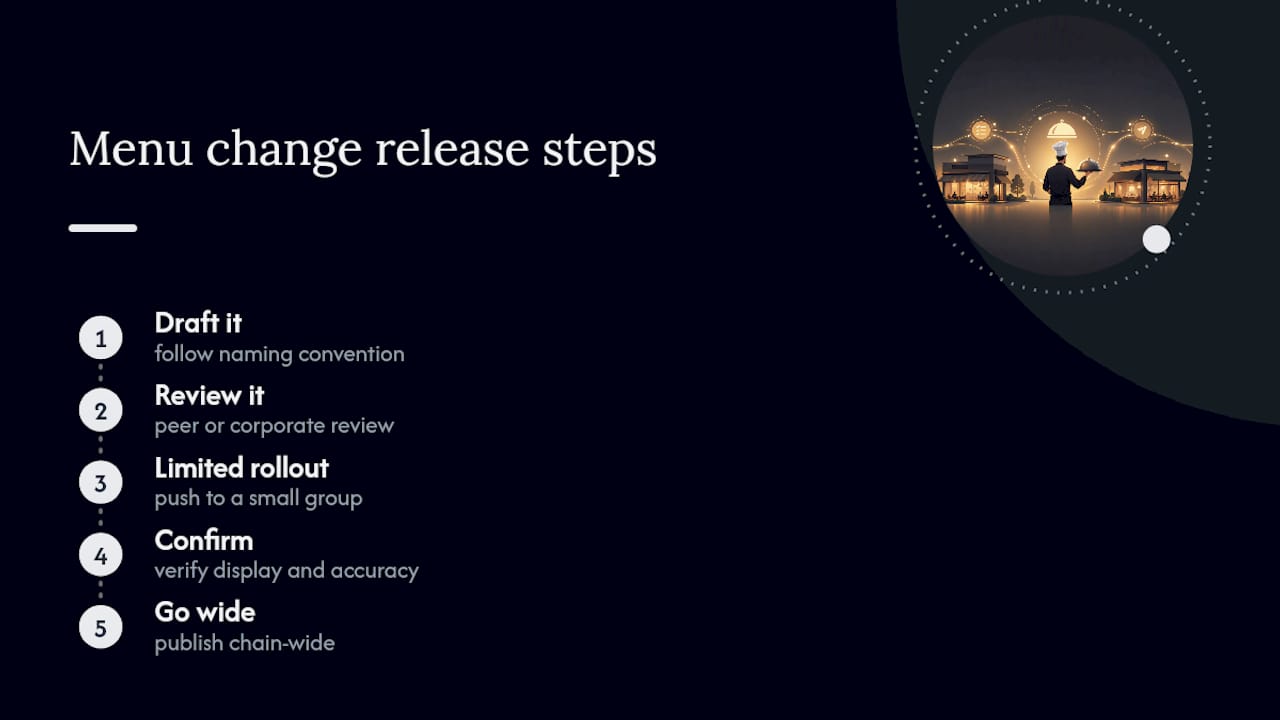
Chains that get this right tend to treat every menu change like a small software release. Draft it, review it, push it to a limited group, confirm it looks right, then go wide. That discipline matters more than which platform’s logo sits on the login screen, though the right platform makes the discipline dramatically easier to enforce. Restaurant trend coverage increasingly points to this operational layer, not the food itself, as where multi-unit brands are winning or losing consistency with guests.
— Abhi
How Mydigimenu Handles Multi-Location Menu Control
Some digital menu platforms are built around the workflow this article walks through: one master menu, pushed to multiple locations, with scheduled publishing so seasonal items and limited-time offers go live automatically instead of depending on someone remembering to flip a switch. Some platforms offer template-based menu structures, POS integration, and multi-language support baked into the same platform, which matters the moment you’re serving guests who don’t all read the same menu language.

Instead of manually duplicating changes across every location, or hiring a coordinator whose entire job is chasing down inconsistent pricing, users can stage a change once, preview it, and roll it out to one location or all of them. Price windows, item availability by time and channel, and rollback capabilities are features available in some digital menu platforms. If you’re currently managing menus with spreadsheets and a lot of hope, take a look at Mydigimenu’s digital menu platform and see what a staged publish actually looks like for your locations, or start with the QR menu option if a faster rollout is the priority right now.
Where to Go for Step-by-Step Procedures
Platform-specific mechanics vary enough that it’s worth bookmarking the primary references before you’re mid-rollout and troubleshooting on the fly.
MenuNav’s platform overview illustrates a centralized master-menu architecture with price levels and scheduled publishing as core features.
If your rollout starts with a QR-based deployment, Mydigimenu’s QR code setup guide covers the practical first steps across multiple venues.
Sources
FAQ
What Is Multi-Location Menu Management?
It’s the practice of controlling menus for several restaurant locations from one central system, so a single update propagates everywhere instead of requiring manual edits at each site.
What’s the Difference Between Full Sync and Incremental Sync?
Full sync replaces a location’s entire menu with the master version, while incremental sync updates only specified items and leaves everything else, including local overrides, untouched.
Who Should Have Permission to Edit a Master Menu?
A small, defined group should hold group-level publish rights, while local managers get item-level permissions limited to genuine local variation, which prevents accidental overwrites of chain-wide updates.
How Do You Test a Menu Change Before Publishing Everywhere?
Push the change to a draft or staging state, review a diff report showing exactly what will change, then publish to one or two pilot locations before a full rollout.
Can a Platform Like Digital Menu Providers Handle Menus in Multiple Languages?
Yes. Some digital menu platforms support multiple languages and currencies from a single master menu structure, which matters for locations serving international or multilingual guests without maintaining separate menu systems.
Recommended
Comments